
You are using an out of date browser. It may not display this or other websites correctly.
You should upgrade or use an alternative browser.
You should upgrade or use an alternative browser.
TIPS Call Audio
- Thread starter NatGarrison
- Start date

NatGarrison
New Member
- Joined
- Aug 8, 2015
- Messages
- 26
- Reaction score
- 2
What about Debain 11?

kenn10
Well-Known Member
- Joined
- Dec 16, 2007
- Messages
- 4,630
- Reaction score
- 3,002
Not yet. Debian 10 is stable and all that is supported at this time for IncrediblePBX2021.What about Debain 11?
NatGarrison
New Member
- Joined
- Aug 8, 2015
- Messages
- 26
- Reaction score
- 2
I have my own incredible PBX that I setup about six years ago and I'm going to reload it now. So, I shouldn't use Ubuntu or Debain 11? I should load it with Debain 10 before installing Incredible PBX 2021?
kenn10
Well-Known Member
- Joined
- Dec 16, 2007
- Messages
- 4,630
- Reaction score
- 3,002
I have my own incredible PBX that I setup about six years ago and I'm going to reload it now. So, I shouldn't use Ubuntu or Debain 11? I should load it with Debain 10 before installing Incredible PBX 2021?


hawk#1
Well-Known Member
- Joined
- Nov 3, 2015
- Messages
- 716
- Reaction score
- 308
correctI have my own incredible PBX that I setup about six years ago and I'm going to reload it now. So, I shouldn't use Ubuntu or Debain 11? I should load it with Debain 10 before installing Incredible PBX 2021?
NatGarrison
New Member
- Joined
- Aug 8, 2015
- Messages
- 26
- Reaction score
- 2
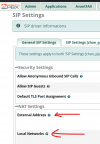
Yes, I set the external and local IP address in the Settings > Asterisk SIP Settings > General SIP settings tab.

dallas
Well-Known Member
- Joined
- Oct 21, 2007
- Messages
- 1,023
- Reaction score
- 318
Only in the USA and Japan. For the rest of the world g.711 is alaw.To clarify, g.711 is ulaw.

kenn10
Well-Known Member
- Joined
- Dec 16, 2007
- Messages
- 4,630
- Reaction score
- 3,002
I know that but the OP is in the USA. I did not want to confuse things.Only in the USA and Japan. For the rest of the world g.711 is alaw.

tbrummell
Guru
- Joined
- Jan 8, 2011
- Messages
- 1,280
- Reaction score
- 340
Canada doesn't make the cut huh? Yes, we're primarily ulaw as well.Only in the USA and Japan. For the rest of the world g.711 is alaw.
tbrummell
Guru
- Joined
- Jan 8, 2011
- Messages
- 1,280
- Reaction score
- 340
<---NOT French. LoLMais oui, il ne faut pas oublier nos amis canucks !
I see:
Mais oui=why yes
pas=not
nos amis=our friends
canucks=well, we all know that one.
So without translate, I can't make out the full sentence. LoL
NatGarrison
New Member
- Joined
- Aug 8, 2015
- Messages
- 26
- Reaction score
- 2
kenn10, I'm back. I switch the voip.ms trunk connection to a pjsip one this morning and it works a little better. But still a strange problem. The system now can be called in from any type phone. But you can't call out of the Incredible PBX system to a cell phone that has AT&T as the provider. You can call out to a cell phones that has either T-Mobile or Verizon as their provider. Another system that you can't call in to is a land line system provided by Google Fiber. When you make the calls, the phones ring and when someone answers, the line is just dead, no audio. Could this problem be related to me using Ubuntu 20.04.3 as the base operating system that I installed before installing Incredible PBX 2021?
dallas
Well-Known Member
- Joined
- Oct 21, 2007
- Messages
- 1,023
- Reaction score
- 318
My bad. Not USA but NANP (country code 1).Canada doesn't make the cut huh?
Last edited:
kenn10
Well-Known Member
- Joined
- Dec 16, 2007
- Messages
- 4,630
- Reaction score
- 3,002
If you got it to work at all on Ubuntu, I suspect it will be short-lived success then Ubuntu puts out another update. In any case, if a trunk works to some destinations, I'd say the PBX is working. Voip.ms is likely still a mess after all the DDOS confusion. Open a ticket and work with them on it.kenn10, I'm back. I switch the voip.ms trunk connection to a pjsip one this morning and it works a little better. But still a strange problem. The system now can be called in from any type phone. But you can't call out of the Incredible PBX system to a cell phone that has AT&T as the provider. You can call out to a cell phones that has either T-Mobile or Verizon as their provider. Another system that you can't call in to is a land line system provided by Google Fiber. When you make the calls, the phones ring and when someone answers, the line is just dead, no audio. Could this problem be related to me using Ubuntu 20.04.3 as the base operating system that I installed before installing Incredible PBX 2021?

krzykat
Telecom Strategist
- Joined
- Aug 2, 2008
- Messages
- 3,208
- Reaction score
- 1,288
Do you have a license for G.729 ?? In the US or anyplace with good internet, you typically don't need or want that depending upon your circumstances.I went to my trunk provider and turned on the g.722 and gsm CODEC's. g.711U and g.729a were already enabled. Like I stated earlier, I can't find g.711 in the Incredible PBX 2021 GUI. kemm10 mentioned that I may need to disable direct media in the trunk advanced settings in Incredible PBX. I can't find a setting for "direct media" anywhere.


Get 3CX - Absolutely Free!
Link up your team and customers  Phone System Live Chat Video Conferencing
Hosted or Self-managed. Up to 10 users free forever. No credit card. Try risk free.

Verify your Email
Check your inbox!
We’ve sent you an email. Click on the button in the email body to verify your email address – (if you can not find it, check your spam folder).
Upon verification you will be directed to the 3CX setup wizard.