SOLVED Cannot Log Into Avantfax

cporantes

Member
Joined
Jun 23, 2020
Messages
83
Reaction score
8
Help, please.
I have installed IPBC Debian 10.7 with Avantfax. I cannot log into the Avantfax GUI. Every time I try to log in it goes back to the log-in screen and says "your connection to this site is not private"

I have changed the password several times and tried but it still will not allow me to log in.

I don't know what to do.
 
I cannot log into Avantfax. I have changed the Password. But it won't let me log in with the new password. I have tried changing the password 6 times but it never allows me to log in. I have tried logging in on Chrome and Edge. I have even rebooted the Debian Server. I don't know what else to try.
 
Last edited:
I can ssh into the root. I can log into IPBX. I can log into webmin. But, no matter what I have tried, I cannot log into Avantfax.
 
Last edited:
I can ssh into the root. I can log into IPBX. I can log into webmin. But, not matter what I have tried, I cannot log into Avantfax.
Did you first set avantfax password by using ./avantfax-pw-change ?
 
Did you first set avantfax password by using ./avantfax-pw-change ?
I made that ./avantfax-pw-change password change several times attempting to log in. I even changed the password back to "password". But I cannot login with admin/password.
 
I edited the file thats in /etc/pbx/httpdconf/avantfax.conf as shown below to remove that page completely.

It may be in /etc/pbx/httpconf in your version, just open it up with Filezilla and you can see all the files in the directories and will make it easier to find and fix this file.

#Password protect /var/www/html/avantfax
<Directory /var/www/html/avantfax>
AuthType Basic
#AuthName "Restricted Area"
#AuthUserFile /etc/pbx/wwwpasswd
#Require valid-user
</Directory>
 
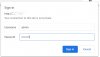
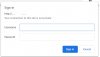
As the tutorial makes clear, that login prompt is for Apache NOT AvantFax, and there is a script to set the admin password for that. Once you get through the Apache gate, then you will be prompted for the AvantFax admin credentials.
 
Hey @wardmundy ,

Here's what I found...

I SSH'd into my incrediblepbx running on a VPS at hotlinservers after not logging in for a few weeks and so I let it execute the incrediblepbx update utility. There was one update, I believe it was Deb9 or Deb09 (any way, it is the very last recent update as the script found only one update).

Once that ran, I could no longer login into AvantFax and the screen that I got was the same as that in thread #9 above.

Note, prior to logging in at root and letting the update utility run, I have been using AvantFAX login without any issues. Either by clicking on the AvantFAX link on the incrediblepbx menu gui or by directly going to mypbx.com/avantfax

So, I believe each time I execute the update utility script, it continues to break the AvantFax login.

I experimented this by rolling back to my VPS backup. Once I roll back, all is back to normal and checks out fine and then I login it the root console and let the incredidblepbx update script execute and it finds the latest update and applies that patch and then I can't login to AvantFax anymore as going to it give the same screenshots given here in thread #9 above.

Then I rolled my prior VPS backup again and this time logged into the root console and I did NOT let the update script execute, so no last update patch was applied and I am still able to login to AvantFax as normal.

I thought that I'd give you some feedback on what I have discovered..

Thank you

My system is:

Incredible PBX/FAX 2020.01 for Debian 10.7 Buster

Asterisk: UP Apache: UP MySQL: UP
SendMail: UP IPtables: UP SSH: UP
LAN port: UP Fail2Ban: UP Webmin: UP
UCP Dmon: UP PortKnock: UP NR VPN: UP
FaxGetty: UP IAX Modem: UP HylaFax: UP

RAM:106440 *Debian 10 buster* Disk:12G

Asterisk 18.1.1 Incredible GUI 15.0.12.44

Private IP: <hidden>

Public Info: <hidden>
 
@Prits: updateDEB7 activated the Apache config file restrictions. That means you have to set the Apache admin password with ./apache-pw-change. Then you login to AvantFax by first entering your Apache credentials: admin and the password you set. Then you login to AvantFax with admin and the password you set by running ./avantfax-pw-change.

THERE ARE 2 SEPARATE LOGIN SCREENS TO GET INTO AVANTFAX, one for Apache and a second for AvantFax.
 
I can confirm this works. I logged in as root and executed the commands to change both passwords and am able to log into first Apache and then Avantfax.
 
@Prits: updateDEB7 activated the Apache config file restrictions. That means you have to set the Apache admin password with ./apache-pw-change. Then you login to AvantFax by first entering your Apache credentials: admin and the password you set. Then you login to AvantFax with admin and the password you set by running ./avantfax-pw-change.

THERE ARE 2 SEPARATE LOGIN SCREENS TO GET INTO AVANTFAX, one for Apache and a second for AvantFax.
ok @wardmundy , thank you for the clarification on this! Much appreciated.
 
@Prits: updateDEB7 activated the Apache config file restrictions. That means you have to set the Apache admin password with ./apache-pw-change. Then you login to AvantFax by first entering your Apache credentials: admin and the password you set. Then you login to AvantFax with admin and the password you set by running ./avantfax-pw-change.

THERE ARE 2 SEPARATE LOGIN SCREENS TO GET INTO AVANTFAX, one for Apache and a second for AvantFax.

That worked for me.

Q. Will the system require me to log in to Apache and Avantfax every time or periodically?
 
Your browser should prompt you to save your credentials.
 
Your browser should prompt you to save your credentials.
BTW: Everytime that I log into Avantfax, in different sessions, I am required to log into Apache again.
My browsers, MSEdge, Chrome, and Firefox, do not prompt me to store credentials. Annoying... Is there any way to fix that?
 
@cporantes: If this is a PBX just for you and your family, simply remove /etc/pbx/httpdconf/avantfax.conf and restart Apache: systemctl restart apache2.
 
Get 3CX - Absolutely Free!

Link up your team and customers Phone System Live Chat Video Conferencing

Hosted or Self-managed. Up to 10 users free forever. No credit card. Try risk free.

3CX
A 3CX Account with that email already exists. You will be redirected to the Customer Portal to sign in or reset your password if you've forgotten it.
Back
Top