NO JOY Can't call paging group

bazzacad

Member
Joined
Jun 11, 2014
Messages
33
Reaction score
1
PIAF Green 2.0.6.5 under VMWARE
Asterisk (Ver. 11.10.0)
FreePBX 2.11.0.37
I have version 2.11.0.9 of the paging module installed (current as of this
posting).
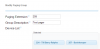
I've setup a paging group with a few extensions, but when I call the group it
says "Your call can not be completed as dialed".
Everything else on the system seams to be running fine. I can call ext. to
ext. I can dial *80ext & intercom on any of the phones, just the paging group
doesn't work. Any suggestions?

Thx,
Barry
 
To clarify - what extension number did you choose for the page group and what do you dial on the phone? Page groups don't use the *80 prefix.
 
I've tried a few different extensions.
Our current extension number range is from 222 - 250, so I used 299.
So I dialed 299.
Yes I know *80 prefix isn't used. I was just doing that to confirm the phone would accept an intercom call.
 

Attachments

  • page.png
    page.png
    10.4 KB · Views: 10
That is really odd. So the group is created and you applied config changes and it still thinks it doesn't exist. That's really weird.

Time for me to ask for call logs. Just the relevant snippets please. Either a live trace or snippets from /var/log/asterisk/full will do fine.
 
Sorry I'm pretty new to the Linux side of things.
Can walk me through how to get the logs?
 
Of course - I can't see your "flair" on tapatalk otherwise I would have gone into more detail.

SSH into your server from a computer ( like PuTTY on Windows and the integrated terminal on OSx). If you can get in front of an extension at the moment and can place a test call, run "asterisk -vvvvr", place the call, and post the output here.

If you don't have access to an extension right now, you can try and sift through the full log at /var/log/asterisk/full, but depending on your call volume that could take a while.
 
Thanks for the help.
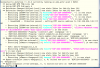
Here is the output.
 

Attachments

  • page2.png
    page2.png
    109.9 KB · Views: 16
After look at the log more closely, it looks like that IP address is wrong. I think that the address when we first set it up and it grabbed the address from DHCP. We changed it to a static address now, but it looks like something still has the old address. Do you know where that could be?
 
From the log, it looks like to me that extension 224 dials 299 and Asterisk gets amnesia so to speak.
Which IP Address? The IP address in the log is that of the extension if I'm not mistaken.
 
Oops your right, yes the IP is for my phone.
I'm 224, I dial 299 the page group.
So how do I fix the "amnesia"?
 
I use extension 5xx for paging group works with no additional setup. (does not page wireless phones)

On SPA50x phones, in order to record prompts with *77 I need to remove this code from phone which comes on default. Maybe you are running in to similar thing?
 
Hi thanks for the reply. I used to use 4xx & still had the same issue.
We have Yealink phones & can record with *77.
 
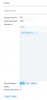
When you go to Reports -> Print Extensions; what do you see under Paging and Intercom?

I tried to reproduce this on one of my boxes, and tried to add a new paging group that has * in it (i used *501 and *50) PIAF did not allowed me and showed me the error saying

"Please enter a valid Paging extension" message.

So I don't believe you are using that extension which has * in it.

I'd recommend as a workaround, delete current group and just add a new one without a start and make sure you select all the extensions you want to page.
 
Hi thanks for looking into this. Attached is what I see...
As you can see I've tried creating multiple groups from scratch to try to get it to work, but none of them do.
I'll try deleting all of them, & starting over, but I doubt it'll make a difference.
 

Attachments

  • page3.png
    page3.png
    5.3 KB · Views: 12
OK I deleted all the groups & made a new one with just 1 phone in it and still no joy. Dial 299 - "Your call can not be completed as dialed"
 

Attachments

  • page4.png
    page4.png
    14 KB · Views: 9
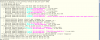
Here's another call log. I'm ext. 224 calling the group 299.
 

Attachments

  • page5.png
    page5.png
    90.3 KB · Views: 12
Just curious, can you dial anything else?
Like an external number?
Also an internal function like *77? Do you hear the beep?

I've googled the error message but whenever ever this error was there (the one in .png) users are able to call but no audio and they modify some sip settings. In your case its that you can't make calls.

The only thing I can find that wasn't having audio issue with the same error message is this thread http://pbxinaflash.com/community/index.php?threads/no-incoming-or-outgoing-calls.14993/

Also normally when I google error messages I find a solid articles but this one returns nothing. While troubleshooting if you have some extra time I'd start with a fresh install :)
 
Hi thx for the reply.
Yes everything else is working fine. I can dial internal & external numbers. I can dial *77 to record a message. I can dial *80ext & intercom another extension. I can dial *2 to do an attended transfer. We're an office of 35 & have been running this PBX for about a month now. We've been tweaking the system to get it just right over this month. I'd really hate to have to start over from scratch just to get this one feature to work.
 
Perhaps try uninstalling and reinstalling the Page Groups module?
 

Members online

Forum statistics

Threads
26,686
Messages
174,406
Members
20,257
Latest member
Dempan
Get 3CX - Absolutely Free!

Link up your team and customers Phone System Live Chat Video Conferencing

Hosted or Self-managed. Up to 10 users free forever. No credit card. Try risk free.

3CX
A 3CX Account with that email already exists. You will be redirected to the Customer Portal to sign in or reset your password if you've forgotten it.
Back
Top