
You are using an out of date browser. It may not display this or other websites correctly.
You should upgrade or use an alternative browser.
You should upgrade or use an alternative browser.
NEED MORE INFO Connecting to Incredible Pi behind NAT
- Thread starter sarichter
- Start date


sarichter
Member
- Joined
- Jun 9, 2013
- Messages
- 40
- Reaction score
- 0
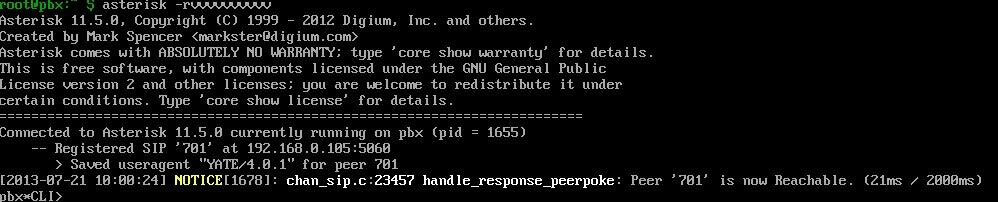
If IPtables is disabled and you see nothing on the Asterisk CLI when you try to connect a remote phone, it is most definitely a router problem. Good luck!
It sounds like that might be the problem. However, could you give me an example of what I should see on Asterisk CLI? Since I saw nothing, I wonder if I was doing something wrong.
sarichter
Member
- Joined
- Jun 9, 2013
- Messages
- 40
- Reaction score
- 0
well, got the new router (netgear 6100) and it supposedly allows SIP pass through. Incredible PBX works great while I'm on the network but again... nothing when I'm outside the network. I get this error from Yate and Sipdroid:
Forbidden (bad auth)
I'm using the same user/pass I was on the network. Do you think it could possibly be something in the Administration setup for Free PBX? If it is the router, can anyone provide me help with this matter? I have forwarded the RTP and SIP ports to the correct internal IP address (hence it working when I make calls from my Yate client on the network). It just won't work outside the network. I've been troubleshooting this for weeks and I can't seem to find the reason as to why it won't connect.
Forbidden (bad auth)
I'm using the same user/pass I was on the network. Do you think it could possibly be something in the Administration setup for Free PBX? If it is the router, can anyone provide me help with this matter? I have forwarded the RTP and SIP ports to the correct internal IP address (hence it working when I make calls from my Yate client on the network). It just won't work outside the network. I've been troubleshooting this for weeks and I can't seem to find the reason as to why it won't connect.
sarichter
Member
- Joined
- Jun 9, 2013
- Messages
- 40
- Reaction score
- 0
Another thought... I checked the IP Subnet mask on my router and it's not the same as the computer IP Subnet mask. Do you think that could be interfering? When I used the auto configure command in Free PBX it gave me the standard IP Subnet mask number.
sarichter
Member
- Joined
- Jun 9, 2013
- Messages
- 40
- Reaction score
- 0
I did that already... It doesn't work.Open ports on router
sarichter
Member
- Joined
- Jun 9, 2013
- Messages
- 40
- Reaction score
- 0
Are you using bria?
I have configured the network settings... it works when I'm calling from within my network. It doesn't work from outside. I've forwarded the RTP ports as well as the SIP port. I've turned off SIP ALG to avoid any conflicts (doesn't work with it on anyway). There must be a translation problem when a device tries to connect to the Pi from outside the network. I've even setup the Pi as the DMZ and it still doesn't work. Asterisk CLI creates an output when I'm connecting via the network, but once I try and connect from outside the network, Asterisk CLI returns no feedback. Does anyone know if there are inherent issues with routers and IncrediblePBX or possibly with my ISP blocking particular ports? Figured I would just throw it out there.
sarichter
Member
- Joined
- Jun 9, 2013
- Messages
- 40
- Reaction score
- 0
Ok is it dhcp or static ip adress configured?
Static and the ip address i correct in FreePBX and IPtables. I've checked multiple times and both IP addresses are correct.

miguel
Member
- Joined
- May 22, 2013
- Messages
- 276
- Reaction score
- 8
Ok put dhcp sometimes pi does not likes static for some reason and on your router place dhcp on pi with the mac adress of the raspi and forward ports 5060 and 10000 to 20000 to raspi seee if that works you can try with 3g connection on your phone.
sarichter
Member
- Joined
- Jun 9, 2013
- Messages
- 40
- Reaction score
- 0
Ok put dhcp sometimes pi does not likes static for some reason and on your router place dhcp on pi with the mac adress of the raspi and forward ports 5060 and 10000 to 20000 to raspi seee if that works you can try with 3g connection on your phone.
Well if you mean, is it set up for DHCP the answer is yes. FreePBX has three options, Public IP, Static IP (with network fields), and Dynamic IP. Since I don't have a dynamic IP host, I can't use that one. The connections are all UDP and the router is forwarding those ports for both TCP and UDP.
I actually did try calling Netgear about this but they were no help because they considered the Pi and FreePBX third party software.
sarichter
Member
- Joined
- Jun 9, 2013
- Messages
- 40
- Reaction score
- 0
Get a dynamic ip and configure your router to it, how do you know that your public ip adress has not changed when you want to access your pbx?
I know it hasn't changed because I can see it on my router status monitor. Basically, if I don't unhook the modem, I always keep my IP address. If I ever do power the modem down, I update FreePBX, IPtables, and check my router. This shouldn't be rocket science. It's either IPtables (which I'm not really understanding how it could be since my public IP is allowed or it's my router. There is virtually no documentation on the web that replicates my current issue.


Get 3CX - Absolutely Free!
Link up your team and customers  Phone System Live Chat Video Conferencing
Hosted or Self-managed. Up to 10 users free forever. No credit card. Try risk free.

Verify your Email
Check your inbox!
We’ve sent you an email. Click on the button in the email body to verify your email address – (if you can not find it, check your spam folder).
Upon verification you will be directed to the 3CX setup wizard.