NEW Dial Plan Vizualizer 1.0.27 Released!

madgen

New Member
Joined
Jun 3, 2025
Messages
16
Reaction score
18
All,

Big update to the FreePBX Dial Plan Vizualizer module!

This release adds a bunch of quality-of-life features and visual improvements to make managing dial plans and extensions a lot smoother:

  • Dynamic queue member login status is now displayed.
  • See Asterisk DND / Call Forward status at a glance.
  • ⏸️ Queue pause status detection included.
  • Tooltips now show user agents and voicemail counts.
  • Consistent tooltips across queues, ring groups, and extensions.
  • Added Next / Previous buttons for dialplan navigation (works with search!).
  • Extensions now appear in the dialplan dropdown.
  • New options: Allowlist, Blacklist, and Auto-play audio.
This should make it easier to visualize what’s really going on in your PBX and speed up troubleshooting.

Installation / upgrade: GitHub - madgen78/dpviz: Dial Plan Vizualizer module for FreePBX
Previous releases: Releases · madgen78/dpviz · GitHub

Let me know what you would like to see next.
Thanks for all of the support and suggestions. - and if you’d like to keep up with future updates, consider ⭐ starring or following the project on GitHub.

-Adam
 
I have installed this module on a few on the PBXs I manage and it is incredible. Especially handy on complex systems. Thank you for creating this!
 
I have installed this module on a few on the PBXs I manage and it is incredible. Especially handy on complex systems. Thank you for creating this!
Jake, you're welcome. Glad to hear it is working well for you.
 
All,

Big update to the FreePBX Dial Plan Vizualizer module!

This release adds a bunch of quality-of-life features and visual improvements to make managing dial plans and extensions a lot smoother:

  • Dynamic queue member login status is now displayed.
  • See Asterisk DND / Call Forward status at a glance.
  • ⏸️ Queue pause status detection included.
  • Tooltips now show user agents and voicemail counts.
  • Consistent tooltips across queues, ring groups, and extensions.
  • Added Next / Previous buttons for dialplan navigation (works with search!).
  • Extensions now appear in the dialplan dropdown.
  • New options: Allowlist, Blacklist, and Auto-play audio.
This should make it easier to visualize what’s really going on in your PBX and speed up troubleshooting.

Installation / upgrade: GitHub - madgen78/dpviz: Dial Plan Vizualizer module for FreePBX
Previous releases: Releases · madgen78/dpviz · GitHub

Let me know what you would like to see next.
Thanks for all of the support and suggestions. - and if you’d like to keep up with future updates, consider ⭐ starring or following the project on GitHub.

-Adam
Hey Adam,

Love your module, and I have started putting it on all PBX's. The only issue I've really had is that when going to zoom in - and using the Up or Down scroll on my mouse, it zooms in or out too much. Would be better if it wasn't so "touchy" - or am I using it wrong?
 
Hey Adam...

Great module, and it makes call flow much easier to visualize, and debug. So, under the category of "it never hurts to ask":

I have two stacked Time conditions, one for holidays, followed by normal hours of operation. It would be great(tm) if the output paths of the Time conditions could be drawn in different colours based on the current time of day, to see what the actual current condition is. While the illustration correctly shows the call flow for multiple time/date scenarios, it might help to "prove" various conditions in Technicolor.

Thoughts?

Thanks!
 
Hey Adam,

Love your module, and I have started putting it on all PBX's. The only issue I've really had is that when going to zoom in - and using the Up or Down scroll on my mouse, it zooms in or out too much. Would be better if it wasn't so "touchy" - or am I using it wrong?
Are you using a free flow wheel (without any "stops")?
I will see if I can add something here or a way to adjust/ control the sensitivity.
 
Hey Adam...

Great module, and it makes call flow much easier to visualize, and debug. So, under the category of "it never hurts to ask":

I have two stacked Time conditions, one for holidays, followed by normal hours of operation. It would be great(tm) if the output paths of the Time conditions could be drawn in different colours based on the current time of day, to see what the actual current condition is. While the illustration correctly shows the call flow for multiple time/date scenarios, it might help to "prove" various conditions in Technicolor.

Thoughts?

Thanks!
Interesting idea. Did you have a color in mind? Green for the active path and black(current) or a shade of gray for the opposite path?
 
Are you using a free flow wheel (without any "stops")?
I will see if I can add something here or a way to adjust/ control the sensitivity.
That would be awesome. I'm using a Logitech M317 mouse. You could also perhaps have a plus/minus on the page for zoom in/out.
 
Hey Adam...

Great module, and it makes call flow much easier to visualize, and debug. So, under the category of "it never hurts to ask":

I have two stacked Time conditions, one for holidays, followed by normal hours of operation. It would be great(tm) if the output paths of the Time conditions could be drawn in different colours based on the current time of day, to see what the actual current condition is. While the illustration correctly shows the call flow for multiple time/date scenarios, it might help to "prove" various conditions in Technicolor.

Thoughts?

Thanks!
Not only that, what if you had an option that said "Time of Flow" - so this initial idea would show for the current time. But would be awesome to have the ability to set a specified date/time and see what the flow would be then. You'd be able for example to test what's going to happen Friday, Nov 28, 2025. Then you'd see is it going to a prompt saying closed for thanksgiving, etc.
 
Interesting idea. Did you have a color in mind? Green for the active path and black(current) or a shade of gray for the opposite path?

Green for active, and black for inactive works for me! Ultimately, your choice, of course.. Thanks for considering this feature!
 
Not only that, what if you had an option that said "Time of Flow"

Part of this "test" might be accomplished just by toggling the Time condition, Eg: dial *271 to force the alternate state, and see the flow change?

Partial solution, I know...
 
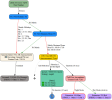
ok...this is what I came up with... I like it... but I'm struggling to handle time zones. This is only reading the system time. If a TC has a different time zone set - other than default, this could be incorrect.
Call Flow has always displayed the correct path with Active. Now, the lines are red and green.
Simulating a future time could be helpful. Not sure how to design it at the moment.
I'll leave this in for the next version which may be ready to be released soon.
Reply here or message me directly if you would like to beta test it in your test environment. It's close to being ready for production, but not quite.1763515819164.png
 
This is only reading the system time. If a TC has a different time zone set - other than default, this could be incorrect.

Should a Web Browser app not be using the Local Time of the Browser ?? If my Server is on PST (UTC-8) and I am on IST (UTC+2), doing the math can be painful. We all naturally think in local time zones.
 
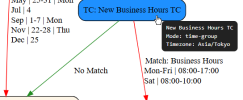
I got time zone matching to work. My server's current time is 9:45am. Time in Tokyo is 11:45pm. It is outside of business hours.
1763649840545.png
 
Get 3CX - Absolutely Free!

Link up your team and customers Phone System Live Chat Video Conferencing

Hosted or Self-managed. Up to 10 users free forever. No credit card. Try risk free.

3CX
A 3CX Account with that email already exists. You will be redirected to the Customer Portal to sign in or reset your password if you've forgotten it.
Back
Top