

wardmundy
Nerd Uno
- Joined
- Oct 12, 2007
- Messages
- 20,217
- Reaction score
- 5,974
Obviously nobody has tried installing Digium Phones with Asterisk 13 and DPMA, or we would have heard the screaming from coast to coast. It's that painful. Allow me to share my last two days of water torture which hopefully will save the young and the restless some time.
NOTE: A CentOS/Scientific 6.7 Linux platform is MANDATORY. No Ubuntu, Debian, or Raspberry Pi.
1. You'll need your (free) DPMA secret code from Digium. Get it here.
2. Download and run the installer as root on your Asterisk 13 server:
3. Open the FreePBX 12 or Incredible PBX 12 GUI and choose Connectivity -> Digium Phones -> General Settings.
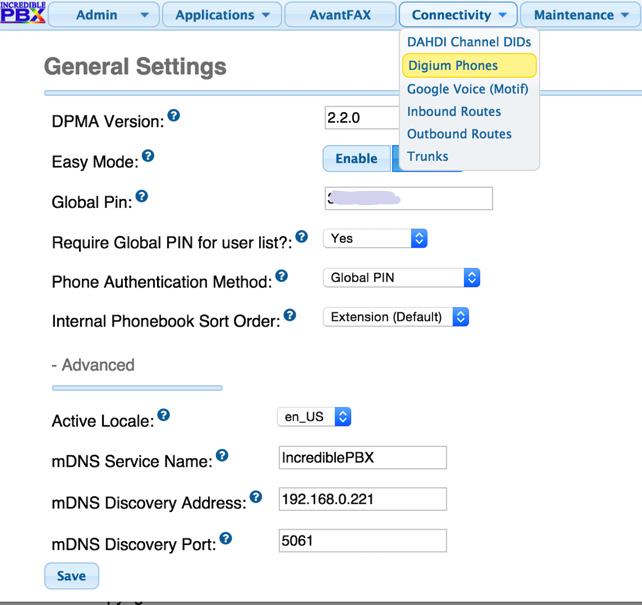
4. Disable Easy Mode, create a Global PIN, enter your correct server IP address with port 5061, and make the other settings look like this:
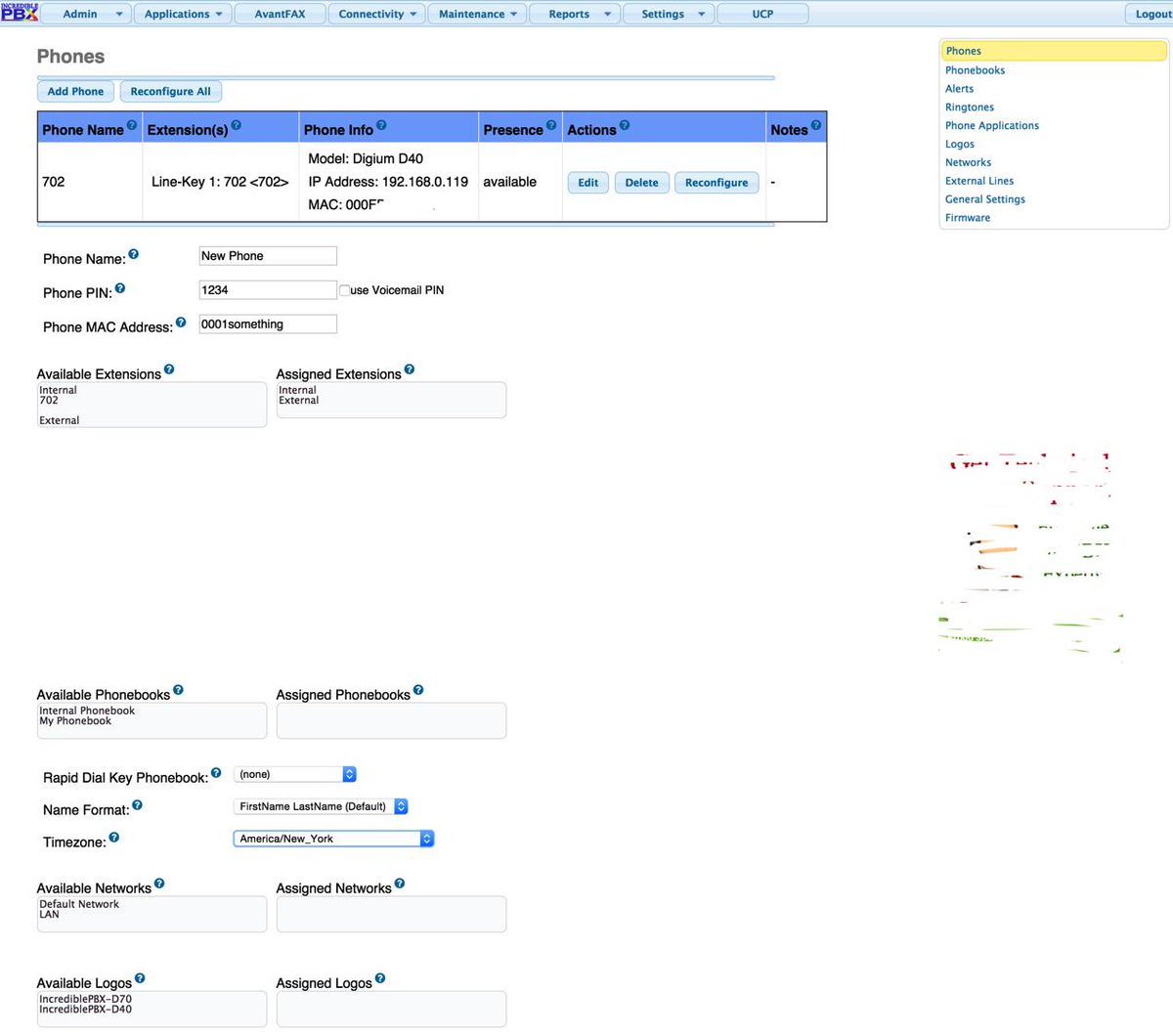
5. Click on the Phone option on the right and add a phone with two entries: the phone PIN and the MAC address of the Digium Phone. Save your entry.
6. Add your local LAN entry under the Networks option on the right:

7. Create a SIP extension with voicemail.
8. Apply Settings, restart Asterisk, plug in your phone, and pray... A LOT!
9. If it doesn't work, clear your calendar for the day and CALL Digium! It's a free call with free support.
NOTE: A CentOS/Scientific 6.7 Linux platform is MANDATORY. No Ubuntu, Debian, or Raspberry Pi.
1. You'll need your (free) DPMA secret code from Digium. Get it here.
2. Download and run the installer as root on your Asterisk 13 server:
Code:
cd /root
wget http://incrediblepbx.com/install-digphones13.tar.gz
tar zxvf install-digphones13.tar.gz
rm install-digphones13.tar.gz
./install-digphones13.tar.gz
amportal restart
3. Open the FreePBX 12 or Incredible PBX 12 GUI and choose Connectivity -> Digium Phones -> General Settings.
4. Disable Easy Mode, create a Global PIN, enter your correct server IP address with port 5061, and make the other settings look like this:
5. Click on the Phone option on the right and add a phone with two entries: the phone PIN and the MAC address of the Digium Phone. Save your entry.
6. Add your local LAN entry under the Networks option on the right:
7. Create a SIP extension with voicemail.
8. Apply Settings, restart Asterisk, plug in your phone, and pray... A LOT!
9. If it doesn't work, clear your calendar for the day and CALL Digium! It's a free call with free support.


 Phone System