e164.org sip2sip google voice OH MY

edisoninfo

Guru
Joined
Nov 19, 2007
Messages
505
Reaction score
4
I didn't want to hi-jack the other thread, so I'll start a new question. In the thread about the Nortel video phones http://pbxinaflash.com/community/threads/nortel-ip-1535-27-95.8273/?t=8273 there is mention of Sip2Sip.info and e164.org and Google Voice all somehow being tied together. I am very lost as to how to use this and when/why. Can someone tie it all together for me?

So Far I have:
registered my PSTN office phone number with e164.org
created an account at Sip2Sip.info
created in/out trunks for Sip2Sip.info number
Have a Google Voice number I don't really use. Not sure what to do with it. I did add both my cell phone and pstn office number to it tho.

Being a geek and always wanting to learn I set all this up but have no idea why I would want it or what to do with it.
:biggrin5:
 
Last edited by a moderator:
Ha Ha Ha! What timing!

I guess I still need a little hand holding. From an Aastra 57i phone, how do I fully utilize these numbers and trunks?

For example:
I have a Google Voice number, (although when I dial it, it goes straight to "you have no messages"). I thought it was supposed to ring the two numbers I added??

I have an account at sip2sip.info and in/out trunks created and working on my piaf box. How do I use them? How do I find out anyone elses 2233xxx number?

I registered my office number at e164.org, now what? How do I call someone else on e164 from my Aastra phone? I see "relay denied" messages in the cli debug coming from the e164 IP address. What does that mean? Something wrong?

As a geek I like trying new stuff and making it work just because I can. But I also like to know, now that I have a bunch of pieces parts, can I do anything with them?
 
For example:
I have a Google Voice number, (although when I dial it, it goes straight to "you have no messages"). I thought it was supposed to ring the two numbers I added??

This to me sounds like you are calling your GV number from a number you have configured on your GV settings page.

I have an account at sip2sip.info and in/out trunks created and working on my piaf box. How do I use them? How do I find out anyone elses 2233xxx number?

I haven't gotten myself set up with sip2sip yet so I'm not exactly sure - Once I do get it set up I'll post back but there are probably some clues in the nortel phone thread and the sip2sip trunk settings thread in the forums here.


I registered my office number at e164.org, now what? How do I call someone else on e164 from my Aastra phone? I see "relay denied" messages in the cli debug coming from the e164 IP address. What does that mean? Something wrong?
I suspect that your call is only using your ENUM trunk here and that the number you are dialing is not registered with e164...I could be wrong though :rolleyes5:


Before we go any further could you provide some info about your PIAF set up? Does your PSTN "office line" ring into your PIAF? Do you have any DID's on your PIAF? etc...
 
e164.org

"I registered my office number at e164.org, now what?"

If your office number is a PSTN line (POTS - no VOIP involved), then registering it is pretty useless.

The idea behind e164.org is, if a PSTN number has a SIP alternate, you can dial your number and it'll be routed over the internet (free) rather than over $$$ PSTN networks.

Now, if your office phone is on your PBX-in-a-Flash, and that pbx has a public IP, you could have registered your number with e164.org, with the SIP URI being yourOfficeNumber@yourPIAFipOrDNSname.
e164.org doesn't benefit you directly -- it benefits those who call you IF they are using voip, and if, whatever they are using, supports e164.org.

One such organization is sip2sip.info. All you need is an account with them. If you dial 001NXXNXXXX (North America), and the number is registered with e164.org, you call for free.

Now, as I explained on another thread, I made my cell phone e164.org dialable by putting an inbound route on my pbx which is my cell phone number, then having an extension that dials my cellphone. That last leg to the ITSP is not free, but I pick it up. I suppose I could route it via Google Voice, then it would be totally free.

Anyway, the magic of e164.org is to route PSTN numbers via the internet if possible.

Gerry
 
"I registered my office number at e164.org, now what?"

If your office number is a PSTN line (POTS - no VOIP involved), then registering it is pretty useless.

The idea behind e164.org is, if a PSTN number has a SIP alternate, you can dial your number and it'll be routed over the internet (free) rather than over $$$ PSTN networks.

Now, if your office phone is on your PBX-in-a-Flash, and that pbx has a public IP, you could have registered your number with e164.org, with the SIP URI being yourOfficeNumber@yourPIAFipOrDNSname.
e164.org doesn't benefit you directly -- it benefits those who call you IF they are using voip, and if, whatever they are using, supports e164.org.

One such organization is sip2sip.info. All you need is an account with them. If you dial 001NXXNXXXX (North America), and the number is registered with e164.org, you call for free.

Now, as I explained on another thread, I made my cell phone e164.org dialable by putting an inbound route on my pbx which is my cell phone number, then having an extension that dials my cellphone. That last leg to the ITSP is not free, but I pick it up. I suppose I could route it via Google Voice, then it would be totally free.

Anyway, the magic of e164.org is to route PSTN numbers via the internet if possible.

Gerry


Yes, my office phone is a standard PSTN number, and I do have a public IP with the firewall locked down to the IP of sip2sip.info servers and my other voip providers, but I did register it at e164.org as yourOfficeNumber@yourPIAFipOrDNSname. I also have the in/out trunks setup with sip2sip so, you are saying if I dial out the sip2sip trunk using my "yourOfficeNumber@yourPIAFipOrDNSname" e164 number it should ring right back to me on the inbound sip2sip trunk? I'll try that....... Sweet! It works!! Now to figure out how to use my Google Voice number in all this! Ha! Thanks again!
 
FYI: ENUM comes preconfigured as the primary default outbound route with The Incredible PBX so all outbound calls are checked against the ENUM registry for free calling before being routed elsewhere.

If you use sip2sip.info, you might want to drop them a line and thank them for adding e164.org as an ENUM lookup source. Two weeks ago it wasn't included... but we begged. :rolleyes:
 
FYI: ENUM comes preconfigured as the primary default outbound route with The Incredible PBX so all outbound calls are checked against the ENUM registry for free calling before being routed elsewhere.

If you use sip2sip.info, you might want to drop them a line and thank them for adding e164.org as an ENUM lookup source. Two weeks ago it wasn't included... but we begged. :rolleyes:

you are DA MAN, Wardster! ;)
 
FYI: ENUM comes preconfigured as the primary default outbound route with The Incredible PBX so all outbound calls are checked against the ENUM registry for free calling before being routed elsewhere.

If you use sip2sip.info, you might want to drop them a line and thank them for adding e164.org as an ENUM lookup source. Two weeks ago it wasn't included... but we begged. :rolleyes:

I did not run the incredible script since for this install as I did not want all the extra stuff. Is there a screen shot of just the ENUM outbound route so I can add just that to my piaf install? Right now I have to dial using the special dial patterns. How do I make it always check ENUM first no matter how I dial a number? Obviously if it doesn't find a match it has to send the call out a standard Zap or Sip trunk.

I'm not sure I did this totally correct, but this is how I have it working at the moment:
I created an outbound route with the 001NXXNXXXXXX and 223NXXXXXX dial patterns. If a call matches this, it goes out the sip2sip trunk. I presume from here, sip2sip is checking itself and e164 and finding the ENUM record, then picking up the IP address and sending the call on it's way to that IP right?

Thanks all for the hard work and sorry to be a pain sometimes! I just want to make sure I fully understand how these things work. Anyone can cut/paste and watch it work, but I want to understand the mechanics.
 
That should do it. But it's easy to add ENUM support directly. Choose add a new Trunk and choose ENUM. Then move that trunk to the top of all your Outbound Routes that handle 1NXXNXXXXXX or NXXNXXXXXX calls.
 
That should do it. But it's easy to add ENUM support directly. Choose add a new Trunk and choose ENUM. Then move that trunk to the top of all your Outbound Routes that handle 1NXXNXXXXXX or NXXNXXXXXX calls.

For the outbound route I select the new ENUM trunk first, then sip2sip or Zap or SIP or what next? The ENUM trunk does not have any real "channel" associated with it like a Zap channel or Sip registry or something. For the ENUM trunk I had to pre-pend a 1+ to the number so it matches the ENUM style. (Most of the time I just dial the 10 digits, I never dial 1+ 10 digits).

UPDATE OK Forget the previous question. I couldn't see the forest for the trees. If a match on ENUM is found it is a direct IP to IP call and does not need Zap or any Sip isp. Duh!

This does bring up another question. I have my firewall configured to only accept the 5060,10000 stuff from the IP's of my providers. I presume to use ENUM dialing properly and let someone call me, I have to open the ports up to the world right? I don't need to for me to dial them of course.

It also needs to be mentioned that you would have to turn on "allow anonymous sip calls" right? (And Yes, I have setup my inbound routes as Jroper suggested many posts/threads ago with a fall-through route that just hangs up.)
 
Hi

Yes you would have to open up the ports to the world to allow enum to work, and yes, you would have to allow anonymous SIP calls.

Therefore, you must ensure you have strong alphanumeric passwords on all your extensions and trunks, and as you mention, it is a good idea to have a catchall to send all calls from anyone who does not know your telephone number to hangup immediately.

Joe
 
Sorry to disagree, but... we use ENUM all the time with Incredible PBX and there are NO firewall ports opened and NO anonymous SIP. Works fine with dLink routers. ;)

Think of how a browser works on your PC when you access a web site. You don't go running to your router to map port 80 back to your PC. Works the same with SIP... if your router is smart enough to handle it.
 
Um, sorry to disagree, but if I do not have any ports open and forwarded to the piaf box, nobody can call me via ENUM. Their piaf box (or whatever) will try to send a sip invite to my box and the firewall will pitch it. The invite will never reach piaf. With Sip and Iax trunks that use the 'register' command, yes, no ports are required to be open since the connection was initiated and held open from inside the firewall, (like a browser)!
 
Sorry. I was referring to calling out. Obviously, for calling in via SIP, there has to be a hole somewhere. The safest option is still an IAX connection to voip.ms and then use your SIP URI there for secure access back to your server.
 
I agree, but that sort of defeats the purpose of sip-2-sip dialing which is totally free since no provider is involved. That said, I will probably use a provider for inbound. I can't afford $100,000 phone bills!! :)
 
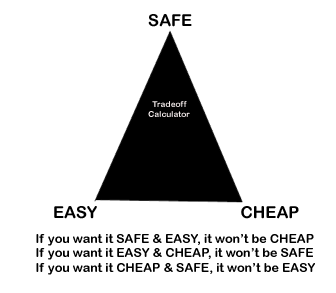
The Tradeoff Calculator

tradeoff.gif
 
My 2c,

I am running "stock" PIAF hosted with a public IP
- I don't expose port 80 FreePBX
- I have VERY long and complicated passwords
- I DO have anonymous SIP ON
- I DO use specific inbound SIP URIs defined in
extensions_override_freepbx.conf.
- I do have users on my PBX who travel to places like China on business, so I do not block by country.
- I do dump calls that do not have a specific matching DID or URI.

- My pbx is in a different domain than most of my (public) SIP URIs -- I use DNS SRV records to do the mapping.

In two years of doing this, I've NEVER been broken into, not even once. Yes, I see many attempts from places like China, Brazil and Palestine... but FAIL2BAN nails them every time.

I also have a circuit breaker (max prepay) with my ITSPs that limits my liability to about $50.

Yes, I agree that the Incredible PIAF is the way to go if you are a neophyte and are not sure how this all works; it you have a good understanding of what is happening, you can do lots of "free" stuff without compromising security too much.

(What I REALLY like about PIAF is the range of possibilities -- there are versions for every skill level and implementation need.)

- Gerry
 
Sorry. I was referring to calling out. Obviously, for calling in via SIP, there has to be a hole somewhere. The safest option is still an IAX connection to voip.ms and then use your SIP URI there for secure access back to your server.
I have a VoipMS SIP URI, but how would I be able to have the person on the other end dialing the ENUM XXXX*XXXX to vary if I only have one URI from VoipMS?
(Ex. Say my URI is [email protected], that would go through where ever my VOIPms trunk would go, would it not?)
 
ENUM registered number points to your voip.ms SIP URI. And your voip.ms trunk is registered with your Asterisk server. So... when a call is made to your ENUM registered number, it will be sent to the DID that you've set up as an inbound route for your registered voip.ms trunk on your Asterisk server.
 

Members online

Forum statistics

Threads
26,687
Messages
174,410
Members
20,257
Latest member
Dempan
Get 3CX - Absolutely Free!

Link up your team and customers Phone System Live Chat Video Conferencing

Hosted or Self-managed. Up to 10 users free forever. No credit card. Try risk free.

3CX
A 3CX Account with that email already exists. You will be redirected to the Customer Portal to sign in or reset your password if you've forgotten it.
Back
Top