ALERT GV: The Sky Has Fallen... Really

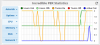
The update has worked for me since the 15th, but the dashboard shows that the GV trunks are going up and down frequently (see attachment). While the trunks are down, outbound calls fail immediately.

Anyone else seeing this behavior? Is there something I can tweak to keep the trunks up consistently?

I'm running the Raspberry Pi build from the 15th, with the latest NAF update available on the 15th.

Thanks.
 

Attachments

  • trunks.PNG
    trunks.PNG
    31.1 KB · Views: 9
There was an Asterisk bug that attempted to load the Intel version of the OPUS codec at the time of your install. Best to start over with the latest image which now included native GVSIP support.
 
New Incredible PBX .ova image for VirtualBox (2.24 GB) with native GVSIP-NAF support will be available on SourceForge after 3 p.m. today.

Di-UMQbUUAEQL-s.jpg
 
Last edited:
There was an Asterisk bug that attempted to load the Intel version of the OPUS codec at the time of your install. Best to start over with the latest image which now included native GVSIP support.
Thanks! I rebuilt with the new image and so far it looks good.

I tried the "qualify_frequency=120" tweak (uncommented in the pjsip_custom file) and it took down both GV trunks and "disappeared" the Obitalk devices in the voice.google settings page.

Ward, thanks for all your help. It is great to see a forum that helps newbs (me!) and experienced alike.

troy
 
Hi all,

I applied the update to Incredible 13-13 on a Pi and I'm unable to get outgoing and incoming calls working yet.

I have one outbound route, to GVSIP. For outgoing call the log file shows this...

Code:
[2018-07-26 11:45:08] VERBOSE[4029][C-00000001] pbx.c: Executing [s@macro-dialout-trunk:30] Dial("SIP/200-00000000", "PJSIP/15165551212@gvsip1,300,W") in new stack
[2018-07-26 11:45:08] WARNING[4029][C-00000001] channel.c: No channel type registered for 'PJSIP'
[2018-07-26 11:45:08] WARNING[4029][C-00000001] app_dial.c: Unable to create channel of type 'PJSIP' (cause 66 - Channel not implemented)
[2018-07-26 11:45:08] VERBOSE[4029][C-00000001] app_dial.c: Everyone is busy/congested at this time (1:0/0/1)
[2018-07-26 11:45:08] VERBOSE[4029][C-00000001] pbx.c: Executing [s@macro-dialout-trunk:31] NoOp("SIP/200-00000000", "Dial failed for some reason with DIALSTATUS = CHANUNAVAIL and HANGUPCAUSE = 66") in new stack

For incoming calls, the call goes to GV voicemail.

I tried re-generating a new refresh token and deleting/recreating a new GV trunk with the new token but no go.

UPDATE: /root/GVSIP-install-log.txt shows a number of patch errors in the area of pjsip for example...

Code:
.
.
.
patching file res/res_pjsip_outbound_registration.c
Hunk #6 succeeded at 609 (offset 1 line).
Hunk #7 succeeded at 997 (offset 1 line).
Hunk #8 succeeded at 1352 (offset 1 line).
Hunk #9 succeeded at 1492 (offset 1 line).
Hunk #10 succeeded at 2298 (offset 1 line).
Hunk #11 succeeded at 2438 with fuzz 2 (offset 3 lines).
Hunk #12 succeeded at 2501 (offset 3 lines).
Hunk #13 FAILED at 2550.
1 out of 13 hunks FAILED -- saving rejects to file res/res_pjsip_outbound_registration.c.rej
patching file third-party/pjproject/patches/0100-oauth.patch
patching file README.md
Hunk #1 FAILED at 5.
Hunk #2 FAILED at 48.
2 out of 2 hunks FAILED -- saving rejects to file README.md.rej
patching file res/res_pjsip.c
Hunk #1 succeeded at 1092 (offset -23 lines).
patching file res/res_pjsip_outbound_registration.c
Hunk #1 succeeded at 2438 with fuzz 2 (offset 3 lines).
Hunk #2 succeeded at 2499 (offset 3 lines).
Hunk #3 FAILED at 2547.
1 out of 3 hunks FAILED -- saving rejects to file res/res_pjsip_outbound_registration.c.rej
patching file res/res_pjsip_outbound_registration.c
.
.
.

Code:
STARTING ASTERISK
Asterisk Started
grep: /var/www/html/admin/modules/core/functions.inc/drivers/PJSip.class.php: No such file or directory
sed: can't read /var/www/html/admin/modules/core/functions.inc/drivers/PJSip.class.php: No such file or directory

Where to go from here?
 
Last edited:
Hi all,

I applied the update to Incredible 13-13 on a Pi and I'm unable to get outgoing and incoming calls working yet.

I have one outbound route, to GVSIP. For outgoing call the log file shows this...

Code:
[2018-07-26 11:45:08] VERBOSE[4029][C-00000001] pbx.c: Executing [s@macro-dialout-trunk:30] Dial("SIP/200-00000000", "PJSIP/15165551212@gvsip1,300,W") in new stack
[2018-07-26 11:45:08] WARNING[4029][C-00000001] channel.c: No channel type registered for 'PJSIP'
[2018-07-26 11:45:08] WARNING[4029][C-00000001] app_dial.c: Unable to create channel of type 'PJSIP' (cause 66 - Channel not implemented)
[2018-07-26 11:45:08] VERBOSE[4029][C-00000001] app_dial.c: Everyone is busy/congested at this time (1:0/0/1)
[2018-07-26 11:45:08] VERBOSE[4029][C-00000001] pbx.c: Executing [s@macro-dialout-trunk:31] NoOp("SIP/200-00000000", "Dial failed for some reason with DIALSTATUS = CHANUNAVAIL and HANGUPCAUSE = 66") in new stack

For incoming calls, the call goes to GV voicemail.

I tried re-generating a new refresh token and deleting/recreating a new GV trunk with the new token but no go.

A few thoughts:
Did you restart the Pi after adding the Google Trunk?
Do you see the Obitalk device in your voice.google settings page?
Did you add dialplan settings for the trunk and route? This one had me stuck for a while - add the "prepend 1, *41, NXXNXXXXXX" and see if that helps.
 
I did restart the Pi. I also deleted all other outbound routes except for the one that goes to GVSIP. But there is no Obitalk device listed on the GV page.... I am thinking the update did not go as planned based on the add'l logs I found. I may have to start from scratch I think.
 
I did restart the Pi. I also deleted all other outbound routes except for the one that goes to GVSIP. But there is no Obitalk device listed on the GV page.... I am thinking the update did not go as planned based on the add'l logs I found. I may have to start from scratch I think.
From what I saw, if the Obitalk device doesn't show up, it didn't work.

From when I ran through the tutorial (June) to my last build (July), the refresh token had changed in size (different hash?). It may be good to get a new refresh token and then go through adding the trunk again.
 
The update has worked for me since the 15th, but the dashboard shows that the GV trunks are going up and down frequently (see attachment). While the trunks are down, outbound calls fail immediately.

Anyone else seeing this behavior? Is there something I can tweak to keep the trunks up consistently?

I'm running the Raspberry Pi build from the 15th, with the latest NAF update available on the 15th.

Thanks.

You are not alone. I'm noticing the same thing and I'm on the latest code. Seems to occur in the late evenings (11pm Pacfic) for me when I noticed it. Rebooting the server brings the trunks back up or just waiting it out they eventually come back up. It's random. Sometimes 4 trunks down, sometimes 2, etc.

UPDATE: I installed everything on the 16th.
 
Thanks! I rebuilt with the new image and so far it looks good.

I tried the "qualify_frequency=120" tweak (uncommented in the pjsip_custom file) and it took down both GV trunks and "disappeared" the Obitalk devices in the voice.google settings page.

Ward, thanks for all your help. It is great to see a forum that helps newbs (me!) and experienced alike.

troy

Yeah. I think Google finally got tired of being bombarded with qualify requests. The failure to show these as registered trunks in the FreePBX Dashboard is a bug in their current design.
 
I have a little problem. Today I see one thing. Google voice incoming & outgoing not working until I run amportal -restart when I lose my internet connection.
 
@wardmundy, thanks for all you do. I had a quick question. Is this new image being used on new instances at hiformance? Just curious your write ups and support here has turned me over to a hosted solution versus local. Also any impact picking a server closer physically to where I am? I am east coast of US, but it seems West Coast servers are the only ones available for me.
 
I was able to successfully install the NAF update package on top of my existing RPi PIAF to get my GV trunks working again. Worked like a champ! Thanks!!!

Searching the forums for GVSIP-NAF I find all the references to my needed fix to update my existing Raspi config to fix the now dead GoogleVoice trunks but how do I back out from the search to find the thread with the much needed instructions??

Seems silly, but I seem to have do a post to find just where my post went...
Shortcut anyone?

J
 
Last edited:
I have a little problem. Today I see one thing. Google voice incoming & outgoing not working until I run amportal -restart when I lose my internet connection.

As noted previously, you need to reserve the IP address of your server if you are using DHCP. When the network fails, you will lose your connection.
 
@wardmundy, thanks for all you do. I had a quick question. Is this new image being used on new instances at hiformance? Just curious your write ups and support here has turned me over to a hosted solution versus local. Also any impact picking a server closer physically to where I am? I am east coast of US, but it seems West Coast servers are the only ones available for me.

GVSIP image is not installed at HiFormance. You'll need to go through the upgrade procedure documented here. It takes about 20 minutes.
 
As noted previously, you need to reserve the IP address of your server if you are using DHCP. When the network fails, you will lose your connection.
I use static ip address from tplink router. When my internet connection up I need to restart pbx server. Then all gv outgoing and incoming working.
 
Ward (and anyone else with an opinion): Given the choice between 13-13 on CentOS 6 and 13-13 on Ubuntu 18.04, which would you choose and why?
 
Click on the image below to get to all of the hotlinks:
I am running Incredible PBX 12.0.74 'Incredible GUI' on RASPIAN. Linux raspberrypi.incrediblepbx.com 4.1.18-v7+ #846 SMP Thu Feb 25 14:22:53 GMT 2016 armv7l. My GV trunk is now dead. Can I upgrade the existing running config using:

cd /root
wget http://incrediblepbx.com/gvsip-naf-gui.tar.gz
tar zxvf gvsip-naf-gui.tar.gz
rm -f gvsip-naf-gui.tar.gz
cd gvsip-naf
./install-gvsip


or do I have to re-image to the most current distro. If the latter, is there an easy way to preserve the rest of my config/trunks/IVR recordings/CDR etc....??
 
Last edited:
That is what I did and it worked for me. I just ran the script. I removed my old GV Motif trunks before I started just to be safe. Also, just out of caution, I backed up my FreePBX configs, recordings and such as my previous backups were out-of-date. However, it wasn't necessary as the upgrade was flawless. One caveat I found out is I had long ago disable PJSIP and you obviously need that to make GV work with the new PJSIP method.

I am running Incredible PBX 12.0.74 'Incredible GUI' on RASPIAN. Linux raspberrypi.incrediblepbx.com 4.1.18-v7+ #846 SMP Thu Feb 25 14:22:53 GMT 2016 armv7l. My GV trunk is now dead. Can I upgrade the existing running config using:

cd /root
wget http://incrediblepbx.com/gvsip-naf-gui.tar.gz
tar zxvf gvsip-naf-gui.tar.gz
rm -f gvsip-naf-gui.tar.gz
cd gvsip-naf
./install-gvsip


or do I have to re-image to the most current distro. If the latter, is there an easy way to preserve the rest of my config/trunks/IVR recordings/CDR etc....??
 

Members online

No members online now.

Forum statistics

Threads
26,687
Messages
174,410
Members
20,257
Latest member
Dempan
Get 3CX - Absolutely Free!

Link up your team and customers Phone System Live Chat Video Conferencing

Hosted or Self-managed. Up to 10 users free forever. No credit card. Try risk free.

3CX
A 3CX Account with that email already exists. You will be redirected to the Customer Portal to sign in or reset your password if you've forgotten it.
Back
Top