SOLVED Incredible PBX/Flash 13-12.2 at RentPBX

mkoenig

New Member
Joined
Apr 6, 2011
Messages
18
Reaction score
1
Unable to login to what I think is the PBX In a flash Kennosoft Admin screen. I have used admin-pw-change to change all passwords, and I know what the passwords are. None of them work here.

I am able login and access the FreePBX admin menu. I am also able to access the system via ssh. Where do I change the kennosoft admin and/or user password?

Here is a link to see where the problem is.
 
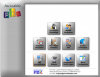
...well - there are still some issues. I can now login, but the menu is more or less unusable. I can see the menu below...

upload_2015-11-9_11-19-3.png
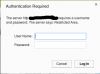
When I click on an item, I get the following. No matter what is entered, I get an authentication error. I added a user under admin/user management and that did not help.
upload_2015-11-9_15-5-55.png

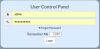
Cannot login to User Control Panel either.
upload_2015-11-9_15-14-35.png

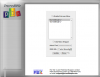
In addition, I get the following when I click on Menu Configuration.
upload_2015-11-9_11-24-21.png


Any help is greatly appreciated!
 
Last edited:
Are you using NoScript or the like? You do have to allow javascript for the GUI to work.
(I usually run into this when spinning up a new cloud server, always surprises me when the GUI doesn't work, then I look at the status icon and &^&^&$!$&&, did it again...)

I don't see the USER/ADMIN switch, that's the giveaway that JS isn't on.
 
Thanks for the suggestion, but no to NoScript or Ghostery etc. These same buttons work on other Incredible PBX installations that I have.
 

Members online

Forum statistics

Threads
26,687
Messages
174,411
Members
20,257
Latest member
Dempan
Get 3CX - Absolutely Free!

Link up your team and customers Phone System Live Chat Video Conferencing

Hosted or Self-managed. Up to 10 users free forever. No credit card. Try risk free.

3CX
A 3CX Account with that email already exists. You will be redirected to the Customer Portal to sign in or reset your password if you've forgotten it.
Back
Top