
You are using an out of date browser. It may not display this or other websites correctly.
You should upgrade or use an alternative browser.
You should upgrade or use an alternative browser.
PIONEERS Incredible PBX for Pogoplug 4
- Thread starter wardmundy
- Start date


wardmundy
Nerd Uno
- Joined
- Oct 12, 2007
- Messages
- 20,219
- Reaction score
- 5,974
Some of the threads on the net indicated that MySQL has problems resolving FQDNs on the Debian platform. That doesn't sound quite right either. Anyway, it's fixed until a better fix comes along.
And there's more good news. Just finished testing the Pogoplug Backup and Sharing Device (Model Number: POGO-V4-A1-01). Also works like a champ. The difference is it only costs $10.95 with free 2-day Prime shipping. Unbelievable. Get 'em while they're hot!

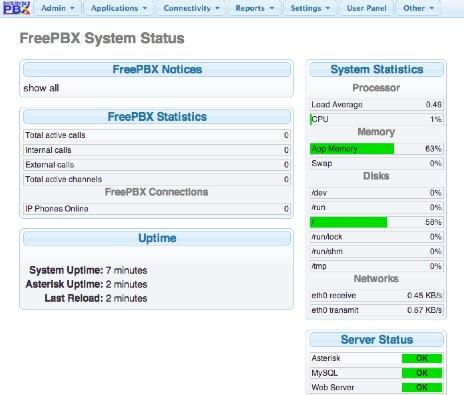
And there's more good news. Just finished testing the Pogoplug Backup and Sharing Device (Model Number: POGO-V4-A1-01). Also works like a champ. The difference is it only costs $10.95 with free 2-day Prime shipping. Unbelievable. Get 'em while they're hot!

tm1000
Schmoozecom INC/FreePBX
- Joined
- Dec 1, 2009
- Messages
- 1,360
- Reaction score
- 78
You changed the asterisk manager connection. Not the mysql connection, your mysql connection is fine, otherwise you would have been modifying freepbx.conf not "php-asmanager.php" (which btw "asmanager" should give you the hint that it's not mysql). and you changed it because the word "localhost" isn't resolving to 127.0.0.1 like it should and you didn't work with us (being "freepbx") on a better solution, one that would help you without having to have run a hacky script fix against "php-asmanager.php" which changes a lot in FreePBX 12....
I'm just trying to be helpful here.
I'm just trying to be helpful here.
wardmundy
Nerd Uno
- Joined
- Oct 12, 2007
- Messages
- 20,219
- Reaction score
- 5,974
You changed the asterisk manager connection. Not the mysql connection, your mysql connection is fine, otherwise you would have been modifying freepbx.conf not "php-asmanager.php" (which btw "asmanager" should give you the hint that it's not mysql). and you changed it because the word "localhost" isn't resolving to 127.0.0.1 like it should and you didn't work with us (being "freepbx") on a better solution, one that would help you without having to have run a hacky script fix against "php-asmanager.php" which changes a lot in FreePBX 12....
I'm just trying to be helpful here.
The FreePBX GUI was completely broken on the Pogoplug platform. This was an interim fix to allow folks to at least use FreePBX on the Pogoplug until a permanent solution is available. I'm fully aware of what was being modified. Changing the entry in freepbx.conf did not fix the problem. It was the first thing we tried. I also posted the Pogoplug's PHP setup for you a few days ago and never heard back so I removed it. Tony and I discussed possible fixes again last night, and we worked through several of them. Unfortunately, it didn't fix the problem. But I'm still all ears and would be glad to send you a device if it would be helpful.
I've highlighted a few of your comments in red just so you can better appreciate why people sometimes take offense with some of your attempts to help.
tm1000
Schmoozecom INC/FreePBX
- Joined
- Dec 1, 2009
- Messages
- 1,360
- Reaction score
- 78
Here's a two line fix that will last forever. This solution is not hacky. It will last through all upgrades of FreePBX because it's the supported way to do this things.
Code:
/var/lib/asterisk/bin/freepbx_setting ASTMANAGERHOST 127.0.0.1
/var/lib/asterisk/bin/freepbx_setting ASTMANAGERPORT 5038
wardmundy
Nerd Uno
- Joined
- Oct 12, 2007
- Messages
- 20,219
- Reaction score
- 5,974
Here's a two line fix that will last forever. This solution is not hacky. It will last through all upgrades of FreePBX because it's the supported way to do this things.
Code:/var/lib/asterisk/bin/freepbx_setting ASTMANAGERHOST 127.0.0.1 /var/lib/asterisk/bin/freepbx_setting ASTMANAGERPORT 5038
Thank you for the fix.

Jay Deal
Phhhhhhhhttttttt :)
- Joined
- Dec 26, 2013
- Messages
- 267
- Reaction score
- 85
@nerduno, any chance you or one of the people on this forum have access to a Pogoplug P22 version EO2? This is the graphite colored PP I posted on the first page of this thread - also available in fuchsia. While this is the earlier generation, it has a faster processor (same core architecture as V4) and more RAM. It does have Gigabit ethernet (like a V4) but unfortunately it doesn't have a SD card slot. However, it will boot off of a flash drive.
FWIW, I have read that it has a Bogomips score slightly higher than a Raspi. This might be the ultimate Pogoplug for IPBX if it will boot the image created for the V4 and mobile. Its 20 bucks and you have to get the right version but it's completely self contained and is attractive to boot (pun intended)
FWIW, I have read that it has a Bogomips score slightly higher than a Raspi. This might be the ultimate Pogoplug for IPBX if it will boot the image created for the V4 and mobile. Its 20 bucks and you have to get the right version but it's completely self contained and is attractive to boot (pun intended)

wardmundy
Nerd Uno
- Joined
- Oct 12, 2007
- Messages
- 20,219
- Reaction score
- 5,974
Adding Wireless Networking to the Pogoplug (works on both Pogoplug 4 models in the NV article)
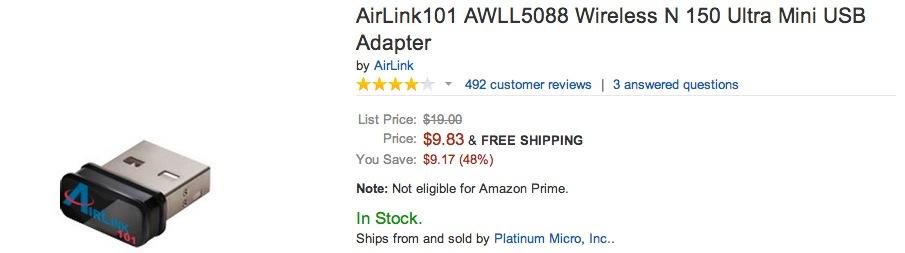
1. Click on the image above and buy yourself the (required) AirLink 101 AWLL5088 WiFi dongle. Costs about as much as your Pogoplug.
2. Complete the following steps after plugging in your AirLink 101:
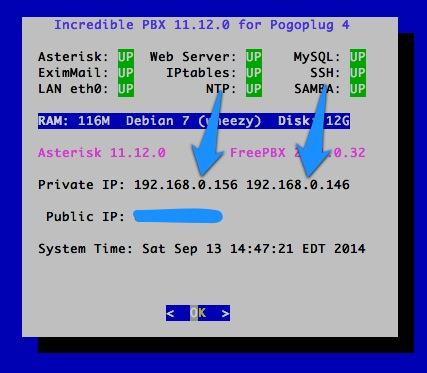
3. status should look something like this with wired and wireless IP addresses, respectively...
1. Click on the image above and buy yourself the (required) AirLink 101 AWLL5088 WiFi dongle. Costs about as much as your Pogoplug.
2. Complete the following steps after plugging in your AirLink 101:
Code:
cd /root
nano -w /etc/apt/sources.list
# add contrib non-free to the top debian source so it looks like this:
# deb http://ftp.us.debian.org/debian wheezy main contrib non-free
# save the file
apt-get update
apt-get install pciutils iw wireless-tools
apt-get install firmware-realtek unzip
wget http://incrediblepbx.com/dwa130_revC_drivers_linux_006.zip
unzip dwa130_revC_drivers_linux_006.zip
mkdir -p /lib/firmware/RTL8192U
cp rtl8192u_linux_2.6.0006.1031.2008/firmware/RTL8192U/* /lib/firmware/RTL8192U
reboot
lsmod # is the wifi device rtl… in the list?
apt-get install wpasupplicant
nano -w /etc/network/interfaces  # add the following:
# auto wlan0
  iface wlan0 inet dhcp
  wpa-ssid "your-SSID-network"
  wpa-psk "your-SSID-password"
# save the file
ifup wlan0
iwconfig
ifconfig
status
# if it's workin', uncomment auto wlan0 to enable wireless on boot
# comment out auto eth0 to disable wired connection on boot
rebootwardmundy
Nerd Uno
- Joined
- Oct 12, 2007
- Messages
- 20,219
- Reaction score
- 5,974

wardmundy
Nerd Uno
- Joined
- Oct 12, 2007
- Messages
- 20,219
- Reaction score
- 5,974


tycho
Guru (not...)
- Joined
- Aug 9, 2011
- Messages
- 703
- Reaction score
- 324
Potential thread-hijacking question:
Although I have a Pogoplug in my cart at Amazon as I type this, I was wondering if all this IncrediblePBX goodness could be loaded onto my Seagate Dockstar. Said device is a cousin to the older Pogos; previously ran Asterisk+FreePBX; now solely runs Asterisk 1.8.X; has a Marvell Kirkwood ARMv5 processor at 1.2GHz with 128 MB RAM, etc.; and was long ago finagled to run Debian (but which variant I have forgotten; have to look).
Wondering if, given that the Dockstar has been Debianized, I can pick-ip the Nerdvittles installation process starting after the:
Installing Incredible PBX 11.12.0 on the Pogoplug 4
heading...
Although I have a Pogoplug in my cart at Amazon as I type this, I was wondering if all this IncrediblePBX goodness could be loaded onto my Seagate Dockstar. Said device is a cousin to the older Pogos; previously ran Asterisk+FreePBX; now solely runs Asterisk 1.8.X; has a Marvell Kirkwood ARMv5 processor at 1.2GHz with 128 MB RAM, etc.; and was long ago finagled to run Debian (but which variant I have forgotten; have to look).
Wondering if, given that the Dockstar has been Debianized, I can pick-ip the Nerdvittles installation process starting after the:
Installing Incredible PBX 11.12.0 on the Pogoplug 4
heading...

tycho
Guru (not...)
- Joined
- Aug 9, 2011
- Messages
- 703
- Reaction score
- 324
Cool; I just happen to have one of these languishing in a drawer. Between that, and the fact that I already have an appropriate SD card, my Pogoplug4 experiment outlay is limited to the $10.95-delivered cost of the Pogo!
wardmundy
Nerd Uno
- Joined
- Oct 12, 2007
- Messages
- 20,219
- Reaction score
- 5,974
Potential thread-hijacking question:
Although I have a Pogoplug in my cart at Amazon as I type this, I was wondering if all this IncrediblePBX goodness could be loaded onto my Seagate Dockstar.
Moved to a new thread here.
Bob Helbush
Member
- Joined
- May 22, 2013
- Messages
- 99
- Reaction score
- 28
Trying to use a Pogo Plug as a Fax to email gateway. Mostly works except I get a TIF file no matter what. If I set it to both, I get two TIF files. Anybody else tried this?
Feeling kind of stupid here. Followed the debian load tutorial and have no problem with that. My pogoplug boots to debian just fine. When I put the pbxinaflash flashed card in, I can't ssh to the device. Every time I try I get "connection timed out". Just started from scratch again tonight and got the same result. Any suggestions would be greatly appreciated.

Frederick Grayson
New Member
- Joined
- Sep 18, 2014
- Messages
- 13
- Reaction score
- 2
Are you sure you are connecting to the correct IP address? Can you ping it?


Get 3CX - Absolutely Free!
Link up your team and customers  Phone System Live Chat Video Conferencing
Hosted or Self-managed. Up to 10 users free forever. No credit card. Try risk free.

Verify your Email
Check your inbox!
We’ve sent you an email. Click on the button in the email body to verify your email address – (if you can not find it, check your spam folder).
Upon verification you will be directed to the 3CX setup wizard.