NEW IncrediblePBX 2026-Debian13

To install webmin without error, you first need to run the script that setup the new repos and key, then install:

Code:
curl -o webmin-setup-repo.sh https://raw.githubusercontent.com/webmin/webmin/master/webmin-setup-repo.sh
sudo sh webmin-setup-repo.sh
sudo apt update
sudo apt install webmin
Here's what I get:
Code:
The following packages have unmet dependencies:
 libauthen-pam-perl : Depends: perlapi-5.36.0
 libio-pty-perl : Depends: perlapi-5.36.0
E: Unable to correct problems, you have held broken packages.
E: The following information from --solver 3.0 may provide additional context:
   Unable to satisfy dependencies. Reached two conflicting decisions:
   1. libauthen-pam-perl:amd64 is selected for install because:
      1. webmin:amd64=2.641 is selected for install
      2. webmin:amd64 Depends libauthen-pam-perl
   2. libauthen-pam-perl:amd64 Depends perlapi-5.36.0
      but none of the choices are installable:
      - perl-base:amd64=5.36.0-7+deb12u3 is not selected for install
      - perl-base:amd64=5.36.0-7+deb12u2 is not selected for install
 
Here's what I get:
Code:
The following packages have unmet dependencies:
 libauthen-pam-perl : Depends: perlapi-5.36.0
 libio-pty-perl : Depends: perlapi-5.36.0
E: Unable to correct problems, you have held broken packages.
E: The following information from --solver 3.0 may provide additional context:
   Unable to satisfy dependencies. Reached two conflicting decisions:
   1. libauthen-pam-perl:amd64 is selected for install because:
      1. webmin:amd64=2.641 is selected for install
      2. webmin:amd64 Depends libauthen-pam-perl
   2. libauthen-pam-perl:amd64 Depends perlapi-5.36.0
      but none of the choices are installable:
      - perl-base:amd64=5.36.0-7+deb12u3 is not selected for install
      - perl-base:amd64=5.36.0-7+deb12u2 is not selected for install

Code:
sudo apt update
sudo apt-get install -f
sudo dpkg --configure -a
sudo apt install perl-base
sudo apt autoremove --purge webmin
sudo apt clean
curl -o setup-repos.sh https://raw.githubusercontent.com/webmin/webmin/master/setup-repos.sh
sh setup-repos.sh
sudo apt install webmin --install-recommends

if above still fails:

Code:
sudo apt update
sudo apt full-upgrade
 
Here's the ALPHA install process minus WebMin which I will wrestle with separately:

Download Debian 13 ISO: https://www.debian.org/download
Install base Debian 13 with SSH & System Utilities only (recommend: 25GB, 2GB RAM, 2 cores)
reboot
login as root and remove other user acct you created: deluser nerd --remove-home
sed -i 's|prohibit-password|yes|' /etc/ssh/sshd_config
systemctl restart ssh
# decipher local IP address and login via ssh elsewhere
ip a
after relogin as root via SSH
wget https://filedn.com/lBgbGypMOdDm8PWOoOiBR7j/IncrediblePBX2026/IncrediblePBX2026.sh
chmod +x IncrediblePBX2026.sh
./IncrediblePBX2026.sh

BUGS: You may need to run fwconsole reload from the CLI after you login to the FreePBX GUI to save the config.
Still some bugs adding or upgrading modules from the web. CLI works fine.
 
Last edited:
@wardmundy still seems to be throwing bookworm sources in to trixie :(
I shall have a look in a moment, got a few vpses kicking around

it's the end of the script, it replaces /etc/apt/sources.list with bookworm sources instead of trixie

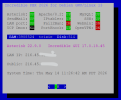
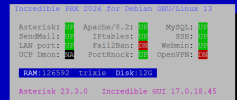
anyway running fine with Asterisk 23.3.0

1778756017021.png
 
Last edited:
I played with it some last night in a VirtualBox vm. I didn't get fail2ban to work yet. Also, this bit of code is invalid but doesn't appear to be needed:
apt-get install -y software-properties-common
LC_ALL=C.UTF-8 add-apt-repository ppa:ondrej/php -y
And this code appears to be redundant since nodejs is already installed at this point:
Code:
apt-get update
apt-get install sudo -y
curl -fsSL https://deb.nodesource.com/setup_20.x | bash -
apt-get install -y nodejs

It leaves a number of files that it says to autoremove but I haven't tried to do it.

I also observed that some bookworm stuff is being pulled in.

I'd recommend these changes to pull in Asterisk-23:
Code:
wget http://downloads.asterisk.org/pub/telephony/asterisk/asterisk-23-current.tar.gz
tar xvf asterisk-23-current.tar.gz
cd asterisk-23*/

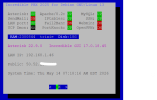
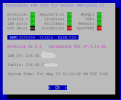
PBXSTATUS needs update to reflect IncrediblePBX2026.

1778757735327.png
 
Last edited:
For Fail2ban, I needed to comment out the last line of the /etc/fail2ban/paths-debian.conf file.
Code:
fail2ban-client -x start
2026-05-14 07:56:04,747 fail2ban                [7459]: ERROR   Failed during configuration: While reading from '/etc/fail2ban/paths-debian.conf' [line 42]: option 'sshd_backend' in section 'DEFAULT' already exists

And I believe the install of Webmin fails because parts of Debian-12 got pulled in by something in the install script:
Code:
Unsatisfied dependencies:
 libauthen-pam-perl : Depends: perlapi-5.36.0
Error: Unable to correct problems, you have held broken packages.
Error: The following information from --solver 3.0 may provide additional context:
   Unable to satisfy dependencies. Reached two conflicting decisions:
   1. libauthen-pam-perl:amd64=0.16-5+b1 is selected for install
   2. libauthen-pam-perl:amd64 Depends perlapi-5.36.0
      but none of the choices are installable:
      - perl-base:amd64=5.36.0-7+deb12u3 is not selected for install
      - perl-base:amd64=5.36.0-7+deb12u2 is not selected for install
Here is the code to use to solve the webmin installation problem:
Code:
dpkg -i --force-depends webmin-current.deb
apt install -f
iptables -A INPUT -p tcp --dport 10000 -j ACCEPT
 
Last edited:
The only other problem I have found is that the gui Reload button always fails on the reload but a manual fwconsole reload works without error. I'm seeing some directory permission issues that I haven't located yet. The fwconsole chown command didn't seem to help.

1778762680022.png
 
Last edited:
OK. Another land mine: You cannot install Asterisk 23.3 prior to the FreePBX install because the installer only accepts up to Asterisk-22. After everything is installed with Asterisk-22, you can upgrade Asterisk to version 23 and FreePBX doesn't seem to care.
 
@wardmundy : Try using "sudo apt install webmin --install-recommends". The additional parameter is not needed as it is active by default for a standard Debian 13 installation, but sometimes it is not defaulted properly or gets deactivated.

Update:
I've just installed webmin on a new Debian 13 VPS and everything worked flawlessly. But earlier, I tried to upgrade a Debian 12 machine to Debian 13 and then I tried to install webmin, that took me into the same errors that you've experienced.
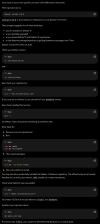
Then I asked chatgpt for help and below is his guidance:
1778775930926.png
 
Last edited:
OK. Another land mine: You cannot install Asterisk 23.3 prior to the FreePBX install because the installer only accepts up to Asterisk-22. After everything is installed with Asterisk-22, you can upgrade Asterisk to version 23 and FreePBX doesn't seem to care.
23 is a Normal release though, 22 is the LTS.

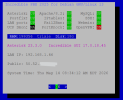
Mine shows 2026 on pbxstatus.
 
I guess I'm going to give up on loading Debian-13 on VirtualBox. It had tons of issues and FreePBX would not install. So I switched to a Debian-13 instance on Rack Nerds and it seems to be installing nicely.

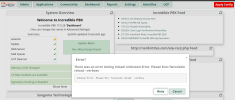
I still need to fix the fail2ban issue and install Webmin, but the bigger issue is that the FreePBX GUI will not do Apply Config and gives an error. Manually doing a fwconsole reload will work.

1778783422023.png
1778783527784.png
 
I still cannot get Webmin to load. We need to figure out where the old Debian-12 modules are coming from. I suspect it may have something to do with some of the post-FreePBX install downloads. I'll try eliminating the secondary IncrediblePBX file downloads for things like the FreePBX backup and some of the other stuff and see if that keeps Debian-13 clean.

There is still some sort of security issue with FreePBX that is not allowing the Apply Config stuff to work so something is wonky when permissions are set during the install.
 
Wait until you try to update the certificates using Certificate Manager: (plan to spend a couple hours on this)
### FreePBX 17 Certificate Manager Crash / PKCS Permission Error Fix

**Issue:**
When updating certificates in FreePBX 17 (Debian 12), the GUI or `fwconsole reload` fails with:
`Fatal error: Uncaught Exception: Don't have permission/can't write to: /etc/asterisk/keys in PKCS.class.php`
Followed by PHP 8.2 deprecation exceptions on `rtrim()`, `strlen()`, and `scandir()`.

**Root Causes:**
1. A corrupted or ghost `integration` directory node/symlink blocking filesystem writes.
2. FreePBX passing a `null` variable to string functions, causing PHP 8.2 type-safety crashes.

**Resolution Steps:**

1. Clean up ghost directory structures and rebuild the proper path:
```bash
rm -rf /etc/asterisk/integration
mkdir -p /etc/asterisk/keys/integration
chown -R asterisk:asterisk /etc/asterisk/keys
chmod -R 775 /etc/asterisk/keys
```

2. Open `/var/www/html/admin/libraries/BMO/PKCS.class.php` and patch the PHP 8.2 `null` type errors:

* **Line 524 (Permission throw):** Comment out the strict permission block check:
`// throw new \Exception(sprintf(_("Don't have permission/can't write to: %s"),$keyloc));`
* **Fix `rtrim()` error:** Change `$dir = rtrim($dir, "/");` to:
`$dir = rtrim((string)$dir, "/");`
* **Fix `strlen()` error:** Change `$this->recurseDirectory($dir, $retarr, strlen($dir)+1);` to:
`$this->recurseDirectory($dir, $retarr, strlen((string)$dir)+1);`
* **Fix `scandir()` error:** Change `$dirarr = scandir($dir);` to:
`$dirarr = scandir($dir ?? '/etc/asterisk/keys');`

3. Re-sync permissions and reload the framework:
```bash
fwconsole chown
fwconsole reload
```

And then there's the rest of the nightmare:

 
Last edited:
Summary of What Was Fixed Above using Google's Gemini:

  • Permissions & Layout: Cleaned up a corrupted integration ghost folder that was blocking the filesystem.
  • Service Recovery: Stabilized the Asterisk telephony engine by bypassing a crashing Sangoma library architecture binary.
  • PHP 8.2 Modernization: Hardened the FreePBX PKCS.class.php module code against null variable string deprecations (rtrim, strlen, and scandir).
Your FreePBX 17 system is now clean, secure, and running smoothly with Debian 13 "trixie."
 
I suspect the Apply Config bug in the GUI is the result of a similar bug elsewhere in the FreePBX spaghetti code. :rolleyes5:
 
If anyone wants to skip the hours of aggravation, I will provide a working Proxmox image of a working system one day soon.
 
@wardmundy this is where the Debian-12 (bookworm) stuff gets introduced in the installation. It overwrites the /etc/app/sources.list with bookworm references:

Code:
--2026-05-15 12:26:06--  https://filedn.com/lBgbGypMOdDm8PWOoOiBR7j/Debian12/iPBX-custom.tar.gz
Resolving filedn.com (filedn.com)... 74.120.8.113
Connecting to filedn.com (filedn.com)|74.120.8.113|:443... connected.
HTTP request sent, awaiting response... 200 OK
Length: 1790949 (1.7M) [application/gzip]
Saving to: ‘iPBX-custom.tar.gz’

iPBX-custom.tar.gz                              100%[====================================================================================================>]   1.71M  8.82MB/s    in 0.2s

2026-05-15 12:26:07 (8.82 MB/s) - ‘iPBX-custom.tar.gz’ saved [1790949/1790949]

var/lib/asterisk/sounds/en/custom/
var/lib/asterisk/sounds/en/custom/press7.ulaw
var/lib/asterisk/sounds/en/custom/alexa_hello
var/lib/asterisk/sounds/en/custom/alexa_example
var/lib/asterisk/sounds/en/custom/press7.gsm
var/lib/asterisk/sounds/en/custom/PressZeroToReconnect.wav
var/lib/asterisk/sounds/en/custom/reminder2.gsm
var/lib/asterisk/sounds/en/custom/today.gsm
var/lib/asterisk/sounds/en/custom/contactFCC.gsm
var/lib/asterisk/sounds/en/custom/nv-ivr
var/lib/asterisk/sounds/en/custom/ivr-Allison.wav
var/lib/asterisk/sounds/en/custom/nv-GenericWelcome.gsm
var/lib/asterisk/sounds/en/custom/sms-help
var/lib/asterisk/sounds/en/custom/welcome3
var/lib/asterisk/sounds/en/custom/welcome.gsm
var/lib/asterisk/sounds/en/custom/alarm
var/lib/asterisk/sounds/en/custom/press3.gsm
var/lib/asterisk/sounds/en/custom/reminder1.gsm
var/lib/asterisk/sounds/en/custom/BiltmorePark.gsm
var/lib/asterisk/sounds/en/custom/AllCallsRecorded.wav
var/lib/asterisk/sounds/en/custom/welcome-old
var/lib/asterisk/sounds/en/custom/nv-ivr.gsm
var/lib/asterisk/sounds/en/custom/reminder5.gsm
var/lib/asterisk/sounds/en/custom/reminder4.gsm
var/lib/asterisk/sounds/en/custom/welcome2
var/lib/asterisk/sounds/en/custom/411.gsm
var/lib/asterisk/sounds/en/custom/wm-NotHomeOptions.gsm
var/lib/asterisk/sounds/en/custom/411
var/lib/asterisk/sounds/en/custom/nothome4
var/lib/asterisk/sounds/en/custom/nothome
var/lib/asterisk/sounds/en/custom/wm-NotHomeOptions.sln
var/lib/asterisk/sounds/en/custom/gateopening.gsm
var/lib/asterisk/sounds/en/custom/reminder6.gsm
var/lib/asterisk/sounds/en/custom/alexa_another
var/lib/asterisk/sounds/en/custom/wm-NotHomeOptions.wav
var/lib/asterisk/sounds/en/custom/nv-GenericWelcome.wav
var/lib/asterisk/sounds/en/custom/Renaissance.gsm
var/lib/asterisk/sounds/en/custom/press8.gsm
var/lib/asterisk/sounds/en/custom/LeaveMessage.wav
var/lib/asterisk/sounds/en/custom/wm-NotHomeOptions.ulaw
var/lib/asterisk/sounds/en/custom/itsnotus.wav
var/lib/asterisk/sounds/en/custom/alarm.gsm
var/lib/asterisk/sounds/en/custom/reminder3.gsm
var/lib/asterisk/sounds/en/custom/AllCallsRecorded.gsm
var/lib/asterisk/sounds/en/custom/itsnotus.gsm
Get:1 http://security.debian.org bookworm-security InRelease [48.0 kB]
Get:2 http://deb.debian.org/debian bookworm InRelease [151 kB]
Get:3 http://deb.debian.org/debian bookworm-updates InRelease [55.4 kB]
Get:4 http://security.debian.org bookworm-security/main amd64 Packages [306 kB]
Hit:5 https://packages.sury.org/php trixie InRelease
Get:6 http://deb.debian.org/debian bookworm/main amd64 Packages [8,792 kB]
Ign:7 http://download.webmin.com/download/repository sarge InRelease
Get:8 http://security.debian.org bookworm-security/main Translation-en [188 kB]
Get:9 http://security.debian.org bookworm-security/contrib amd64 Packages [896 B]
Get:10 http://security.debian.org bookworm-security/contrib Translation-en [652 B]
Get:11 http://security.debian.org bookworm-security/non-free-firmware amd64 Packages [688 B]
Get:12 http://security.debian.org bookworm-security/non-free-firmware Translation-en [472 B]
Get:13 http://download.webmin.com/download/repository sarge Release [19.2 kB]
Get:14 http://deb.debian.org/debian bookworm/main Translation-en [6,108 kB]
Hit:15 https://download.webmin.com/download/newkey/repository stable InRelease
Get:16 http://deb.debian.org/debian bookworm/contrib amd64 Packages [53.5 kB]
Get:17 http://deb.debian.org/debian bookworm/contrib Translation-en [48.4 kB]
Get:18 http://deb.debian.org/debian bookworm/non-free amd64 Packages [102 kB]
Get:19 http://download.webmin.com/download/repository sarge Release.gpg [181 B]
Get:20 http://deb.debian.org/debian bookworm/non-free Translation-en [68.1 kB]
Get:21 http://deb.debian.org/debian bookworm/non-free-firmware amd64 Packages [6,368 B]
Get:22 http://deb.debian.org/debian bookworm/non-free-firmware Translation-en [20.9 kB]
Get:23 http://deb.debian.org/debian bookworm-updates/main amd64 Packages [6,924 B]
Get:24 http://deb.debian.org/debian bookworm-updates/main Translation-en [5,448 B]
Ign:19 http://download.webmin.com/download/repository sarge Release.gpg
Reading package lists... Done
W: OpenPGP signature verification failed: http://download.webmin.com/download/repository sarge Release: Sub-process /usr/bin/sqv returned an error code (1), error message is: Missing key D97A3AE911F63C51, which is needed to verify signature.
E: The repository 'http://download.webmin.com/download/repository sarge Release' is not signed.
N: Updating from such a repository can't be done securely, and is therefore disabled by default.
N: See apt-secure(8) manpage for repository creation and user configuration details.
Reload Started
Reload Complete
 
Last edited:
I moved the install of Webmin up before Asterisk is installed and it worked correctly. Then I had to fix the /etc/app/sources.list back for trixie. I did not install portknock. Everything works except for the FreePBX apply config button.

1778875430466.png
 
Last edited:
I think I've addressed most of the bugs and also gave user the choice of Asterisk 22 LTS or Asterisk 23 at top of script if and when FreePBX 17 installer supports Asterisk 23. Certificate Management mess has also been cleaned up. Hard to say how many other disasters await because of the new way missing variables are being handled. What used to be a warning is now a crash. Probably need to run this code through AI to find all the potholes. I doubt Sangoma's bean counters are up to the task. And that fully explains the reluctance documented below to deal with Debian 13. So the dead end may be fast approaching. In the meantime, I've clicked through every menu option, and none blow up out of the gate.

Code:
wget https://filedn.com/lBgbGypMOdDm8PWOoOiBR7j/IncrediblePBX2026/IncrediblePBX2026.sh
chmod +x IncrediblePBX2026.sh
./IncrediblePBX2026.sh
 
Last edited:
when FreePBX 17 installer supports Asterisk 23
I submitted a ticket to FreePBX re Asterisk-23. First they closed it saying they don't support Debian-13 (which is unrelated to the installer script not accepting Asterisk-23). Then submitted another ticket. Who knows if they'll fix it since Kapil is gone. He always fixed it the same day I reported an Asterisk version issue.

In the mean time. once FreePBX installs, you can install Asterisk-23 and everything is OK. I'll load your new script at Rack Nerds and see what happens. Rack Nerds has Debian 13.5.
 
Last edited:

Members online

No members online now.

Forum statistics

Threads
26,686
Messages
174,406
Members
20,257
Latest member
Dempan
Get 3CX - Absolutely Free!

Link up your team and customers Phone System Live Chat Video Conferencing

Hosted or Self-managed. Up to 10 users free forever. No credit card. Try risk free.

3CX
A 3CX Account with that email already exists. You will be redirected to the Customer Portal to sign in or reset your password if you've forgotten it.
Back
Top