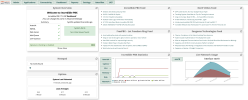
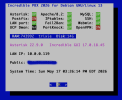
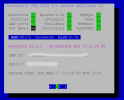
NEW IncrediblePBX 2026-Debian13

@wardmundy Your new script ran OK. Here are some observations:

This shouldn't still be there:
Code:
Ign:6 http://download.webmin.com/download/repository sarge InRelease
Get:7 http://download.webmin.com/download/repository sarge Release [19.2 kB]
Hit:8 https://download.webmin.com/download/newkey/repository stable InRelease
Get:9 http://download.webmin.com/download/repository sarge Release.gpg [181 B]
Ign:9 http://download.webmin.com/download/repository sarge Release.gpg

As a result, the script added this to /etc/apt/sources.list which is not correct.:
Code:
deb http://download.webmin.com/download/repository sarge contrib

FreePBX still won't apply configuration:
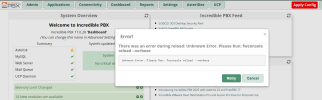
1778956909782.png

FreePBX disabled the UCP module and when you try to upgrade it, the GUI bombs out.

Adding an extension causes the GUI to bomb out:
Code:
Whoops \ Exception \ ErrorException (E_WARNING)
file_put_contents(/etc/asterisk/voicemail.conf): Failed to open stream: Read-only file system
The file system is not read-only.
Code:
-rw-rw-r-- 1 asterisk asterisk   2072 May 16 11:42 voicemail.conf

FreePBX is basically unusable even though it looks OK. The extensions that are preloaded will work but you can't add anything new.

There are file permission issues not addressed by the FreePBX installer.
 
Last edited:
There is something going on with the /etc permissions with Debian-13 but they are set the same as on Debian-12:
Code:
drwxrwxr-x 111 root root    4096 May 16 11:38 etc     <-- Debian-13

drwxr-xr-x 118 root root   12288 May 16 06:01 etc      <-- Debian-12

Journal file entries:
Code:
░░ The job identifier is 131 and the job result is failed.
May 16 12:01:01 noreply.incrediblepbx.com postfix/sendmail[8599]: fatal: open /etc/postfix/main.cf: Permission denied
May 16 12:01:03 noreply.incrediblepbx.com systemd-ssh-generator[8661]: Failed to query local AF_VSOCK CID: Cannot assign requested address
May 16 12:01:03 noreply.incrediblepbx.com (sd-exec-[8651]: /usr/lib/systemd/system-generators/systemd-ssh-generator failed with exit status 1.
May 16 12:02:01 noreply.incrediblepbx.com postfix/sendmail[11728]: fatal: open /etc/postfix/main.cf: Permission denied
 
Last edited:
Reinstall using the last install script and everything works including the GUI. But... it's going to take a major rewrite of FreePBX to use Debian 13 in a non-kludgey way. The internal plumbing rears its ugly head with Debian 13, and I'm not sure Sangoma has anyone left to tackle this. Some of the spaghetti code is more than a decade old, and now it shows.
 
I think this needs to be dead-ended until FreePBX-18 which is designed for Debian-13. There are too many things wrong. I'll stick with IncrediblePBX-2025 and my FusionPBX and FS PBX systems run flawlessly on Debian-13. There is no immediate need for switching FreePBX to Debian-13 in its current form. They claim they'll have early release in August (yeah, I bet.) Those who want bleeding edge current releases have other options.

Maybe we need to work more on customizing an Incredible FS PBX. I'm running my home system on it now. They are up to release 1.8.2 and have made major improvements since your initial review of it. Much of the old FusionPBX code has been replaced.

On FusionPBX, MarkcCrane has made a number of major improvements on that as well.
 
I guess I have a high pain tolerance. After spending all day yesterday on this, I think we have a usable Debian 13 platform. I wouldn't hold my breath waiting on the Sangoma contractors. They have no idea what lies ahead with Debian 13. The arrows in my back attest to my pioneer status. But... everything now works as best I can tell. Just be sure to use the latest installer on a clean Debian 13 platform.

1. Apply Config from the GUI... works.
2. Updating, adding, and deleting extensions... works.
3. Updating, adding and deleting modules... works.
4. All menu options execute properly.
5. Proxmox image coming soon for the less adventurous.

For Debian install, follow the traditional Debian installation scenario. Choose your Language. Choose your Location to set your time zone. Choose your Keyboard. Leave the default Hostname set to debian. Set the Domain Name to incrediblepbx.com. Create a very secure root user password. Create a nerd user with a password of your choice. Choose your Time Zone. Choose Use Entire Disk for the partitioning with All Files in One Partition. Choose Yes to write changes to disk. Choose the nearest Debian Mirror for your server. Leave the Proxy blank. For Software Selections, choose SSH Server and Standard System Utilities options only. Install GRUB boot loader on Default Drive that is displayed. Wait for the install to complete and then choose Continue to Reboot.

wget https://filedn.com/lBgbGypMOdDm8PWOoOiBR7j/IncrediblePBX2026/IncrediblePBX2026.sh
chmod +x IncrediblePBX2026.sh
./IncrediblePBX2026.sh

Screenshot 2026-05-17 at 3.32.45 PM.png

Screenshot 2026-05-17 at 3.39.27 PM copy.png
 
Last edited:
FYI: If you use Asterisk Info in Reports tab, you can enable the Asterisk REST Interface in Settings -> Advanced Settings.

In Asterisk Info, you can review the status of all 358 modules on the system.

 
Last edited:
@wardmundy it looks like you have a winner! :clap: Clean install and it looks good. For my final test, I'll try to restore a Freepbx backup from another system.
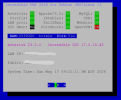
 
Lots of under-the-covers fixes to both the FreePBX code base and also its MySQL tables. I would expect some smoke doing a restore, but it's worth a try. :sifone:
 
The FreePBX restore worked perfectly! Also, I added a module and upgraded a module and both worked.

Very minor issue: The pbxstatus screen still points at sendmail instead of postfix for the running process check.

What about the IncrediblePBX updater? Does it need any changes for this release?
 
The FreePBX restore worked perfectly! Also, I added a module and upgraded a module and both worked.

Very minor issue: The pbxstatus screen still points at sendmail instead of postfix for the running process check.

What about the IncrediblePBX updater? Does it need any changes for this release?
Updater seems to be fine. I fixed the pbxstatus to point to Postfix. I wonder if your restore from a backup changed it back??
 
Updater seems to be fine. I fixed the pbxstatus to point to Postfix. I wonder if your restore from a backup changed it back??
No. It was that way before I ran the restore. I manually fixed my copy of pbxstatus. It still had sendmail in it for checking for the process running.

1779067299992.png

And this is the system the backup came from:

1779067776866.png
 
Last edited:
It must be in the Automatic Update Utility scripts because it's already near the end of the installer:

sed -i 's|SendMail| Postfix|' /usr/local/sbin/pbxstatus

UPDATE: Just ran a clean install plus the updates, and mine still shows Postfix. So it's a FLUKE for now.
 
Last edited:
Yeah, that's in the install script on mine too. It did change the pbxstatus to show "Postfix" on the screen but it showed red because the pbxstatus still had it looking for the sendmail process. Let's see if some other pioneers do this and get different results.
 
Yeah, that's in the install script on mine too. It did change the pbxstatus to show "Postfix" on the screen but it showed red because the pbxstatus still had it looking for the sendmail process. Let's see if some other pioneers do this and get different results.
It will show as disabled until you run the enable-gmail-smarthost-with-postfix script because most downstream providers are blocked unless you use a smarthost to send outbound emails.
 
line 95 a2enconf not found
line 96 a2enmod not found
line 102 add-apt-repository not found

reinstalls Debian 13 and tries again
 
Last edited:
reinstalls Debian 13 and tries again
Amazing troubleshooting skills! Error appears, start from scratch. I mean, maybe by some miracle it will just work the next time?

Is someone offering prize money here for producing an unsupported install? What's the motivator? Bookworm has LTS through 2028.
 
Amazing troubleshooting skills! Error appears, start from scratch. I mean, maybe by some miracle it will just work the next time?

Is someone offering prize money here for producing an unsupported install? What's the motivator? Bookworm has LTS through 2028.
That's what I said about Incredible PBX 2027. Yet here we are. Some of us like a challenge, and Debian 13 fills that bill in spades. What it really shows is how fragile the entire FreePBX platform is. Virtually none of their code shows variables being declared before they are used. And now it's going to bite them in the :asshole:. Some of the hidden code is almost 20 years old and goes back before Philippe took over the project.
 
Last edited:
Amazing troubleshooting skills! Error appears, start from scratch. I mean, maybe by some miracle it will just work the next time?

Is someone offering prize money here for producing an unsupported install? What's the motivator? Bookworm has LTS through 2028.
is it helpful?
is it productive?
is it urinating downwind?
 
@hecatae Maybe Bill was having a bad day yesterday. He's often helpful but these comments were sort of condescending, to say the least. Considering @wardmundy had FreePBX-17 and a new version of Asterisk running on Debian-12 long before Sangoma could manage it, and he is on the bleeding edge again while Sangoma plays musical programmers, the negativity is unwarranted.

The question is, why hasn't Sangoma managed to do this for themselves while FS PBX and FusionPBX already ported to Debian-13? The small guys with limited resources are leading well ahead of the mega corporation.
 

Members online

No members online now.

Forum statistics

Threads
26,686
Messages
174,406
Members
20,257
Latest member
Dempan
Get 3CX - Absolutely Free!

Link up your team and customers Phone System Live Chat Video Conferencing

Hosted or Self-managed. Up to 10 users free forever. No credit card. Try risk free.

3CX
A 3CX Account with that email already exists. You will be redirected to the Customer Portal to sign in or reset your password if you've forgotten it.
Back
Top