SOLVED incrediblepbx13-12.2 ubuntu asterisk down

wa4zlw

Member
Joined
Feb 14, 2008
Messages
845
Reaction score
22
with all the issues of my Centos 6.7 incredible13-12 (and the last straw was VMs emails did not have the messages contained) I installed ubuntu and followed the july 8, 2015 NV article. This is on my Digital Ocean droplet and yes I did create the swapfile and I expanded the ssh window during build.

asterisk did not come up:

Code:
/usr/local/sbin/pbxstatus: line 12: asterisk: command not found
sudo: unable to resolve host ubuntu-14-04-x64

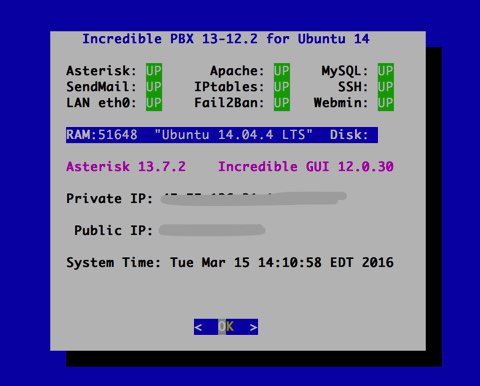
                          Incredible PBX 13-12.2 for Ubuntu 14

                        Asterisk: DN      Apache: UP    MySQL: UP
                        SendMail: UP    IPtables: UP      SSH: UP
                        LAN eth0: UP    Fail2Ban: UP   Webmin: UP

                        RAM:759276  "Ubuntu 14.04.4 LTS"  Disk:

                        Asterisk     Incredible GUI 12.0.30

                        Private IP: 45.x.y.z 10.17.0.5

                         Public IP: 45.x.y.z

                        System Time: Mon Mar 14 22:36:51 EDT 2016

                                        <  OK  >

Always run Incredible PBX behind a hardware-based firewall.
root@ubuntu-14-04-x64:~# amportal restart

Please wait...

**** WARNING: ERROR IN CONFIGURATION ****
astrundir in '/etc/asterisk' is set to /var/run/asterisk but the directory
does not exists. Attempting to create it with: 'mkdir -p /var/run/asterisk'

STOPPING ASTERISK
Waiting for Asterisk to Stop Gracefully...

any ideas?

I've spent three days working on rebuilding and is getting old fast :-(

Thanks in advance leon
 
root@ubuntu-14-04-x64:~# asterisk -rvvvvvvvvvv
The program 'asterisk' is currently not installed. You can install it by typing:
apt-get install asterisk
root@ubuntu-14-04-x64:~#
 
I rebuilt it a second time and while watching it seems I saw errors. this time asterisk seems to have come up with a error if you restart:


root@ubuntu-14-04-x64:~# amportal restart

Please wait...


STOPPING ASTERISK
Waiting for Asterisk to Stop Gracefully...

Asterisk Stopped

SETTING FILE PERMISSIONS................sudo: unable to resolve host ubuntu-14-04-x64
..Done
Removing any dangling symlinks
Dangling symlinks removed

STARTING ASTERISK
Asterisk Started
root@ubuntu-14-04-x64:~# asterisk -rvvvvvvvv
Asterisk 13.7.2, Copyright (C) 1999 - 2014, Digium, Inc. and others.
Created by Mark Spencer <[email protected]>
Asterisk comes with ABSOLUTELY NO WARRANTY; type 'core show warranty' for details.
This is free software, with components licensed under the GNU General Public
License version 2 and other licenses; you are welcome to redistribute it under
certain conditions. Type 'core show license' for details.
=========================================================================
Connected to Asterisk 13.7.2 currently running on ubuntu-14-04-x64 (pid = 2443)
[2016-03-15 05:17:29]

Code:
                    Incredible PBX 13-12.2 for Ubuntu 14

                                                                               Asterisk: UP      Apache: UP    MySQL: UP
                                                                               SendMail: UP    IPtables: UP      SSH: UP
                                                                               LAN eth0: UP    Fail2Ban: UP   Webmin: UP

                                                                               RAM:572740  "Ubuntu 14.04.4 LTS"  Disk:

                                                                               Asterisk 13.7.2    Incredible GUI 12.0.30

                                                                               Private IP: 45.x.y.z 10.17.0.5

                                                                                Public IP: 45.x.y.z

                                                                               System Time: Tue Mar 15 05:19:24 EDT 2016

                                                                                               <  OK  >

what is this error?

SETTING FILE PERMISSIONS................sudo: unable to resolve host ubuntu-14-04-x64

thanks leon
 
was able to restore my backup but again unable to drag-n-drop the audio object onto the target area even from the full backup
is this a bug?

also, email is not being sent. I do not see an email setup command in the /root

leon
 
checking asterisk info looks like having same pjsip issues with extensions not showing up or more importantly unavailable; have to get ready for work will have to look later :-(

Code:
 Endpoint:  701/701                                              Not in use    0 of inf
     InAuth:  701-auth/701
        Aor:  701                                                8
      Contact:  701/sip:[email protected]:1030                194a8a6822 Created       0.000

Endpoint:  702/702                                              Unavailable   0 of inf
     InAuth:  702-auth/702
        Aor:  702                                                8
 
outbound mail with the builtin mail client goes nowhere

Code:
root@ubuntu-14-04-x64:~# mail
"/var/mail/root": 16 messages 16 new
>N   1 root@ubuntu-14-04- Tue Mar 15 05:11  15/709   *** SECURITY information for ubuntu-14-04-
N   2 root@ubuntu-14-04- Tue Mar 15 05:12  15/709   *** SECURITY information for ubuntu-14-04-
N   3 root@ubuntu-14-04- Tue Mar 15 05:12  15/709   *** SECURITY information for ubuntu-14-04-
N   4 root@ubuntu-14-04- Tue Mar 15 05:12  15/709   *** SECURITY information for ubuntu-14-04-
N   5 root@ubuntu-14-04- Tue Mar 15 05:12  15/709   *** SECURITY information for ubuntu-14-04-
N   6 root@ubuntu-14-04- Tue Mar 15 05:12  15/709   *** SECURITY information for ubuntu-14-04-
N   7 root@ubuntu-14-04- Tue Mar 15 05:13  15/709   *** SECURITY information for ubuntu-14-04-
N   8 root@ubuntu-14-04- Tue Mar 15 05:13  15/709   *** SECURITY information for ubuntu-14-04-
N   9 root@ubuntu-14-04- Tue Mar 15 05:13  15/709   *** SECURITY information for ubuntu-14-04-
N  10 root@ubuntu-14-04- Tue Mar 15 05:13  15/709   *** SECURITY information for ubuntu-14-04-
N  11 root@ubuntu-14-04- Tue Mar 15 05:13  15/709   *** SECURITY information for ubuntu-14-04-
N  12 root@ubuntu-14-04- Tue Mar 15 05:13  15/709   *** SECURITY information for ubuntu-14-04-
N  13 root@ubuntu-14-04- Tue Mar 15 05:14  15/709   *** SECURITY information for ubuntu-14-04-
N  14 root@ubuntu-14-04- Tue Mar 15 05:16  15/709   *** SECURITY information for ubuntu-14-04-
N  15 root@ubuntu-14-04- Tue Mar 15 05:16  15/709   *** SECURITY information for ubuntu-14-04-
N  16 root@ubuntu-14-04- Tue Mar 15 05:19  15/709   *** SECURITY information for ubuntu-14-04-
? q
Held 16 messages in /var/mail/root
root@ubuntu-14-04-x64:~# mail [email protected]
Cc:
Subject: where does this go 2
test
.

^Z
[2]+  Stopped                 mail [email protected]
You have mail in /var/mail/root
root@ubuntu-14-04-x64:~#

/var/log/mail.log snippet:

Code:
Mar 15 05:47:20 ubuntu-14-04-x64 sm-mta[5958]: u2F9lJrt005956: to=<[email protected]>, ctladdr=<asterisk@ubuntu-14-04-x64> (1000/1000), delay=00:00:01, xdelay=00:00:01, mailer=esmtp, pri=120549, relay=mx-3.rightbox.com. [208.72.237.94], dsn=5.5.2, stat=Service unavailable
Mar 15 05:47:20 ubuntu-14-04-x64 sm-mta[5958]: u2F9lJrt005956: u2F9lKrt005958: DSN: Service unavailable
Mar 15 05:47:20 ubuntu-14-04-x64 sm-mta[5958]: u2F9lKrt005958: to=<asterisk@ubuntu-14-04-x64>, delay=00:00:00, xdelay=00:00:00, mailer=local, pri=30000, dsn=2.0.0, stat=Sent
Mar 15 05:47:40 ubuntu-14-04-x64 sendmail[6008]: u2F9le40006008: from=asterisk, size=144, class=0, nrcpts=1, msgid=<201603150947.u2F9le40006008@ubuntu-14-04-x64>, relay=asterisk@localhost
Mar 15 05:47:40 ubuntu-14-04-x64 sendmail[6021]: u2F9le6H006021: from=asterisk, size=43758, class=0, nrcpts=0, msgid=<Asterisk-2-1561270086-702-2443@ubuntu-14-04-x64>, relay=asterisk@localhost
Mar 15 05:47:40 ubuntu-14-04-x64 sm-mta[6009]: u2F9leYt006009: from=<asterisk@ubuntu-14-04-x64>, size=335, class=0, nrcpts=1, msgid=<201603150947.u2F9le40006008@ubuntu-14-04-x64>, proto=ESMTP, daemon=MTA-v4, relay=pbx.backwoodswireless.net [127.0.0.1]
Mar 15 05:47:40 ubuntu-14-04-x64 sendmail[6008]: u2F9le40006008: to="House Main" <[email protected]>, ctladdr=asterisk (1000/1000), delay=00:00:00, xdelay=00:00:00, mailer=relay, pri=30144, relay=[127.0.0.1] [127.0.0.1], dsn=2.0.0, stat=Sent (u2F9leYt006009 Message accepted for delivery)
Mar 15 05:47:45 ubuntu-14-04-x64 sm-mta[6024]: u2F9leYt006009: to=<[email protected]>, ctladdr=<asterisk@ubuntu-14-04-x64> (1000/1000), delay=00:00:05, xdelay=00:00:05, mailer=esmtp, pri=120335, relay=sprint-com.mail.protection.outlook.com. [207.46.163.215], dsn=5.7.606, stat=User unknown
Mar 15 05:47:56 ubuntu-14-04-x64 sm-mta[6024]: u2F9leYt006009: u2F9luYt006024: DSN: User unknown
Mar 15 05:47:56 ubuntu-14-04-x64 sm-mta[6024]: u2F9luYt006024: to=<asterisk@ubuntu-14-04-x64>, delay=00:00:00, xdelay=00:00:00, mailer=local, pri=30000, dsn=2.0.0, stat=Sent
Mar 15 05:49:25 ubuntu-14-04-x64 sm-mta[1129]: rejecting connections on daemon MTA-v4: load average: 13
Mar 15 05:49:25 ubuntu-14-04-x64 sm-mta[1129]: rejecting connections on daemon MSP-v4: load average: 13
Mar 15 05:49:40 ubuntu-14-04-x64 sm-mta[1129]: rejecting connections on daemon MTA-v4: load average: 21
Mar 15 05:49:40 ubuntu-14-04-x64 sm-mta[1129]: rejecting connections on daemon MSP-v4: load average: 21
Mar 15 05:49:55 ubuntu-14-04-x64 sm-mta[1129]: rejecting connections on daemon MTA-v4: load average: 17
Mar 15 05:49:55 ubuntu-14-04-x64 sm-mta[1129]: rejecting connections on daemon MSP-v4: load average: 17
Mar 15 05:50:10 ubuntu-14-04-x64 sm-mta[1129]: rejecting connections on daemon MTA-v4: load average: 13
Mar 15 05:50:10 ubuntu-14-04-x64 sm-mta[1129]: rejecting connections on daemon MSP-v4: load average: 13
Mar 15 05:50:25 ubuntu-14-04-x64 sm-mta[1129]: accepting connections again for daemon MTA-v4
Mar 15 05:50:25 ubuntu-14-04-x64 sm-mta[1129]: accepting connections again for daemon MSP-v4
root@ubuntu-14-04-x64:/var/log#
 
sorry for flurry of posts...looks like email not working because of this found in one of the local emails, which also shows up on amportal restart:

Code:
Return-Path: <root@ubuntu-14-04-x64>
Received: from ubuntu-14-04-x64 (pbx.backwoodswireless.net [127.0.0.1])
        by ubuntu-14-04-x64 (8.14.4/8.14.4/Debian-4.1ubuntu1) with ESMTP id u2F9B0Kf025954
        for <root@ubuntu-14-04-x64>; Tue, 15 Mar 2016 05:11:00 -0400
Received: (from root@localhost)
        by ubuntu-14-04-x64 (8.14.4/8.14.4/Submit) id u2F9B0N4025949;
        Tue, 15 Mar 2016 05:11:00 -0400
Date: Tue, 15 Mar 2016 05:11:00 -0400
Message-Id: <201603150911.u2F9B0N4025949@ubuntu-14-04-x64>
To: root@ubuntu-14-04-x64
From: root@ubuntu-14-04-x64
Auto-Submitted: auto-generated
Subject: *** SECURITY information for ubuntu-14-04-x64 ***
X-IMAPbase: 1458035966 17
Status: O
X-UID: 1

ubuntu-14-04-x64 : Mar 15 05:11:00 : root : unable to resolve host ubuntu-14-04-x64
?
 
@wa4zlw: Not sure what you're doing or not doing, but it appears you don't have a stable Internet connection on the machine you're using to build the Incredible PBX Virtual Machine at Digital Ocean. Either that or your firewall is blocking critical components. I can't fix that!

THE INSTALLER WILL FAIL IF THERE ISN'T AN INTERNET CONNECTION TO DOWNLOAD ALL OF THE INCREDIBLE PBX COMPONENTS, INCLUDING ASTERISK.

SO... let me document once more how it ought to go. When you create your 512MB VM at Digital Ocean, use a hostname that is a FULLY-QUALIFIED DOMAIN NAME or SendMail won't work, e.g. ubuntu.incrediblepbx.com. It doesn't have to be resolvable so you can use my example if you like.

Log into your new server as root and change your root password.

Execute the following commands:
Code:
cd /root
wget http://incrediblepbx.com/incrediblepbx13-12.2-ubuntu14.tar.gz
tar zxvf incrediblepbx*
apt-get install dialog
./create-swapfile-DO
./Incredible*
# server will reboot after applying Ubuntu updates
# then run the installer again after logging in as root
./Incredible*

When the install finishes, reboot your virtual machine and then log back in as root. DONE! Elapsed time: 25 minutes

Test outgoing mail functionality with this command using your destination email address:
Code:
echo "test" | mail -s testmessage [email protected]

I just ran the entire setup procedure on Digital Ocean using a 512MB VM. Everything works fine including Asterisk and SendMail.

Cdm7Ra5WoAA87tb.jpg


If you get this far, the rest is up to you. We cannot fix defective backups. If you restore a damaged one, it will likely destroy a perfectly functioning server. Can't fix that either. Over and out.
 
Last edited:
Ward the droplet at D.O. has a FQDN pbx.backwoodswireless.net. I used that on the centos image and now should work for the ubuntu one.

the following is NOT in the printed copy of the nerdvittles article I have from july 8 2015.

Code:
apt-get install dialog

Since i had a missing step I will try it again. Thank for updating me.

Leon
 
Ward the droplet at D.O. has a FQDN pbx.backwoodswireless.net. I used that on the centos image and now should work for the ubuntu one.

the following is NOT in the printed copy of the nerdvittles article I have from july 8 2015.

Code:
apt-get install dialog

Since i had a missing step I will try it again. Thank for updating me.

Leon

That step doesn't matter at all. It still will get installed automatically. But the step came right out of the Incredible PBX Ubuntu tutorial.
 
dunno ward I did everything the tutorial said. I just updated my paper copy to indicate 12.2 instead of 12.0
 
I tried the same install twice on an Atom thin client running 14.04 32 bit and while it successfully built I couldn't get an extension to connect to it either using 701 or one I created. I observed the same pj sip behavior. I trashed the install figuring I didn't know enough about Asterisk 13.

Ward for your DO droplet, did you try to connect an extension?
 
I tried the same install twice on an Atom thin client running 14.04 32 bit and while it successfully built I couldn't get an extension to connect to it either using 701 or one I created. I observed the same pj sip behavior. I trashed the install figuring I didn't know enough about Asterisk 13.

Ward for your DO droplet, did you try to connect an extension?

If PJsip is not working for you, you may want to hold off a bit until Asterisk 13.8 is released. It includes a bundled version of PJsip which we will incorporate. Details here.
 
interesting with my cent 6.7 and incredible I had pjsip working ok it was just when things went flooey that all hell broke loose. I'm going to try and reroll incredible on centos now and see what happens without doing a restore

thanks for the update. any idea when 13.8 is coming out?

Leon
 
ok incredible 13.2-12 on centos up on d.o.
mail came up right away.
pjsip is still wonky. x702 only shows one registered device (multiple deivces on this ext) wheres 701 has multiple devices showing. this worked previously last week.

I think I am back to at least being able to work again. I did not restore from backup so it seems the pjsip issue is asterisk related.

Leon
 
ok 702 is working now had max connections for this extension set to 1 so looks like we may be back to where we were. more details tomorrow after it simmers for 24 hours.

leon
 
Asterisk Releases
Asterisk 13.8.0 Now Available
Mar 29, 2016
The Asterisk Development Team has announced the release of Asterisk 13.8.0.

@ward
I have reinstalled Incredible PBX 13-12 on a Ubuntu 14.04 Server twice now, but am unable to register a SIP phone to a PJSIP extension.
With 13.8.0 available, how do I get it?
Best to have a clean start or not?
 

Members online

Forum statistics

Threads
26,688
Messages
174,412
Members
20,259
Latest member
Fadeek86
Get 3CX - Absolutely Free!

Link up your team and customers Phone System Live Chat Video Conferencing

Hosted or Self-managed. Up to 10 users free forever. No credit card. Try risk free.

3CX
A 3CX Account with that email already exists. You will be redirected to the Customer Portal to sign in or reset your password if you've forgotten it.
Back
Top