

wardmundy
Nerd Uno
- Joined
- Oct 12, 2007
- Messages
- 20,409
- Reaction score
- 6,124
We've had so much fun dusting off our old Raspberry Pi devices, we decided to tackle building an actual FreePBX module to handle outbound SMS Messaging for Incredible PBX 2026 as well as the RasPi platform.
Prerequisites:
1. Incredible PBX 2026 platform or Incredible 2027 platform with new PJsip (not existing SIP) trunk named VoIPms-Registered.
2. A voip.ms account with at least one DID configured to support SMS. Please use our signup link which helps fund our dozen honeypots that protect Incredible PBX platforms.
3. A PJsip trunk enabled on your Incredible PBX 2026 platform for voip.ms. Required: Use the default VoIPms-Registered trunk provided with the iPBX 2027 distro or roll your own PJsip trunk on iPBX 2027 and name it VoIPms-Registered.
4. A default Outbound Route using your VoIPms-Registered Trunk
5. If you've experimented with Raspberry Pi SMS setup, delete [sms-outbound] context from extensions_custom.conf
Installation:
Operation:
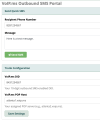
1. From the FreePBX GUI, choose Connectivity -> VoIP.ms SMS
2. In Trunk Configuration, enter 10-digit DID and one of the VoIP.ms POPs, e.g. atlanta2.voip.ms
3. Click Save Settings and Apply Config
4. In Send Quick SMS, enter 10-digit destination number and message to deliver via SMS
5. Click Send SMS
SMS messages sent through VoIP.ms are $0.0075 each. Licensed for use pursuant to GPLv2+.
Prerequisites:
1. Incredible PBX 2026 platform or Incredible 2027 platform with new PJsip (not existing SIP) trunk named VoIPms-Registered.
2. A voip.ms account with at least one DID configured to support SMS. Please use our signup link which helps fund our dozen honeypots that protect Incredible PBX platforms.
3. A PJsip trunk enabled on your Incredible PBX 2026 platform for voip.ms. Required: Use the default VoIPms-Registered trunk provided with the iPBX 2027 distro or roll your own PJsip trunk on iPBX 2027 and name it VoIPms-Registered.
4. A default Outbound Route using your VoIPms-Registered Trunk
5. If you've experimented with Raspberry Pi SMS setup, delete [sms-outbound] context from extensions_custom.conf
Installation:
Code:
cd /tmp
wget https://filedn.com/lBgbGypMOdDm8PWOoOiBR7j/IncrediblePBX2026/sms-outbound.txt
cat sms-outbound.txt >> /etc/asterisk/extensions_custom.conf
asterisk -rx "dialplan reload"
fwconsole ma downloadinstall https://filedn.com/lBgbGypMOdDm8PWOoOiBR7j/IncrediblePBX2026/smsrouting-1.1.16.tar.gz
fwconsole reload
/root/sig-fix
/root/sig-fix
Operation:
1. From the FreePBX GUI, choose Connectivity -> VoIP.ms SMS
2. In Trunk Configuration, enter 10-digit DID and one of the VoIP.ms POPs, e.g. atlanta2.voip.ms
3. Click Save Settings and Apply Config
4. In Send Quick SMS, enter 10-digit destination number and message to deliver via SMS
5. Click Send SMS
SMS messages sent through VoIP.ms are $0.0075 each. Licensed for use pursuant to GPLv2+.
Last edited:


 Phone System