

jmullinix
Guru
- Joined
- Oct 21, 2007
- Messages
- 1,263
- Reaction score
- 7
The motherboard is a D945GCLF2 with a soldered on Dual-Core Atom processor. The case is a Jetway with a PCI riser card and includes the power supply and an 80 watt brick. I install 2 Gigabytes of RAM and a 160 Gig Laptop Sata Hard drive. This machine will hold a laptop (slim) CD drive, but I do not install one. Make sure you get one of those silly four-prong power connectors for Intel Motherboards. The Jetway power supply does not include one and the damn thing will not run without it.
Installation:
After assembly, I plug a regular CD drive into the IDE cable that comes with the machine and leave the top off. Place you PIAF 1.3 CD in this drive and boot the machine. After the first reboot, you will need to choose Q from Tom's script to load an additional driver. The onboard NIC does not work out-of-the-box with Centos. Download r8168-8.009.00.tar.bz2 onto your desktop machine (Google is your friend here). I decompress it and then burn it to a CD or copy it to a USB stick. Place the CD in the drive on the soon to be PIAF server. From the command line issue the following commands
cd /
mkdir /cdromdev
mount /dev/hda /cdromdev
cd /usr/src/
cp -r /cdromdev/r8168-8.009.00 /usr/src/
cd r8168-8.009.00
lsmod | grep r8169
If the above command returns anything, issue this command.
rmmod r8169
note: If the built-in driver cannot removed by rmmod, please edit /etc/modprobe.conf and comment 'alias eth0 r8169'. Then, remove it again or reboot your computer.
Now run the following commands:
make clean modules
make install
depmod -a
insmod ./src/r8168.ko (or r8168.o in linux kernel 2.4.x)
This last command threw an error message on mine, but it worked.
Now bounce the box (reboot) and continue the normal PIAF installation. Once the installation is finished, shut it down, remove the CD drive and the IDE ribbon cable, put the lid on and you have a phone server.
This box has room for a Sangoma A200 card with one additional remora, for a total of 8 PSTN ports. From what I have read about it, it should handle 30 to 40 simultaneous calls without transcoding. I think it will handle a Sangoma A101 card, but I haven't tested it with that. The Digium TDM-410 card will not fit in the box and the Openbox 4-port card will just fit. I have not tested this with any Rhino hardware.
I have one of these in production with a Sangoma USB-FXO adapter on it and voip trunks. I am installing the second next week with a Sangoma A200002D, 4-port FXO card in it.
It has a very small power footprint and the Jetway case comes with wall mounting brackets. For the smaller installation, this is a neat box.
Ya'll have a Happy New Year,
Installation:
After assembly, I plug a regular CD drive into the IDE cable that comes with the machine and leave the top off. Place you PIAF 1.3 CD in this drive and boot the machine. After the first reboot, you will need to choose Q from Tom's script to load an additional driver. The onboard NIC does not work out-of-the-box with Centos. Download r8168-8.009.00.tar.bz2 onto your desktop machine (Google is your friend here). I decompress it and then burn it to a CD or copy it to a USB stick. Place the CD in the drive on the soon to be PIAF server. From the command line issue the following commands
cd /
mkdir /cdromdev
mount /dev/hda /cdromdev
cd /usr/src/
cp -r /cdromdev/r8168-8.009.00 /usr/src/
cd r8168-8.009.00
lsmod | grep r8169
If the above command returns anything, issue this command.
rmmod r8169
note: If the built-in driver cannot removed by rmmod, please edit /etc/modprobe.conf and comment 'alias eth0 r8169'. Then, remove it again or reboot your computer.
Now run the following commands:
make clean modules
make install
depmod -a
insmod ./src/r8168.ko (or r8168.o in linux kernel 2.4.x)
This last command threw an error message on mine, but it worked.
Now bounce the box (reboot) and continue the normal PIAF installation. Once the installation is finished, shut it down, remove the CD drive and the IDE ribbon cable, put the lid on and you have a phone server.
This box has room for a Sangoma A200 card with one additional remora, for a total of 8 PSTN ports. From what I have read about it, it should handle 30 to 40 simultaneous calls without transcoding. I think it will handle a Sangoma A101 card, but I haven't tested it with that. The Digium TDM-410 card will not fit in the box and the Openbox 4-port card will just fit. I have not tested this with any Rhino hardware.
I have one of these in production with a Sangoma USB-FXO adapter on it and voip trunks. I am installing the second next week with a Sangoma A200002D, 4-port FXO card in it.
It has a very small power footprint and the Jetway case comes with wall mounting brackets. For the smaller installation, this is a neat box.
Ya'll have a Happy New Year,


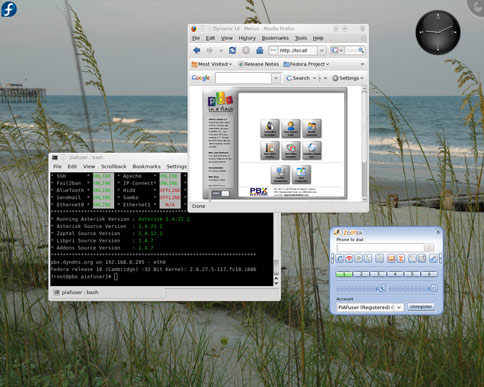


 ). Just need to add RAM and HD. It also has the Wall mounting brackets (real pbx look and feel factor). Only concerns are how tight a fit an FXO card would be....


 Phone System