SMS for iPBX with VoIP.ms, Skyetel & BulkVS

ALERT: Be advised that there is a UCP bug with versions later than 16.0.37. FreePBX folks apparently forgot that people were already using templates from previous releases. If you attempt to login to UCP and the screen immediately flashes back to a login prompt, congratulations. You have found the bug.

Here's the fix. Make yourself an executable script with the following contents and then run it to restore UCP to the living. Or you can download the bugfix from the Incredible PBX Repository and run it.

Code:
mysql -u root -ppassw0rd asterisk -e "update freepbx_settings set value = 'Latest-16' where keyword = 'MIRROR_BRAND_VERSION'; "
mysql -u root -ppassw0rd asterisk -e "update admin set value = 'true' where variable = 'need_reload'; "
rm -f /tmp/*
fwconsole reload
fwconsole ma downloadinstall ucp
rm -f /tmp/*
fwconsole reload
 
Last edited:
@billsimon and I worked over the weekend on a VoIP.ms solution using Bill's new SMS Connector module that did not require Apache config changes, HTTPS, TLS certificates, FQDNs, and firewall adjustments to get incoming SMS messages delivered in the User Control Panel or with Sangoma and ClearlyIP SIP phones. Bill came up with a solution if you'd like to try it.

FOR NON-BUSINESS PIONEERS ONLY:

AT VoIP.ms..
.
1. Create a subaccount and trunk at VoIP.ms
2. At VoIP.ms, enable SMS on the trunk and Link SMS Messages received on this Trunk to your SubAccount
3. At VoIP.ms, enable API, create an API Password, and Whitelist the public IP address of your Incredible PBX server
4. Copy your VoIP.ms email address and API Password for use on your server's SMS setup

On Your Incredible PBX server...
1. Login to the FreePBX GUI as admin
2. Create a PJsip Trunk for VoIP.ms
3. In Advanced Settings, set Message Context to voipms-sms-in
4. In Admin -> User Management, create a password for extension 701
5. Add the following context to the end of /etc/asterisk/extensions_custom.conf
Code:
[voipms-sms-in]
exten => _.,1,NoOp(Inbound Voip.ms SMS dialplan invoked)
same => n,Set(TO=${MESSAGE_DATA(X-SMS-To)})
same => n,Set(FROM=${CUT(MESSAGE(from),\",2)})
same => n,Set(ENV(QUERY_STRING)=provider=voipms\;to=${TO}\;from=${FROM}\;message=${URIENCODE(${MESSAGE(body)})})
same => n,Set(ENV(REQUEST_METHOD)=GET)
same => n,System(php /var/www/html/smsconn/provider.php)
same => n,Set(ENV(QUERY_STRING)=)
same => n,Hangup()
;-------------------------------------------------------------------------
6. Reload your dialplan: rm /tmp/* ; fwconsole reload

Install and Configure SMS Connector Module...
1. Login to your server as root and issue the following commands:
Code:
fwconsole ma downloadinstall https://filedn.com/lBgbGypMOdDm8PWOoOiBR7j/SMSconnector/smsconnector-16.0.11.tar.gz
fwconsole reload
2. In the FreePBX GUI, navigate to Connectivity -> SMS Connector
3. Click Provider Settings and enter your email address for Username and API Secret for VoIP.ms. Click Submit.
4. In SMS Connector menu, click Add Number and enter your DID and PJsip extension 701 to associate with it.
5. Enter VoIP.ms as Provider and click Save Changes.

Using User Control Panel...
1. If you have not already done so, apply these UCP patches for Incredible PBX:
Code:
mysql -u root -ppassw0rd asterisk -e "update freepbx_settings set value = 'Latest-16' where keyword = 'MIRROR_BRAND_VERSION'; "
mysql -u root -ppassw0rd asterisk -e "update admin set value = 'true' where variable = 'need_reload'; "
rm -f /tmp/*
fwconsole reload
fwconsole ma downloadinstall ucp
rm -f /tmp/*
fwconsole reload
2. Open UCP from FreePBX GUI
3. Login as 701 with your new password
4. Click + in Upper Left of display and add SMS Module for 701.
5. When SMS Module appears on UCP console, click Start Conversation
6. Send a test message to your cellphone
7. Reply to the SMS message from your cellphone
8. Reply should appear in UCP within 20-30 seconds

sms-connector.png
 

Attachments

Last edited:
Just a couple of tips. First, the sms_messages table continues to grow so purging may be appropriate depending on use:
Code:
mysql -u root -ppassw0rd asterisk -e "truncate table sms_messages"

You also can review messages from command line using one of these (ALL MESSAGES or DATE SPECIFIC):
Code:
/usr/bin/mysql -u root -ppassw0rd asterisk -s -e "select sms_messages.tx_rx_datetime AS DATE_SENT_TIME_SENT,sms_messages.direction as IN_OUT,sms_messages.from AS SENDING_FROM,sms_messages.to AS SENDING_TO,sms_messages.body AS MESSAGE from sms_messages"

/usr/bin/mysql -u root -ppassw0rd asterisk -s -e "select sms_messages.tx_rx_datetime AS DATE_SENT_TIME_SENT,sms_messages.direction as IN_OUT,sms_messages.from AS SENDING_FROM,sms_messages.to AS SENDING_TO,sms_messages.body AS MESSAGE from sms_messages where tx_rx_datetime LIKE '2023-10-31%'"

SMS-Demo.png
 
Last edited:
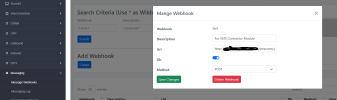
In setting up the sms connector for Bulkvs, I made a slight change on their messaging web hook to access my system using http instead of https.

On the BulkVS web portal, I changed the messaging web hook from https:// to http:// so that I did not have to open up port 443. I already had the Bulkvs messaging IP addresses setup using /root/add-ip.

1698763259358.png
 
Just a couple of tips. First, the sms_messages table continues to grow so purging may be appropriate depending on use:
Code:
mysql -u root -ppassw0rd asterisk -e "truncate table sms_messages"

You also can review messages from command line using one of these (ALL MESSAGES or DATE SPECIFIC):
Code:
/usr/bin/mysql -u root -ppassw0rd asterisk -s -e "select sms_messages.tx_rx_datetime AS DATE_SENT_TIME_SENT,sms_messages.direction as IN_OUT,sms_messages.from AS SENDING_FROM,sms_messages.to AS SENDING_TO,sms_messages.body AS MESSAGE from sms_messages"

/usr/bin/mysql -u root -ppassw0rd asterisk -s -e "select sms_messages.tx_rx_datetime AS DATE_SENT_TIME_SENT,sms_messages.direction as IN_OUT,sms_messages.from AS SENDING_FROM,sms_messages.to AS SENDING_TO,sms_messages.body AS MESSAGE from sms_messages where tx_rx_datetime LIKE '2023-10-31%'"

View attachment 5204

It would be great if @billsimon could add another screen to the sms connector that would allow you to delete messages by older than date, user or user older than date. Possibly set it up so you can spin off a cron job from the GUI. On the whole, Bill's OSS module is much more flexible and usable than the commercial module.
 
In setting up the sms connector for Bulkvs, I made a slight change on their messaging web hook to access my system using http instead of https.

On the BulkVS web portal, I changed the messaging web hook from https:// to http:// so that I did not have to open up port 443. I already had the Bulkvs messaging IP addresses setup using /root/add-ip.

View attachment 5203
Why wouldn't you just open up 443 to BulkVS IPs? You could also just setup another port to listen for HTTPS on and put that in the BulkVS webhook.
 
Why wouldn't you just open up 443 to BulkVS IPs? You could also just setup another port to listen for HTTPS on and put that in the BulkVS webhook.
Because without messing with the firewall, IncrediblePBX is not set up for access via https. At least my recent installs are set up that way by default.
 
Because without messing with the firewall, IncrediblePBX is not set up for access via https. At least my recent installs are set up that way by default.
Oh so you can't install TLS/SSL on the PBX for admin/user access?
 
In setting up the sms connector for Bulkvs, I made a slight change on their messaging web hook to access my system using http instead of https.

The dirty secret is that you don't have to use HTTPS*, you just need to get the sms into your system somehow. HTTP is ok but secure-by-default is a better practice.

It would be great if @billsimon could add another screen to the sms connector that would allow you to delete messages...

The connector module is not a generic SMS system -- FreePBX already has that -- it's a bridge from providers into the SMS system. In other words, the scope is connectivity and not SMS management. So I don't think it would be a good fit, but you can add the feature request on github.com/simontelephonics/smsconnector issue tracker and someone (or I) might pick it up.

I don't really see the need though. SMS are small and the database table is on the order of kilobytes.

* (you do if you are going to be sending MMS, because the MMS link points back at your PBX and most of the providers require the MMS URL to be HTTPS)
 
Last edited:
Thanks for this kind word @kenn10 . I am interested in how the bulkvs integration is working for you.
It works great for inbound. I'm not using it for outbound because I have not registered a campaign.
 
It works great for inbound. I'm not using it for outbound because I have not registered a campaign.
Yeah, I think this will be the general usage at this point. Every provider this module supports, outside of VoIP.ms, requires 10DLC registration for sending outbound messages.
 
Thanks for this kind word @kenn10 . I am interested in how the bulkvs integration is working for you.
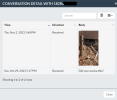
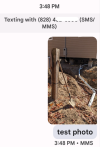
I also just tried a full MMS with a large photo and that also worked flawlessly with the exception that the caption I placed on the SMS message for the photo does not appear.

1698954678126.png
This is the snapshot of the MMS on the phone:
1698955178237.png
 
Last edited:
I also just tried a full MMS with a large photo and that also worked flawlessly with the exception that the caption I placed on the SMS message for the photo does not appear.
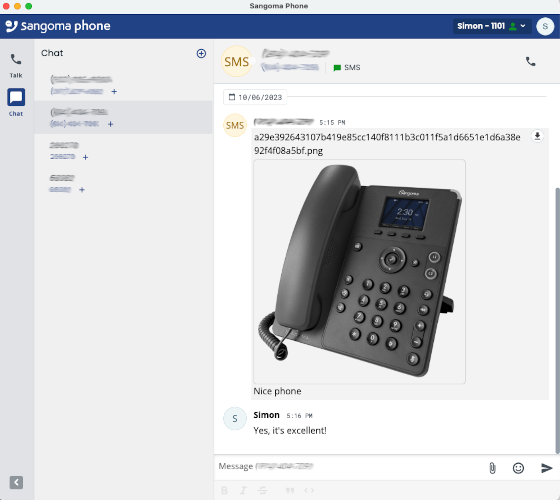
MMS captions don't appear in UCP but they do appear in softphone. I don't know why.

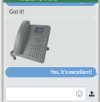
MMS with caption ("Nice phone") on softphone:
sms-in-softphone.png


Caption isn't shown in UCP:
1698958997600.png
 
@billsimon and I worked over the weekend on a VoIP.ms solution using Bill's new SMS Connector module that did not require Apache config changes, HTTPS, TLS certificates, FQDNs, and firewall adjustments to get incoming SMS messages delivered in the User Control Panel or with Sangoma and ClearlyIP SIP phones. Bill came up with a solution if you'd like to try it.

FOR NON-BUSINESS PIONEERS ONLY:

AT VoIP.ms..
.
1. Create a subaccount and trunk at VoIP.ms
2. At VoIP.ms, enable SMS on the trunk and Link SMS Messages received on this Trunk to your SubAccount
3. At VoIP.ms, enable API, create an API Password, and Whitelist the public IP address of your Incredible PBX server
4. Copy your VoIP.ms email address and API Password for use on your server's SMS setup

On Your Incredible PBX server...
1. Login to the FreePBX GUI as admin
2. Create a PJsip Trunk for VoIP.ms
3. In Advanced Settings, set Message Context to voipms-sms-in
4. In Admin -> User Management, create a password for extension 701
5. Add the following context to the end of /etc/asterisk/extensions_custom.conf
Code:
[voipms-sms-in]
exten => _.,1,NoOp(Inbound Voip.ms SMS dialplan invoked)
same => n,Set(TO=${MESSAGE_DATA(X-SMS-To)})
same => n,Set(FROM=${CUT(MESSAGE(from),\",2)})
same => n,Set(ENV(QUERY_STRING)=provider=voipms\;to=${TO}\;from=${FROM}\;message=${URIENCODE(${MESSAGE(body)})})
same => n,Set(ENV(REQUEST_METHOD)=GET)
same => n,System(php /var/www/html/smsconn/provider.php)
same => n,Set(ENV(QUERY_STRING)=)
same => n,Hangup()
;-------------------------------------------------------------------------
6. Reload your dialplan: rm /tmp/* ; fwconsole reload

Install and Configure SMS Connector Module...
1. Login to your server as root and issue the following commands:
Code:
fwconsole ma downloadinstall https://filedn.com/lBgbGypMOdDm8PWOoOiBR7j/SMSconnector/smsconnector-16.0.11.tar.gz
fwconsole reload
2. In the FreePBX GUI, navigate to Connectivity -> SMS Connector
3. Click Provider Settings and enter your email address for Username and API Secret for VoIP.ms. Click Submit.
4. In SMS Connector menu, click Add Number and enter your DID and PJsip extension 701 to associate with it.
5. Enter VoIP.ms as Provider and click Save Changes.

Using User Control Panel...
1. If you have not already done so, apply these UCP patches for Incredible PBX:
Code:
mysql -u root -ppassw0rd asterisk -e "update freepbx_settings set value = 'Latest-16' where keyword = 'MIRROR_BRAND_VERSION'; "
mysql -u root -ppassw0rd asterisk -e "update admin set value = 'true' where variable = 'need_reload'; "
rm -f /tmp/*
fwconsole reload
fwconsole ma downloadinstall ucp
rm -f /tmp/*
fwconsole reload
2. Open UCP from FreePBX GUI
3. Login as 701 with your new password
4. Click + in Upper Left of display and add SMS Module for 701.
5. When SMS Module appears on UCP console, click Start Conversation
6. Send a test message to your cellphone
7. Reply to the SMS message from your cellphone
8. Reply should appear in UCP within 20-30 seconds

View attachment 5202
Great work here to all involved! Had a question, I was able to implement this in an Incredible PBX 2027-D build. It seems that I am able to messages using the Clearly Anywhere app but it is not receiving messages. Any insight as where to start troubleshooting? TIA

UPDATE! Never mind it is working, just for whatever reason there was a significant delay to receiving the first few messages.

QUESTION: Is there any way to prevent duplicate sent messages, sometimes when sending a message it shows the message on the screen twice?
 
Last edited:
QUESTION: Is there any way to prevent duplicate sent messages, sometimes when sending a message it shows the message on the screen twice?
Is this in UCP or the ClearlyAnywhere client? I haven't seen this.
 
Is this in UCP or the ClearlyAnywhere client? I haven't seen this.
In the Clearly Anywhere client. Double checked and not appearing this way in UCP. I will send a ticket to Clearly IP along with the logs.
 
Last edited:
Thanks, Samot. I had not realized that. Skyetel has a good article on this:


At Skyetel, this would involve a one-time $50 registration fee, plus $15/month forever thereafter to send SMS messages.

Pass, thanks. I can't justify paying $65 to send a single SMS message, which is all this would ever be for me. Easier to live with the occasional nuisance text. I've tried to contact the message sender, but to no avail.
I assume blacklisting the offending did(s) will work, or are you worried about being billed for same SMSs..
 
Is this in UCP or the ClearlyAnywhere client? I haven't seen this.
Clearly IP states that it appears the sms module is sending the message twice. I have sent them the fwconsole debug as well as the app logs to try and diagnose.

FWCONSOLE DEBUG:
OUT >
==> /var/log/asterisk/freepbx_dbug <==
[2024-09-03 18:10:07] [dbug.DEBUG]: 2024-Sep-03 18:10:07 /var/www/html/admin/modules/clearlysp/CIP/Controllers/v1/VPN.php:7


[] []
[2024-09-03 18:10:07] [dbug.DEBUG]: Firewall not found, not adding user to firewall


[] []
OUT > [2024-09-03 18:10:08] [dbug.DEBUG]: 2024-Sep-03 18:10:08 /var/www/html/admin/modules/clearlysp/CIP/Controllers/v1/Sms.php:7


[] []
[2024-09-03 18:10:08] [dbug.DEBUG]: Attempting to fetch messages for 0101


[] []
[2024-09-03 18:10:08] [dbug.DEBUG]: 2024-Sep-03 18:10:08 /var/www/html/admin/modules/clearlysp/CIP/Controllers/v1/Sms.php:7


[] []
[2024-09-03 18:10:08] [dbug.DEBUG]: When fetching messages for 0101, we returned messages


[] []
OUT >
==> /var/log/asterisk/freepbx.log <==
[2024-09-03 18:10:17] [freepbx.INFO]: voipms responds: HTTP 200, {"status":"success","sms":81553812} [] []
OUT >
==> /var/log/asterisk/freepbx_dbug <==
[2024-09-03 18:10:30] [dbug.DEBUG]: 2024-Sep-03 18:10:30 /var/www/html/admin/modules/clearlysp/CIP/Controllers/v1/VPN.php:7


[] []
[2024-09-03 18:10:30] [dbug.DEBUG]: Firewall not found, not adding user to firewall


[] []
[2024-09-03 18:10:31] [dbug.DEBUG]: 2024-Sep-03 18:10:31 /var/www/html/admin/modules/clearlysp/CIP/Controllers/v1/Sms.php:7


[] []
[2024-09-03 18:10:31] [dbug.DEBUG]: Attempting to fetch messages for 0101


[] []
[2024-09-03 18:10:31] [dbug.DEBUG]: 2024-Sep-03 18:10:31 /var/www/html/admin/modules/clearlysp/CIP/Controllers/v1/Sms.php:7


[] []
[2024-09-03 18:10:31] [dbug.DEBUG]: When fetching messages for 0101, we returned messages


[] []
OUT > [2024-09-03 18:10:34] [dbug.DEBUG]: 2024-Sep-03 18:10:34 /var/www/html/admin/modules/clearlysp/CIP/Controllers/v1/Sms.php:7


[] []
[2024-09-03 18:10:34] [dbug.DEBUG]: Attempting to fetch messages for 0101


[] []
[2024-09-03 18:10:35] [dbug.DEBUG]: 2024-Sep-03 18:10:35 /var/www/html/admin/modules/clearlysp/CIP/Controllers/v1/Sms.php:7


[] []
[2024-09-03 18:10:35] [dbug.DEBUG]: When fetching messages for 0101, we returned messages
 
Last edited:

Members online

No members online now.

Forum statistics

Threads
26,721
Messages
174,611
Members
20,286
Latest member
lluis.riera
Get 3CX - Absolutely Free!

Link up your team and customers Phone System Live Chat Video Conferencing

Hosted or Self-managed. Up to 10 users free forever. No credit card. Try risk free.

3CX
A 3CX Account with that email already exists. You will be redirected to the Customer Portal to sign in or reset your password if you've forgotten it.
Back
Top