
ednunnemaker
New Member
- Joined
- Oct 31, 2007
- Messages
- 118
- Reaction score
- 0
OK, I have searched and searched with no success, so I'm sorry if this is a duplicate post. Here are my issues, which I have come to the conclusion are all related somehow.
1) Nothing outside my private network will stay connected or monitored, it doesn't matter if its sip, iax, an extension or trunk, it will register but soon after it shows in the asterisk info that it is unreachable and unmonitored. Yes I have a static IP address, yes I have turned off IPTables, yes I have ALL the ports open on my sonicwall firewall. I CAN make calls from any trunk or extension but cannot receive anything if it has been registered for more than a few seconds and it appears they don't try to re register at any time or they are somehow blocked from re registering.
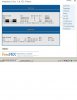
2) The FOP just has flashing red and green icons (even for the internal stuff) and refreshes every couple of seconds, like it cannot retrieve the status of any trunk or extension.
3) My Les.net DID's will not ring, I just get dead air (I am assuming this has something to do with #1 above)
4) I still have the Ultimate Cnam problem when I have it selected as the lookup source the notification email is plain text with no attachment.
With my limited knowledge about Linux and networking I am at a stand still, all these issues seem to relate to registration or lack there of, maybe someone could at least point me in the right direction.
1) Nothing outside my private network will stay connected or monitored, it doesn't matter if its sip, iax, an extension or trunk, it will register but soon after it shows in the asterisk info that it is unreachable and unmonitored. Yes I have a static IP address, yes I have turned off IPTables, yes I have ALL the ports open on my sonicwall firewall. I CAN make calls from any trunk or extension but cannot receive anything if it has been registered for more than a few seconds and it appears they don't try to re register at any time or they are somehow blocked from re registering.
2) The FOP just has flashing red and green icons (even for the internal stuff) and refreshes every couple of seconds, like it cannot retrieve the status of any trunk or extension.
3) My Les.net DID's will not ring, I just get dead air (I am assuming this has something to do with #1 above)
4) I still have the Ultimate Cnam problem when I have it selected as the lookup source the notification email is plain text with no attachment.
With my limited knowledge about Linux and networking I am at a stand still, all these issues seem to relate to registration or lack there of, maybe someone could at least point me in the right direction.


 Phone System