NEW The Taming of FusionPBX + Tutorial

@markjcrane found the issue. Here's the quick fix.

====
This will fix the missing sound files on Debian 13 .. from Mark ...
cd /usr/src/freeswitch
make sounds-install moh-install
make hd-sounds-install hd-moh-install
make cd-sounds-install cd-moh-install
cd /usr/src/fusionpbx-install.sh/debian/resources/switch
./source-permissions.sh
fs_cli -x 'reload mod_local_stream'

Mark will fix the FusionPBX Debian 13 install.

====
 
FusionPBX Debian 13 install should be fixed. Debian 12 and Ubuntu 24.04 LTS were unaffected.

Install FusionPBX
https://www.fusionpbx.com/download

Public Documentation
https://docs.fusionpbx.com/en/latest/home/dashboard.html

Website Documentation
https://www.fusionpbx.com
- From here, you can sign up for a free account.
- With a free account has access to documentation
- Member accounts have more documentation

Search Engines
You can also use search engines to help find additional information.

I'll try to watch this thread a bit more.
 
Previous commands for fixing the music on hold was missing moving them to the default directory

Move the music into the music/default directory
mkdir -p /usr/share/freeswitch/sounds/music/default
mv /usr/share/freeswitch/sounds/music/*000 /usr/share/freeswitch/sounds/music/default

Here are the updated complete list of commands
cd /usr/src/freeswitch
make sounds-install moh-install
make hd-sounds-install hd-moh-install
make cd-sounds-install cd-moh-install
cd /usr/src/fusionpbx-install.sh/debian/resources/switch
mkdir -p /usr/share/freeswitch/sounds/music/default
mv /usr/share/freeswitch/sounds/music/*000 /usr/share/freeswitch/sounds/music/default
./source-permissions.sh
fs_cli -x 'reload mod_local_stream'
This was all available in the sounds.sh script that is part of the install.

Note - A new install, you won't need to worry about this, as it has been fixed.
 
Just a quick update. We've been gradually building a FusionPBX platform connected to dozens of Groundwire extensions (for internal dialing) plus several gateways (aka trunks) from VoIP.ms and BulkVS (using dial prefixes restricted to certain extensions). The Groundwire extensions are connected to Android phones, iPhones, tablets, and even DAP devices for grandkids. The idea for the grownups is to allow a cell number to be forwarded to a FusionPBX trunk and then onto a Groundwire extension so those with internet connectivity and poor cellphone service never miss an incoming cell call. It also provides the added functionality of a free fax server on another dedicated DID. So far, it's working swimmingly thanks to dozens of tips from Google's Gemini which has a wealth of information about FusionPBX. To reduce inbound SPAM, we've deployed the press-x trick to weed out robocallers.
 
Last edited:
seems easier to install on FreeBSD 15.0, just requires pcre2 adding to the build instructions.
 
Just a quick update. We've been gradually building a FusionPBX platform connected to dozens of Groundwire extensions (for internal dialing) plus several gateways (aka trunks) from VoIP.ms and BulkVS (using dial prefixes restricted to certain extensions). The Groundwire extensions are connected to Android phones, iPhones, tablets, and even DAP devices for grandkids. The idea for the grownups is to allow a cell number to be forwarded to a FusionPBX trunk and then onto a Groundwire extension so those with internet connectivity and poor cellphone service never miss an incoming cell call. It also provides the added functionality of a free fax server on another dedicated DID. So far, it's working swimmingly thanks to dozens of tips from Google's Gemini which has a wealth of information about FusionPBX. To reduce inbound SPAM, we've deployed the press-x trick to weed out robocallers.
I'm sure this is in full compliance with Kari's Law / Ray Baum's.
 
I support the developer with a top tier subscription, not because I need his training materials (I actually haven't used any of his training materials at all - it's easier just to query an LLM) but because I appreciate what he does so much that I want to make sure it continues to be made available and well supported. Mark works like crazy on this project. Like literally all night long with no sleep. If you find commercial value in it, consider supporting the project.
 
I support the developer with a top tier subscription, not because I need his training materials (I actually haven't used any of his training materials at all - it's easier just to query an LLM) but because I appreciate what he does so much that I want to make sure it continues to be made available and well supported. Mark works like crazy on this project. Like literally all night long with no sleep. If you find commercial value in it, consider supporting the project.
it will not even compile today, both ubuntu and debian installs bug out at test driver
 
SIP URI Calling to FusionPBX and FS PBX from Incredible PBX and FreePBX

If you've beat your head against the wall trying to make free SIP URI calls, here is the solution. One advantage of routing FreePBX calls through FusionPBX would be the ease of setting up Groundwire with all of your FusionPBX extensions without firewall worries.

On the FusionPBX or FS PBX Server, Create & Save a New Extension

Extension: freepbx_in
Password: verysecurepassword
Users: admin
VM Password: anything
Acct Code: FusionPBX-server-FQDN
Enabled: checked
Description: freepbx_incoming

On the Incredible PBX or FreePBX platform

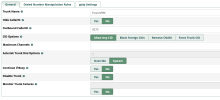
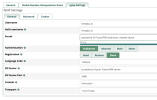
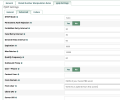
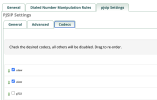
1. Create a new PJsip Trunk:


Screenshot 2026-06-26 at 8.57.06 AM.png
Screenshot 2026-06-26 at 9.02.13 AM.png
Screenshot 2026-06-26 at 9.08.18 AM.png


Screenshot 2026-06-26 at 9.10.13 AM.png

2. Add a Custom Extension for Each FusionPBX Extension you wish to call:


Screenshot 2026-06-26 at 9.13.47 AM.png

In the Advanced tab, add a Dial entry that looks like this using FusionPBX extension to be called (e.g. 706):

PJSIP/706@FusionPBX/sip:706@fusionpbx-FQDN:5080

SAVE and Reload Dialplan.

Place call to 9273 from a phone registered to an extension on your Incredible PBX server.

NOTE:
So long as you don't mind 9273 being the inbound CallerID (which was set in FusionPBX trunk) for all calls, you can add as many custom extensions on the IncrediblePBX/FreePBX side as you like with new FusionPBX extension numbers to be called. If desired, you could also make the From User trunk entry: FusionPBX which would become the CallerID for all outgoing calls.
 
Last edited:

Members online

Forum statistics

Threads
26,715
Messages
174,594
Members
20,282
Latest member
lahensd
Get 3CX - Absolutely Free!

Link up your team and customers Phone System Live Chat Video Conferencing

Hosted or Self-managed. Up to 10 users free forever. No credit card. Try risk free.

3CX
A 3CX Account with that email already exists. You will be redirected to the Customer Portal to sign in or reset your password if you've forgotten it.
Back
Top