I'm in the process of upgrading from IPBX13-13 to IPBX2020 and did a fresh install and then copy/paste configuration since not a good upgrade path. I'm having a problem getting my Sangoma Vega 50 to connect to the new installation. I copied the trunk configuration information over and then changed the sip ip address in the Vega 50 to the IPBX2020 however the Vega 50 is not connecting. If I do a test call to a number routed to the Vega 50 I'm getting the following message in the IPBX 2020 logs pbx.c: Executing [s@from-sip-external:7] Log("SIP/192.168.*.***-00000003", "WARNING,"Rejecting unknown SIP connection from 192.168.*.***"") in new stack. If I Allow Anonymous Inbound SIP Calls in Asterisk SIP Settings the call does complete but I do not have this option set to Yes in my IPBX13-13 so don't really want to enable in IPBX2020. There must be a setting I'm missing to allow the Vega 50 to connect properly and hoping somebody can point me in the right direction to configure.

You are using an out of date browser. It may not display this or other websites correctly.
You should upgrade or use an alternative browser.
You should upgrade or use an alternative browser.
SOLVED Upgrade to IPBX2020 problem with Vega 50
- Thread starter dmmincrjr
- Start date



tbrummell
Guru
- Joined
- Jan 8, 2011
- Messages
- 1,280
- Reaction score
- 340
OK, went and looked at one of mine that I'm basically sending anonymous calls in from SIPp, which is essentially what you are doing. On my Incoming tab I only have 2 entries to make this work:
type=user
context=from-internal
Start with those, and add from there.
type=user
context=from-internal
Start with those, and add from there.

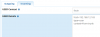
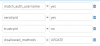
I did a reboot of the server just to see if that might clear anything and now I'm noticing this in Asterisk Info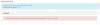
Not sure what is causing or if it is related but might just start over from scratch as I don't have much configuration to do as I basically use this in front of 3cx.
I appreciate you firing up your old hardware to test and think maybe I must have done something wrong in the setup.
Not sure what is causing or if it is related but might just start over from scratch as I don't have much configuration to do as I basically use this in front of 3cx.
I appreciate you firing up your old hardware to test and think maybe I must have done something wrong in the setup.
tbrummell
Guru
- Joined
- Jan 8, 2011
- Messages
- 1,280
- Reaction score
- 340
Asterisk may not have started yet.
As for my programming, what I posted above worked to send a call directly to an extension, but I ended up having to do this to make the call go directly to a voicemail box:
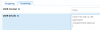
If you are curious why I even bothered to do this, my home I'net package comes bundled with home phone, which I've never ever plugged in, so now it goes to a FXO and in to a mailbox. Just curious how many, if any, calls it may receive.
As for my programming, what I posted above worked to send a call directly to an extension, but I ended up having to do this to make the call go directly to a voicemail box:
If you are curious why I even bothered to do this, my home I'net package comes bundled with home phone, which I've never ever plugged in, so now it goes to a FXO and in to a mailbox. Just curious how many, if any, calls it may receive.
I didn't change any ports so think they are correct at 5060. This is on a virtual machine so just installed IPBX2020 again as a test and still having an issue. The only thing I did is add the trunk to the Vega 50. When I look at the logs I'm seeing the following
I'm copy/pasting the config that works from my old running IPBX13-13 so don't know how IP address is invalid. I even manually typed the IP address thinking something funky happening with the paste but still getting the error. I did also try putting in a PEER Detail from one of my sip providers in the Outgoing section as a test and that then shows as being reachable. Any thoughts?

I'm copy/pasting the config that works from my old running IPBX13-13 so don't know how IP address is invalid. I even manually typed the IP address thinking something funky happening with the paste but still getting the error. I did also try putting in a PEER Detail from one of my sip providers in the Outgoing section as a test and that then shows as being reachable. Any thoughts?
Just to close out the thread I finally was able to get the Vega 50 working with IPBX2020. As I said earlier I started from scratch and reinstalled IPBX2020 and it still did not work with my original configuration which I was posting in the above reply. I cut down the incoming sip settings to just host, type and context and it worked. I then added back lines till it stopped working. When I put in deny=all that was what was causing the problem. I still cannot explain why when I tried a bare bones setting like in post 13 that tbrummell suggested on the original install it still would not work. Here is the final config that works if it helps anyone else. 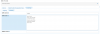
Thanks for the help as your suggestions should have worked originally.
Thanks for the help as your suggestions should have worked originally.

dallas
Well-Known Member
- Joined
- Oct 21, 2007
- Messages
- 1,023
- Reaction score
- 318
When I put in deny=all that was what was causing the problem.
Which suggests to me it's a codec negotiation issue. your allow=ulaw won't force the connection to use ulaw. It will depend on what codecs are enabled in Asterisk.


Get 3CX - Absolutely Free!
Link up your team and customers  Phone System Live Chat Video Conferencing
Hosted or Self-managed. Up to 10 users free forever. No credit card. Try risk free.

Verify your Email
Check your inbox!
We’ve sent you an email. Click on the button in the email body to verify your email address – (if you can not find it, check your spam folder).
Upon verification you will be directed to the 3CX setup wizard.