SOLVED Usage of SSD with this week's IncrediblePBXFAX2020.3 and RPI4B

svangool

New Member
Joined
Jul 23, 2014
Messages
13
Reaction score
5
Hi,

I was wondering if someone had already experience with using the latest IPBX image with the latest RPI Buster and the latest RPI-EEPROM-updates on an SSD?
Using SSD (just a small cheap USB SSD-drive) autonomously (without SD-card) works since a couple of weeks, standard, using the latest RPI bootloader. It works perfectly with the standard RPI Buster image on multiple RPI4B systems (mine are 4G).
The opportunity of getting rid of the SD-cards made my day and I decided to also upgrade my very old perfectly working IPBX to the latest that was just released for the RPI4.

The problem is: I can't get it working with the latest IPBX image. The IPBX image does work from SD, but as soon as I switch to bootloading from SSD it halts during halfway booting. I assume there is no hard-coding of mmcblk0 (the SD-card), do you have any hints on what could go wrong here?

I am using the same procedure as for the standard Buster image:
  1. Full-upgrade
  2. Set power_save_off in rc.local for WLAN
  3. Get RPI-Clone from GIT
  4. Set rpi-eeprom-update to stable
  5. EEPROM update to pieeprom-2020-06-15.bin
  6. RPI-Clone SD-card (32 GB) to two prepared partitions (32 GB) on SSD
  7. Put dtparam=sd_poll_once in config.txt to prevent repeating the miss of SD
  8. Poweroff and pull SD-card
  9. Start system
 
Last edited:
Bottom-stalled2.jpg
My Pi3b /boot/mmcblk01 /root=PTUUID="" (sda2) stalled here with latest EEPROM update.
quirks set in cmdline.txt and matched OK then sda Disabling FUA
doesnt support DPO or FUA
So forced to using usb mass storage device.
then at [ 120.337382] random: crng init done


Anyway I think it probably power related (as usual) I should get a powered hub or powered something adaptor.
It was working OK from SD with Previous image - now new image + incredsiblerestore update upgrade etc and it stalls. Its really one for the RPi Forum rather than here.

Just done the work-around install haveged binary see RC2 here
Code:
apt install -y haveged
# rpi-clone -e sda /dev/sdx
# OOPS:  choked on rpi-clone running an rsync on the /mnt/clone/etc/pbx/.update202016
# So a quick Ctrl+C released that to complete the clone; stopping before unmounting the clone.

This then needs a new Console instance to do the edit of both the mSD and the Clone on sd(x)
so we'll see??? --edit-- it booted fine but fully to usb-HDD It seems to ignore missing the cmdline cmd boot=
Code:
# df -h
Filesystem      Size  Used Avail Use% Mounted on
/dev/root       292G  4.5G  273G   2% /
devtmpfs        459M     0  459M   0% /dev
tmpfs           464M     0  464M   0% /dev/shm
tmpfs           464M   13M  451M   3% /run
tmpfs           5.0M  4.0K  5.0M   1% /run/lock
tmpfs           464M     0  464M   0% /sys/fs/cgroup
/dev/sda1       476M   53M  423M  12% /boot
root@incrediblepbx:~# lsblk
NAME        MAJ:MIN RM   SIZE RO TYPE MOUNTPOINT
sda           8:0    0 298.1G  0 disk
|-sda1        8:1    0   476M  0 part /boot
`-sda2        8:2    0 297.6G  0 part /
mmcblk0     179:0    0  59.5G  0 disk
|-mmcblk0p1 179:1    0   256M  0 part
`-mmcblk0p2 179:2    0  59.2G  0 part

Code:
nano -w /mnt/clone/boot/etc/fstab
#made it look like this on sda
proc                                            /proc           proc    defaults              0       0
PARTUUID=<sdx-PTUUID>-01  /boot          vfat     defaults               0       2
PARTUUID=<sdx-PTUUID>-02  /                 ext4    defaults,noatime  0       1
# a swapfile is not a swap partition, no line here
#   use  dphys-swapfile swap[on|off]  for that

# But on the mSD # cat /etc/fstab   to look like:
proc                  /proc           proc    defaults          0       0
PARTUUID=mSD-PTUUID-01  /boot           vfat    defaults          0       2
PARTUUID=sdx-PTUUID-02  /               ext4    defaults,noatime  0       1

#mSD  #  cat /boot/cmdline.txt
usb-storage.quirks=152d:0578:u dwc_otg.lpm_enable=0 console=serial0,115200 console=tty1 root=PARTUUID=<sdx-PTUUID>-02 rootfstype=ext4 elevator=deadline fsck.repair=yes rootdelay=5 rootwait net.ifnames=0 plymouth.enable=0

seems it waits for mouse to be plugged in but of course mouse requires power, and we run headless here.

So @wardmundy to provide the necessary entropy (whatever that means? :chef: ) can we add the haveged package
Code:
apt install -y haveged
to the image??
 
Last edited:
@ostridge: Mine stops at the same place and it doesn't when I put a plain Buster image on the SSD (as I already stated above). I am very aware of potential Power Supply problems, but this isn't one of them.
 
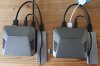
@Eliad: Thanks ! I agree with you that, at that time, it might have been the best solution. But since a couple of weeks with the renewed RPI buster release and the latest bootloader (Youtube link), this was solved. Sorry to still remain stubborn, I have two systems running side by side: one with IPBX2020.3 (left side) and one with RPI OS (Buster) and my home-automation on it (right side). The white USB-cable is a passive hub with dongle. What you see are identical Argon One cases with RPI4B, Orico USB 3.1 NGFF SSDs and original RPI4 3 Amp power supplies.

20200721_174450A.jpg

The IPBX system has the boot problem with SSD, the right-side system is working from SSD. If I copy the right-side system to the left-side system, both work flawlessly without SD-card..
 
Power Supply problems, but this isn't one of them.
You are correct about that. I was in fact answering my own problems but on a Pi3b. a different animal. I like your cases making cables tidy. and the youtube vid looks helpful. My post was my fix that worked for now. - watching with interest.
 
Sorry to still remain stubborn
Have you done anything to fix the device names in /boot/cmdline.txt and /etc/fstab.

Looks like the image is using device names and not UUIDs or PARTUUIDs. This will need to be fixed before USB booting will work with the image.
 
@jerrm: You are spot on. I expected that RPI-Clone had taken care of that, but it did not, I should have checked :oops:.
I am now retrying to get it working, thanks a lot !
 
Working on SSD, no SD-card needed anymore. Thanks a lot everyone in the thread !!!

It looks like RPI-Clone has problems (even when the -e option is used) when the "old" device-names are used (in my case "/dev/mmcblk0pX" and "/dev/sdaX") in "/boot/cmdline.txt" and/or "/etc/fstab", so then it is best to handle these manually, which I now did. On the latest "Raspberry OS" (Raspbian Buster) PARTUUIDs were used, which RPI-Clone handled fine, that is why I had no problems with those.
 
"old" device-names are used - - - - -/boot/cmdline.txt" and/or "/etc/fstab"
Thanks to all for your contributions
Yes @svangool correct thats how I did my edits - (on RPi3b) as my above post hand edited, using a 2nd ssh window of those files. The PARTUUID method is agnostic when it comes to hot plugged ancillary usb devices causing /dev/sdx naming changes.


But - Bump @wardmundy - for the lesser RPi's 2 & 3, where does that leave the entropy problem that is patched or is it band-aided or something, with the
Code:
apt install -y haveged
. If that is the best solution?? it will be needed both in the download image, as well as in the auto-update.

For the record that means 199 kB of additional disk space see:
Code:
The following additional packages will be installed:
  libhavege1
Suggested packages:
  apparmor
The following NEW packages will be installed:
  haveged libhavege1
0 upgraded, 2 newly installed, 0 to remove and 153 not upgraded.
Need to get 56.0 kB of archives.
After this operation, 199 kB of additional disk space will be used.
Do you want to continue? [Y/n] n
 
Last edited:
It looks like RPI-Clone has problems (even when the -e option is used) when the "old" device-names are used
@wardmundy should probably update the image to use the PARTUUID. On newer Pi4's and any Pi3B+'s it should be possible to burn directly to USB thumb or SSD and and never buy a microSD card at all.
 
I'm all ears.
Biggest issue is that I think USB boot for the Pi4 is still beta, so you may not want to upgrade the firmware yet.

That said, if a user has already updated the Pi4 for USB boot, the below should still work based on when you last updated the image for 8GB. It should also make Pi3B+ USB booting "just work."

Based on the current sourceforge image (and assuming no current loop devices), changing the image from a linux machine should be as simple as:
Code:
mkdir /mnt/piboot
mkdir /mnt/piroot
losetup -fP incrediblepbxfax2020.3.img

mount /dev/loop0p1 /mnt/piboot
mount /dev/loop0p2 /mnt/piroot

sed -i 's|/dev/mmcblk0p|PARTUUID=272f3fd1-0|g' /mnt/piboot/cmdline.txt
sed -i 's|/dev/mmcblk0p|PARTUUID=272f3fd1-0|g' /mnt/piroot/etc/fstab

Adjust the partuuid to match the current image if it has changed.

DISCLAIMER - I haven't run any of the above, assume possible typo's, but you get the idea.
 
Last edited:
[QUOTE = "wardmundy, publicación: 149654, miembro: 1"]
Soy todo oídos.
[/ CITAR]

Hi friend, Are you going to support the use of SSD instead of SD? In future updates? They say the SD card is damaged and I want to put a raspberry pi 4 into production with 3 extensions.
 
They say the SD card is damaged and I want
Thats correct the Pi sets thge 'Dirty' bit and lets you bugger about scratching your head wondering why.
Its worth remembering for partition checks
Have you done a repair of the SD card to clear the 'Dirty bit'
Code:
where mmcblk0p1 is your mSD card
fsck.fat -a -w -v /dev/mmcblk0p1
## then
e2fsck -f -y -v -C 0 /dev/mmcblk0p2
## Or to fix Dirty bit on usb device
##  -  where x is your usb mass storage device or SSD
fsck.fat -a -w -v /dev/sdx1
## AND
e2fsck -f -y -v -C 0 /dev/sdx2
Then your mSD card should be able to boot (subject to my post above.
 
Last edited:

Members online

No members online now.

Forum statistics

Threads
26,709
Messages
174,552
Members
20,277
Latest member
bikerlady
Get 3CX - Absolutely Free!

Link up your team and customers Phone System Live Chat Video Conferencing

Hosted or Self-managed. Up to 10 users free forever. No credit card. Try risk free.

3CX
A 3CX Account with that email already exists. You will be redirected to the Customer Portal to sign in or reset your password if you've forgotten it.
Back
Top