SOLVED Zoiper won't work with PJSIP - error code 488

krzykat

Telecom Strategist
Joined
Aug 2, 2008
Messages
3,208
Reaction score
1,288
Had a client that was using Zoiper 5, and we moved them across from SIP to PJSIP. Should be real simple, just add the port 5061 (or whatever your PJSIP port is) to the end of the domain name. Well, when you do that it registers, and things seem great. Make a call to the extension - work perfect. Now try to make a call out ... you may discover that you get an error code of 488 and immediately the call fails.

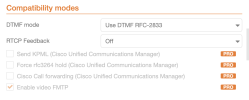
The answer is to go into advanced settings of your account on Zoiper and change RTCP Feedback to "OFF"

1673629003985.png
This should resolve your issue.
 

Attachments

  • 1673628904658.png
    1673628904658.png
    22.2 KB · Views: 9
Had a client that was using Zoiper 5, and we moved them across from SIP to PJSIP. Should be real simple, just add the port 5061 (or whatever your PJSIP port is) to the end of the domain name. Well, when you do that it registers, and things seem great. Make a call to the extension - work perfect. Now try to make a call out ... you may discover that you get an error code of 488 and immediately the call fails.

The answer is to go into advanced settings of your account on Zoiper and change RTCP Feedback to "OFF"

View attachment 4638
This should resolve your issue.
I'm pretty sure the corresponding setting in the Extension settings is in the Advanced tab -> Enable AVPF. If you have some cycles to test, I would be curious whether that works with Zoiper's RTCP Feedback = On.
 
I'm pretty sure the corresponding setting in the Extension settings is in the Advanced tab -> Enable AVPF. If you have some cycles to test, I would be curious whether that works with Zoiper's RTCP Feedback = On.
Excellent info ... I did test and it worked as you expected. With RCTP on, if AVPF is enabled, then YES - things work.
 

Members online

No members online now.

Forum statistics

Threads
26,687
Messages
174,411
Members
20,257
Latest member
Dempan
Get 3CX - Absolutely Free!

Link up your team and customers Phone System Live Chat Video Conferencing

Hosted or Self-managed. Up to 10 users free forever. No credit card. Try risk free.

3CX
A 3CX Account with that email already exists. You will be redirected to the Customer Portal to sign in or reset your password if you've forgotten it.
Back
Top