NEW Free Oracle Cloud Instance

I used the Ubuntu 20.04 virtual machine offering. Then the Oracle firewall doesn't get in the way.

Each tenancy gets the first 3,000 OCPU hours and 18,000 GB hours per month for free to create Ampere A1 Compute instances using the VM.Standard.A1.Flex shape (equivalent to 4 OCPUs and 24 GB of memory). Each tenancy also gets two VM.Standard.E2.1.Micro instances for free.
 
Last edited:
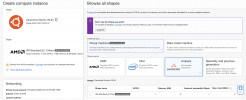
Select Ubuntu as the Image. AMD is the default Shape. Switch to Virtual Machine -> Ampere and grab the biggest size you can get for the Shape.

Screen Shot 2021-10-08 at 4.28.34 PM.png
 
If you switch to Ampere, then you'll have a aarch64 machine, using AMD you get x64. You have AMD selected in your screen shot, not Ampere, with 1 core & 1 gig of ram.
The Pi is aarch64, right. So in theory, a script can be built to install the proper components....

Right now, the Ubuntu script installs (on aarch64), but Asterisk crashes....a lot...
 
If you switch to Ampere, then you'll have a aarch64 machine, using AMD you get x64. You have AMD selected in your screen shot, not Ampere, with 1 core & 1 gig of ram.
The Pi is aarch64, right. So in theory, a script can be built to install the proper components....

Right now, the Ubuntu script installs (on aarch64), but Asterisk crashes....a lot...
The screenshot was to show how to activate the Ampere Shape with their VM. AMD is the default Shape until you change it.
 
Ok, so yours is running Ubuntu for ARM, 3 cores and I assume 8 gigs of RAM, according to your screen shot in the other thread.
Did you do anything special to make it work?
Does asterisk crash when you apply config?
 
1. Ok, so yours is running Ubuntu for ARM, 3 cores and I assume 8 gigs of RAM, according to your screen shot in the other thread.
2. Did you do anything special to make it work?
3. Does asterisk crash when you apply config?
1. Correct. It's whatever their Ubuntu 20.04 VM Image provides.
2. No.
3. No. Once in a while, there's an alert that the Dashboard can't connect to Asterisk, but refreshing the Dashboard fixes it.
 
I was in the Asterisk console, everytime I applied config, I was booted out. That tells me, on mine, asterisk stopped and started. Maybe not a crash, but an unexpected restart?
 
That's good news

3,000 OCPU hours and 18,000 GB hours per month for free

24 x 30 = 720 hours per cpu?

So 4 1 cpu 6 gb ram instances gets to 2,880 hours
 
Managed to snag one with OCPU count of 3
I have an ocpu count of 4 Ubuntu minimal image.
==== AUTHENTICATING FOR org.freedesktop.systemd1.manage-units ===
iPBX install asking password for ubuntu - is it ubuntu by any chance? oops silly question do
Code:
sudo su  && cd /root/

But when I login as root [code]
Using username "root".
Authenticating with public key "imported-openssh-key"
Please login as the user "ubuntu" rather than the user "root".
Then without a bye your leave the b****y putty window disappears.[/code]
 
Last edited:
Instance still loading query 44 country code I be that doesnot load the en_GB sounds does it?
 
You have to use keys to login as Ubuntu, then sudo reset root password, then Su to root.
 
You have to use keys to login as Ubuntu, then sudo reset root password, then Su to root.
Yes I have been using the .ppk private key worked great before the asterisk install. After reboot cannot connect now. Anyone know the troubleshooting route in?
 
Probably same thing I had happen. Ip tables blocked you. Reinstall, fix firewall before reboot.
 
chmod 700 .ssh/ubuntu
ssh -i .ssh/ubuntu ubuntu@server-ip-address

Safest course is to be sure you install OpenVPN before you reboot. All of the 10.8.0.x subnet is whitelisted.

To autostart OpenVPN client, copy .ovpn into /etc/ and name it incrediblepbx.ovpn. Then reboot.
This should already work but, if not, go here.
 
Last edited:
Bash:
~#   ssh -i .ssh/oracle-private-rsa_ssh-key-2021-10-08.key [email protected]
ssh: connect to host 140.xxx.xxx.xxx port 22: Connection timed out
Above my pay grade, but I think the file name in .ssh has to match the login user's name, i.e. ubuntu:
CSS:
cd .ssh
mv oracle-private-rsa_ssh-key-2021-10-08.key ubuntu
cd ..
ssh -i .ssh/ubuntu ubuntu@server-ip-address
 

Members online

Forum statistics

Threads
26,687
Messages
174,410
Members
20,257
Latest member
Dempan
Get 3CX - Absolutely Free!

Link up your team and customers Phone System Live Chat Video Conferencing

Hosted or Self-managed. Up to 10 users free forever. No credit card. Try risk free.

3CX
A 3CX Account with that email already exists. You will be redirected to the Customer Portal to sign in or reset your password if you've forgotten it.
Back
Top