TIPS Replacement for Intel Atom Nettop?

Check the SIP and PJSIP ports your Vultr instance is using (Settings > Asterisk SIP Settings) and make sure your W52P is steered to the correct SIP or PJSIP port on the new system. You might also want to migrate your extensions and trunks on the new system to chan_pjsip since chan_sip is end-of-life on Asterisk. Default port numbers have changed since PIAF.
 
Check the SIP and PJSIP ports your Vultr instance is using (Settings > Asterisk SIP Settings) and make sure your W52P is steered to the correct SIP or PJSIP port on the new system. You might also want to migrate your extensions and trunks on the new system to chan_pjsip since chan_sip is end-of-life on Asterisk. Default port numbers have changed since PIAF.
The extension was created as chan_sip and it's port is 5060. The W52P account was configured to use port 5060.

Migrating to chan_pjsip doesn't create compatibility issues for my existing hardware (GXP2200/W52P)?
 
Migrating to chan_pjsip doesn't create compatibility issues for my existing hardware (GXP2200/W52P)?
It should not so long as your hardware allows you to choose which port you want to use. Some old equipment was locked on port 5060 but most are flexible. You just have to have different ports for chan_sip and pjsip defined in your PBX and make sure you send from your trunk provider to the correct port on your PBX. For example with Bulkvs, I send traffic to them on port 5060 but have them connect to me on 5062.

If you are using chan_sip for your W52P, make sure you enable NAT on the extension in the PBX. I don't have Yealink equipment so I cannot definitively comment.
 
It should not so long as your hardware allows you to choose which port you want to use. Some old equipment was locked on port 5060 but most are flexible. You just have to have different ports for chan_sip and pjsip defined in your PBX and make sure you send from your trunk provider to the correct port on your PBX. For example with Bulkvs, I send traffic to them on port 5060 but have them connect to me on 5062.

If you are using chan_sip for your W52P, make sure you enable NAT on the extension in the PBX. I don't have Yealink equipment so I cannot definitively comment.
I changed all my extensions to chan_pjsip. The W52P successfully registered to port 5061. The two GXP200 extensions that had been chan_sip (5060) can no longer register, even though I changed their port to 5061.
 
The two GXP200 extensions that had been chan_sip (5060) can no longer register, even though I changed their port to 5061.
They should. If the extension in the PBX is on pjsip and the phone is set to the ip address of your cloud server, the Grandstream phones should register correctly. Double check the passwords and logins on the phones and the pbx. If all else fails, delete the extension, save changes and re-add.

I had an ancient GXP2000 on pjsip without issues. I think I had to do something like put the
Code:
ip:port
in the register string but I don't recall exactly. It was like 172.16.126.18:5061 for the registrar as I dimly recall.
 
If all else fails, just leave the Grandstream phones on chan_sip and experiment some more after you get the rest of the system the way you like it.
 
Check if "Use NAT ip" on the phone in advanced settings/general settings is set to NO. If it is, try toggling to YES and see if that makes a difference.

On the phone's account settings, set the user id and authentication id to the extension number.
 
They should. If the extension in the PBX is on pjsip and the phone is set to the ip address of your cloud server, the Grandstream phones should register correctly. Double check the passwords and logins on the phones and the pbx. If all else fails, delete the extension, save changes and re-add.

I had an ancient GXP2000 on pjsip without issues. I think I had to do something like put the
Code:
ip:port
in the register string but I don't recall exactly. It was like 172.16.126.18:5061 for the registrar as I dimly recall.
Appending :5061 to the IP address as you indicated did the trick. Thanks. Now it's on to the next inevitable issue. :)
 
Check if "Use NAT ip" on the phone in advanced settings/general settings is set to NO. If it is, try toggling to YES and see if that makes a difference.

On the phone's account settings, set the user id and authentication id to the extension number.
Use NAT ip was blank. Authentication id was set to extension number.
 
I recreated one of my PIAF extensions in IncrediblePBX2021 on Vultr and was able to configure my Grandstream GXP2200 to connect to it. I then recreated a second extension, but I was unsuccessful in getting the Yealink W52P to connect to it. The fact that the GXP2200 can connect suggests to me that this is not a NAT problem, but if it isn't, why won't the W52P connect?
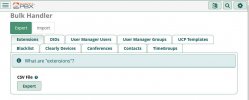
I'm wondering if maybe you havn't used the Admin/Bulk Handler to export; and then to import somewhere else? :
Admin-BulkHandler.JPG
 
@Tom Clark ... it appears that you are configuring your phones "manually."

To support PJSIP with your Grandstream phones, refer to the configuration settings within your Grandstream GXP2200 phones, the settings for the phone where you establish the SIP Server and Outbound Proxy settings (IP address or URL), append the detail with :5061 or whatever defined in your server for the port setting used for PJSIP. i.e., the setting should look like: 12.34.56.78;5061 OR my.address.com:5061.

I am using this setting successfully with both local iPBX2021 servers as well as cloud-based servers ... and it works well, even with out-of-production and obsolete Grandstream GXP1200 two-account phones.

The only gotcha is that if you are using multiple accounts for two or more extensions/accounts on the phone, the Local SIP port can not be the same for both accounts (as is the case if you're using Chan-SIP). I set the Local SIP port for Account 1 for 5061 and Account 2 for 5062. Note that this port setting has zero influence on the account registration with your iPBX server.

/Pete./
 
Last edited:
I'm wondering if maybe you havn't used the Admin/Bulk Handler to export; and then to import somewhere else? :
His system is PIAF from 8 years ago. The bulk export back then was very limited and you had one for extensions and one for DID's. They very likely would not import correctly with FreePBX-15 today. If he doesn't have a whole lot of extensions, it isn't worth the hassle.
 
His system is PIAF from 8 years ago. The bulk export back then was very limited and you had one for extensions and one for DID's. They very likely would not import correctly with FreePBX-15 today. If he doesn't have a whole lot of extensions, it isn't worth the hassle.
You’re right. I don’t have a lot of extensions.
 
I know the cloud is a great option for many but I'm a big fan keeping my PBX in house and a Raspberry Pi is a perfect way of doing it.
 
Last edited:
@Tom Clark: Just a suggestion. You've been using SIP on 5060 for years. Walk before you run. Stick with it before shifting gears to PJSIP which is an entirely different beast. Nothing wrong it, but it injects a whole new set of issues. Get things stable and running first. Then experiment rather than the other way around.
 
@Tom Clark: Just a suggestion. You've been using SIP on 5060 for years. Walk before you run. Stick with it before shifting gears to PJSIP which is an entirely different beast. Nothing wrong it, but it injects a whole new set of issues. Get things stable and running first. Then experiment rather than the other way around.
Come on Ward! I'm one of the most stodgy, hold on to old technology kind of people around and even I have moved to PJSIP. I think it is a lot easier, especially for trunking. You should bite the bullet and modify your core install packages to use it. I'll be happy to provide you with trunk configs that I already use for Anveo-Direct, Skyetel, Bulkvs and Vitelity if you'd like them. One trunk on PJSIP vs. many more on chan_sip for Skyetel or Anveo-Direct is a whole lot easier.
 
@Tom Clark: Just a suggestion. You've been using SIP on 5060 for years. Walk before you run. Stick with it before shifting gears to PJSIP which is an entirely different beast. Nothing wrong it, but it injects a whole new set of issues. Get things stable and running first. Then experiment rather than the other way around.
Just for grins I tried going back to chan_sip. I changed the port number to 5060 on the GXP2200 and W52P extensions. The GXP2200 extensions reconnected successfully, but the W52P failed.
 
Yeah. From what I read yesterday, the GXP2200 natively uses port 5060 unless you change the registrar string like I suggested. Not sure what the deal is on W52P but you seem to have mastered using PJSIP. You may need help when you convert trunks to PJSIP. I don't use Voip.ms so I won't be able to assist with that. You can always have extensions on PJSIP and trunk on chan_sip. Her is a guide to assist in that: https://www.crosstalksolutions.com/voip-ms-setup-using-pjsip-on-freepbx/

Or as Ward suggests, get your trunking stable and then start the learning curve to convert them to PJSIP.
 

Members online

Forum statistics

Threads
26,687
Messages
174,410
Members
20,257
Latest member
Dempan
Get 3CX - Absolutely Free!

Link up your team and customers Phone System Live Chat Video Conferencing

Hosted or Self-managed. Up to 10 users free forever. No credit card. Try risk free.

3CX
A 3CX Account with that email already exists. You will be redirected to the Customer Portal to sign in or reset your password if you've forgotten it.
Back
Top