Incredible PBX Install Fails

wwalcher

New Member
Joined
Apr 15, 2010
Messages
12
Reaction score
0
I am trying to install PBXIF on the recommended Acer Aspire that I bought today at Best Buy. I also purchased an Asus external DVD player.

The CD boots properly and the install starts after I type "ksalt" or "ks16alt". In the documentation on the Nerdvittles website, it says:

"On some systems you may get a notice that CentOS can't find the kickstart file. Just tab to OK and press Enter. Don't change the name or location of the kickstart file! This will get you going."

However, when I press OK and hit Enter, it will not go on. I have to press Cancel to go on. I am not sure if this is the source of the problem or not.

After pressing cancel, it takes me through a couple of config screens, then it asks where the source files are located. I select External CD Rom. It asks for a driver. When I select USB Mass Storage Driver, it finds the drive and starts asking for network, partitioning and other info. (Interestingly enough, on the 3rd time I did this, it brought up a GUI for the configuration. Maybe because I selected ks16alt.) After all of that is entered, it formats the hard drive and transfers the install image to the hard drive. Then it loads the files and prompts me to reboot. When I reboot, the CDRom disk it ejected and the system starts rebooting. However, in the documentation, it says to choose A after the reboot. No such choice is offered. Instead, it starts rebooting and ends up with a login prompt. I login, and get the following prompt:

-bash-3.2#

When I try to run the update-scripts, update-fixes and status commands, it says:
command not found

When I go ahead and try to run the Incredible PBX Installer, it lets me do the first 3 lines, but on the 4th line gives me an error message.

Warning: The Incredible PBX Installer only works with PBX In a Flash. You appear to be running and incompatible version. DO NOT PROCEED.

So, this is where I am at. Anyone have any tips/solution for me?
 
I'm sure you'll get some better responses for your question but I did want to make sure you were plugged into the network while your doing this?

Brian
 
The base install of PIAF is NOT installed. If it cannot find the kickstart file then only centos was installed and a number of critical files are missing from your installation. Unfortunately some external USB drives don't work well with centos 5.x. All external drives are not created equal. I have had some luck with Sony drives but others have has no luck at all with them. Usually when I run up against this I crack the case and plug in a sata/pata cd/dvd drive and all is well. Yes we have attempted to fix this error. Early testing of centos 5.5 show some improvement but I have my doubts.

The next release of PIAF will move all of the critical non centos files into the payload file which will make for an easier time with the ISO and less updates required. Hopefully this and proper USB cd/stick booting will be included with Centos 5.5

Tom
 
I have seen this numerous times. It seems that once CentOS boots, and its running the installer, the installer does not see the CDROM. So the kickstart fails and it does not do the typical install. On some CD drives, you can do the TAB and enter thing and it works, on many it does not.

The only way around it I have seen is to try another USB cdrom. I found a kanguru unit that was not very expensive and works well so far. I also setup a boot server so I can boot rom an install. I keep numerous CD's there. But that is much more complex for a simple install, so I would try another cd drive.
 
:iagree:

Yep. It's a CD-ROM drive compatibility issue with CentOS 5.2, 5.3, 5.4.

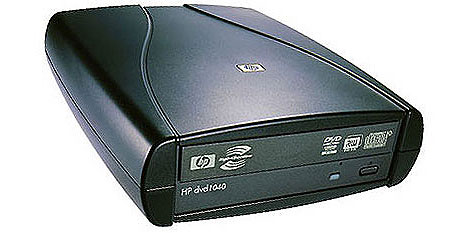
Most HP external DVD drives work well. HINT: Buy the drive where you can take it back if it doesn't work, e.g. BestBuy, OfficeDepot, OfficeMax, Staples, or WalMart.

base_media


Depending upon where you are, I'll be glad to load the base install for you but it would require your paying the shipping/insurance in both directions which is probably just about as much as a drive these days. :crazy:

Drop me a note if that's of interest.
 
Thanks for the info. I will try another drive. Hopefully, Best Buy will take the one I bought back.

A couple of suggestions on the installation instructions/recommended hardware.
  1. I suggest that you recommend a PC that has a built in CD/DVD drive that you know works with the ISO.
  2. 2. Alternatively, if you keep recommending the current unit, it would nice to know that the recommended unit does not have a CD Rom drive built in and that an external unit was required. I did not see that anywhere in the instructions. Neither the necessity of it nor the required cost are included in the documentation. Also, a link to one or more drives that do definitely work would be very helpful. I spent several hours working on this yesterday that would have been saved under this scenario.
That being said, hopefully the alternative drive will do the trick and I will be off and running. A generous donation will then be forthcoming. Thanks for your continuing work on this.
 
Good suggestions, and we have updated the article. At $200, we're not aware of a comparable unit that includes a CD or DVD drive. We have recommended Dell servers for years. Even on sale, however, they're at least 50% more expensive than the Revo... and then there's the issue of the computer footprint, power requirements, and noise. In short, there are tradeoffs with almost any computer you buy. In making a selection, we recommend DVD+/-RW drives as the best chance for success.

As for testing, we do this for fun and not for profit. If you or anyone would like to donate external DVD drives to the project, we will be happy to test them. Short of that, take our advice and purchase from a reputable store that accepts returns. With all of the stores we've mentioned above, I wouldn't think there would be a problem with a return when a unit doesn't work with the computer's operating system... which happens to be functionally identical to RedHat's (commercial) Enterprise Linux.

Comments to this thread indicating known compatible or incompatible external USB CD/DVD drives also would be appreciated.
 
I purchased an HP external drive and it worked. I was able to install the program as laid out in the instructions. However, when I got to the point where you are instructed to:

update-scripts
update-fixes
status

it does not work. I get the following line after trying typing the first line

-bash: update: command not found

Any ideas on this? I installed the ks16alt version.
 
Good suggestions, and we have updated the article. At $200, we're not aware of a comparable unit that includes a CD or DVD drive. We have recommended Dell servers for years. Even on sale, however, they're at least 50% more expensive than the Revo... and then there's the issue of the computer footprint, power requirements, and noise. In short, there are tradeoffs with almost any computer you buy. In making a selection, we recommend DVD+/-RW drives as the best chance for success.

As for testing, we do this for fun and not for profit. If you or anyone would like to donate external DVD drives to the project, we will be happy to test them. Short of that, take our advice and purchase from a reputable store that accepts returns. With all of the stores we've mentioned above, I wouldn't think there would be a problem with a return when a unit doesn't work with the computer's operating system... which happens to be functionally identical to RedHat's (commercial) Enterprise Linux.

Comments to this thread indicating known compatible or incompatible external USB CD/DVD drives also would be appreciated.
The drive I purchased that did not work was an Asus drive that was powered via the USB connection. The HP drive that I subsequently purchased did work. Both were bought at Best Buy.
 
This was designed for Asterisk 1.4. You're using 1.6 so some things require some changes:

update-scripts16
update-fixes16


help-pbx is your friend. :aureola:
 
Thanks for the quick response. I will try it when I get home tonight.
 
And... what was the model of the HP drive that you purchased that worked? That would be helpful info for everyone else.
 
Apparently it's not just USB drives either. I recently installed the O'tron 5.2 build on an older Dell desktop and I had to swap the internal IDE CD drive to get past the kickstart error. (The drive works fine for any other use) I suspect some drive manufacturers are playing fast and loose with the specs :)
 
I used "Bytecc ME-535ISA-BK Aluminum 5.25 " HDD/DVD Enclosure, For IDE or SATA Drive or Optical Drive"

It worked with Acer Aspire Revo AR3610-E9012 and PIAF 1.7 using ksalt (Tab and Enter worked)

Good thing is you can put in optical drive if and when you need and otherwise use it for HDs, nice for older 500GB IDE drives that you otherwise don't have use for
 
Asus SDRW-08D1S-U doesn't work, HP DVD556S does

I experienced the exact same behavior with the above mentioned Asus. I had no problems with the HP DVD556s, however. The Asus is a top user rated external writable DVD player on NewEgg. I was hoping it would work with CentOS 5.5 but no luck. The HP drive came from a WalMart in Central Florida.
 

Members online

Forum statistics

Threads
26,688
Messages
174,412
Members
20,259
Latest member
Fadeek86
Get 3CX - Absolutely Free!

Link up your team and customers Phone System Live Chat Video Conferencing

Hosted or Self-managed. Up to 10 users free forever. No credit card. Try risk free.

3CX
A 3CX Account with that email already exists. You will be redirected to the Customer Portal to sign in or reset your password if you've forgotten it.
Back
Top