
You are using an out of date browser. It may not display this or other websites correctly.
You should upgrade or use an alternative browser.
You should upgrade or use an alternative browser.
ALERT Buh-bye CentOS.
- Thread starter Samot
- Start date


wardmundy
Nerd Uno
- Joined
- Oct 12, 2007
- Messages
- 20,460
- Reaction score
- 6,192
Sad.
Well looks like back to 3CX.
At least won't have to worry about getting a DID Provider configured or a phone.
It's already built-in.
FreePBX could do the same thing to IncrediblePBX with Non-GPL code as well.
Over the years, as I started with CP/M as well.
RedHat did this back around 2002 (I think) when they went Commercial, and announced the GPL version would now be Fedora.
Debian/Ubuntu didn't even exist back then.
Only disto that hasn't come and gone is FreeBSD.
FYI: Both Incredible PBX 2020 and Incredible PBX 2021 self-configure for Skyetel trunks. All you have to do is sign up on their site. Other trunk providers are preconfigured as well. All you have to do is enable the desired trunk after signing up with the provider. Works no differently than 3CX. Preconfigured extensions have been provided in Incredible PBX since its inception.

wardmundy
Nerd Uno
- Joined
- Oct 12, 2007
- Messages
- 20,460
- Reaction score
- 6,192
Thanks, @kenn10.
If you've already downloaded Incredible PBX 2021 and decided to use Incredible Fax, please apply the following patch after installing Incredible Fax to eliminate registration errors in the logs.
Fresh downloads of Incredible PBX 2021 already have the patch applied.
If you've already downloaded Incredible PBX 2021 and decided to use Incredible Fax, please apply the following patch after installing Incredible Fax to eliminate registration errors in the logs.
Fresh downloads of Incredible PBX 2021 already have the patch applied.
Code:
cd /etc/iaxmodem
sed -i s'/^refresh.*/refresh\t\t60/g' /etc/iaxmodem/*cfg.tty*
systemctl restart iaxmodem
fwconsole restart
fwconsole reloadElectricJoe
New Member
- Joined
- Jan 22, 2021
- Messages
- 7
- Reaction score
- 1
The colorful Ubuntu link in Ward's writeup on Nerdvittles points to the Debian version. Is there any reason this should not work on Ubuntu, or why are people so skeptical?
I'm thinking of giving it a try on an Odroid C2 with a Ubuntu 20.04 minimal image. Any thoughts?
I'm thinking of giving it a try on an Odroid C2 with a Ubuntu 20.04 minimal image. Any thoughts?

jaminmc
New Member
- Joined
- Jan 22, 2021
- Messages
- 28
- Reaction score
- 22
Well, Besides the version checks for Debian 10, and Buster backports installed, and Php 5.6 that is specific to Debian Buster...The colorful Ubuntu link in Ward's writeup on Nerdvittles points to the Debian version. Is there any reason this should not work on Ubuntu, or why are people so skeptical?
I'm thinking of giving it a try on an Odroid C2 with a Ubuntu 20.04 minimal image. Any thoughts?
I modified the install script, and installed it on ubuntu 20.04 LXD container, and it seems to mostly work.
Diff:
--- IncrediblePBX2021.sh    2021-01-21 16:57:17.000000000 -0500
+++ IncrediblePBX2021-u.sh    2021-01-24 19:23:50.000000000 -0500
@@ -84,18 +84,18 @@
 read -p "Otherwise, press Enter to proceed at your own risk..."


-debian=`cat /etc/debian_version`
-if [[ "$debian" > "10.0" ]]; then
- proceed=true
-else
- proceed=false
-  echo " "
-  echo "********* WARNING WARNING WARNING WARNING *********"
-  echo "Debian 10.7 is the requuired platform at this time."
-  echo "********** WARNING WARNING WARNING WARNING ********"
-  echo " "
-  exit 6
-fi
+# debian=`cat /etc/debian_version`
+# if [[ "$debian" > "10.0" ]]; then
+#  proceed=true
+# else
+#  proceed=false
+#   echo " "
+#   echo "********* WARNING WARNING WARNING WARNING *********"
+#   echo "Debian 10.7 is the requuired platform at this time."
+#   echo "********** WARNING WARNING WARNING WARNING ********"
+#   echo " "
+#   exit 6
+# fi

 clear
 echo ".-.                          .-. _ .-.   .-.            .---. .---. .-..-."
@@ -128,12 +128,12 @@

 DEBIAN_FRONTEND=noninteractive

-sed -i 's|rm -i|rm -f|' /root/.bashrc
-sed -i 's|cp -i|cp -f|' /root/.bashrc
-sed -i 's|mv -i|mv -f|' /root/.bashrc
-
-echo deb http://ftp.us.debian.org/debian/ buster-backports main > /etc/apt/sources.list.d/backports.list
-echo deb-src http://ftp.us.debian.org/debian/ buster-backports main >> /etc/apt/sources.list.d/backports.list
+# sed -i 's|rm -i|rm -f|' /root/.bashrc
+# sed -i 's|cp -i|cp -f|' /root/.bashrc
+# sed -i 's|mv -i|mv -f|' /root/.bashrc
+#
+# echo deb http://ftp.us.debian.org/debian/ buster-backports main > /etc/apt/sources.list.d/backports.list
+# echo deb-src http://ftp.us.debian.org/debian/ buster-backports main >> /etc/apt/sources.list.d/backports.list
 apt-get update
 #apt-get upgrade -y
 apt-get install -y build-essential openssh-server apache2 mariadb-server mariadb-client bison flex php \
@@ -212,7 +212,7 @@
  cd /usr/src/asterisk-16*
 fi
 contrib/scripts/install_prereq install
-### add expect code to trap telcode =1
+### add expect code to trap telcode =1
 contrib/scripts/get_mp3_source.sh
 # install on server
 if [[ "$ASTVER" = "18" ]]; then
@@ -524,14 +524,15 @@

 # PHP 5.6/7.3 Dual Boot Setup with 5.6 as default to support Incredible Fax and AvantFax
 apt-get install software-properties-common -y
-wget -q https://packages.sury.org/php/apt.gpg -O- | apt-key add -
-echo "deb https://packages.sury.org/php/ buster main" | sudo tee /etc/apt/sources.list.d/php.list
+# wget -q https://packages.sury.org/php/apt.gpg -O- | apt-key add -
+# echo "deb https://packages.sury.org/php/ buster main" | sudo tee /etc/apt/sources.list.d/php.list
+add-apt-repository -y ppa:ondrej/php
 apt-get update
 apt-get install php5.6 -y
 apt-get install php5.6-bcmath php5.6-curl php5.6-gd php5.6-intl php5.6-ldap php5.6-mbstring php5.6-mysql php5.6-xml -y
 sed -i 's|128M|256M|' /etc/php/5.6/apache2/php.ini
 sed -i 's|128M|256M|' /etc/php/5.6/cli/php.ini
-a2dismod php7.3
+a2dismod php7.4
 a2enmod php5.6
 update-alternatives --set php /usr/bin/php5.6
 systemctl restart apache2
@@ -639,4 +640,3 @@

 read -p "Press Enter to reboot or Ctrl-C to exit..."
 /usr/local/sbin/reboot
-
Hylafax status and UCP Dmon don't seem to work, according to the /root/pbxstatus.. But even on a Debian container, the Hylafax doesn't seem to work... Probably because it is an unprivlaged container, and the host may be missing the kernel modules.

ostridge
Guru
- Joined
- Jan 22, 2015
- Messages
- 1,816
- Reaction score
- 632
UCP Dmon, and PortKnock: usually needs a minute to show upHylafax status and UCP Dmon don't seem to work, according to the /root/pbxstatus..
ElectricJoe
New Member
- Joined
- Jan 22, 2021
- Messages
- 7
- Reaction score
- 1
Yepp, I can confirm: it is possible to use on Ubuntu platform.
But with using an Odroid C2 you have the additional challenges of needing modules for arm64 (<>amd64) hardware platform.
Here's the install script I ended up using (see attached zip).
But with using an Odroid C2 you have the additional challenges of needing modules for arm64 (<>amd64) hardware platform.
Here's the install script I ended up using (see attached zip).
Attachments
Last edited:
ElectricJoe
New Member
- Joined
- Jan 22, 2021
- Messages
- 7
- Reaction score
- 1
@wardmundy I thought you were looking for arm64 Neorouter modules. I ended up using client modules from their pro version...
wardmundy
Nerd Uno
- Joined
- Oct 12, 2007
- Messages
- 20,460
- Reaction score
- 6,192
With special thanks to @jaminmc, I think we're ready for the Ubuntu 20.04 PIONEERS:
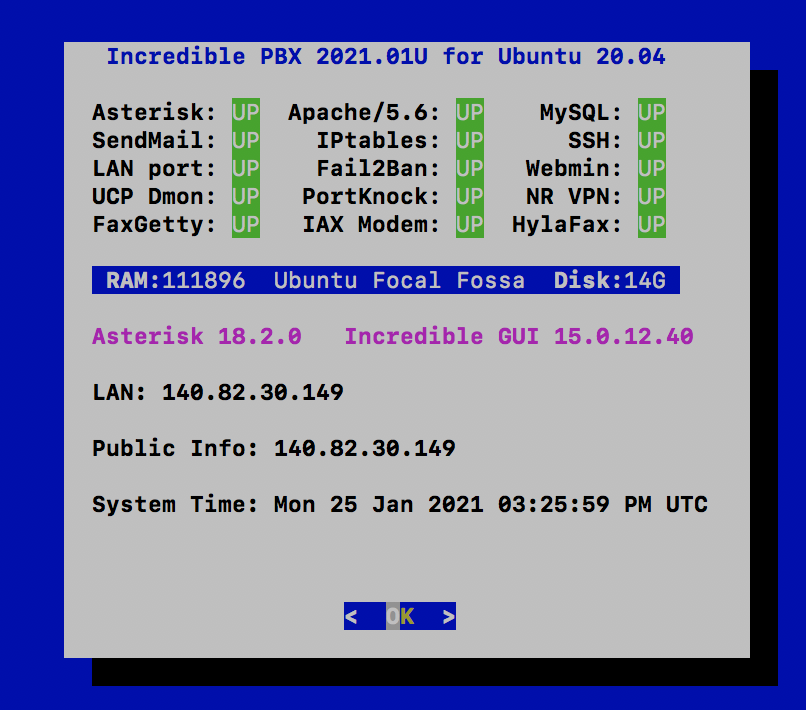
Successfully tested at Vultr. Two also built at CloudAtCost using Ubuntu 18.04 upgrade and new way with Ubuntu 20.04.
Code:
wget http://incrediblepbx.com/IncrediblePBX2021-U.sh
chmod +x IncrediblePBX2021-U.sh
./IncrediblePBX2021-U.sh
Successfully tested at Vultr. Two also built at CloudAtCost using Ubuntu 18.04 upgrade and new way with Ubuntu 20.04.
Last edited:
wardmundy
Nerd Uno
- Joined
- Oct 12, 2007
- Messages
- 20,460
- Reaction score
- 6,192
Not sure why but, on some Ubuntu builds, UCP daemon is going out to lunch. fwconsole reload also seems to croak unless you first remove the contents of the /tmp folder.
A ucp-fix script to rebuild the affected modules seems to fix UCP so I've added it to the default scripts in /root. If we keep seeing the problem, we'll add it to the installer as well. Here's ucp-fix if you have the problem with existing installs:
A ucp-fix script to rebuild the affected modules seems to fix UCP so I've added it to the default scripts in /root. If we keep seeing the problem, we'll add it to the installer as well. Here's ucp-fix if you have the problem with existing installs:
Code:
#!/bin/bash

read -p "This script rebuilds UCP-dependent modules. Ctrl-C to exit."
fwconsole restart
fwconsole ma remove clearlytrunking
fwconsole ma remove sms
fwconsole ma remove ucp
fwconsole ma remove api
fwconsole ma remove pm2
fwconsole ma downloadinstall pm2 api ucp sms clearlytrunking
fwconsole restart
rm -rf /tmp/*
fwconsole reloadwardmundy
Nerd Uno
- Joined
- Oct 12, 2007
- Messages
- 20,460
- Reaction score
- 6,192
What's the benefit of Ubuntu over Debian?
Nothing that I'm aware of at least for a PBX.
Ubuntu LTS releases have 10 years until EOL. Debian is five years.What's the benefit of Ubuntu over Debian?
jaminmc
New Member
- Joined
- Jan 22, 2021
- Messages
- 28
- Reaction score
- 22
I think it may be better to move theNot sure why but, on some Ubuntu builds, UCP daemon is going out to lunch. fwconsole reload also seems to croak unless you first remove the contents of the /tmp folder.
A ucp-fix script to rebuild the affected modules seems to fix UCP so I've added it to the default scripts in /root. If we keep seeing the problem, we'll add it to the installer as well. Here's ucp-fix if you have the problem with existing installs:
Code:#!/bin/bash read -p "This script rebuilds UCP-dependent modules. Ctrl-C to exit." fwconsole restart fwconsole ma remove clearlytrunking fwconsole ma remove sms fwconsole ma remove ucp fwconsole ma remove api fwconsole ma remove pm2 fwconsole ma downloadinstall pm2 api ucp sms clearlytrunking fwconsole restart rm -rf /tmp/* fwconsole reload
rm -rf /tmp/* to just after removing the modulus....Like this:
Code:
#!/bin/bash

read -p "This script rebuilds UCP-dependent modules. Ctrl-C to exit."
fwconsole restart
fwconsole ma remove clearlytrunking
fwconsole ma remove sms
fwconsole ma remove ucp
fwconsole ma remove api
fwconsole ma remove pm2
rm -rf /tmp/*
fwconsole ma downloadinstall pm2 api ucp sms clearlytrunking
fwconsole restart
fwconsole reload
read -p "Press Enter to reboot, or Ctrl-C to exit."
reboot
That way the tmp folder is clean for the Re-install.. Added a Reboot also, in case removing the contents of /tmp causes other things to go wonky
Last edited:
jaminmc
New Member
- Joined
- Jan 22, 2021
- Messages
- 28
- Reaction score
- 22
What's the benefit of Ubuntu over Debian?
Debian vs Ubuntu: Differences, Advantages, Server & More
Switching to Linux but not sure if Debian or Ubuntu is the better option for you? Check out our comparison of the two distros.
 targettrend.com
I've been using Ubuntu for a while. My home and office servers are Ubuntu, and I run a bunch of LXD Containers. IncrediblePBX seems to work just fine in a container, except for Dahdi, as I haven't figured out how to get that to work in a container yet... So that prevents me from using it for Fax's. Then again, LXD can now also do Virtual machines now... So I can always try that. The thing I love about LXD containers is that the OS's that run in the containers share the host Kernel. So no need to emulate hardware to another Kernel, and it uses less resources in the process... But IT has its limitations also...Debian vs Ubuntu As Server Environments
Both systems work well as servers, but Debian Stable releases usually come with time-tested and therefore, theoretically more stable software. This makes them preferable when it comes to stability. Their single downside is their software is often dated when compared to other distros.
Ubuntu offers a separate server installation image, and it can be as lean as a Debian system. It’s the preferred alternative if you need certain features that are only available in updated software. Ubuntu servers are also relatively stable, but the simple truth remains, that the systems aren’t as time-tested as Debian Stable systems.
Now Debian can do the same thing, as Ubuntu is based on Debian. I personally like having newer versions of packages.

wardmundy
Nerd Uno
- Joined
- Oct 12, 2007
- Messages
- 20,460
- Reaction score
- 6,192
Just circling back on the Ubuntu build. Admittedly, CloudAtCost is a horrible platform on which to reach any conclusions, but...
What we're seeing with 2 different Ubuntu 20.04 builds there (one built using their upgraded 18.04 image and a second built from 20.04 ISO using methodology of @jaminmc above), BOTH die within the 6-8 hour time frame. While I would blame it on CloudAtCost, I don't think that's the case here because we have Debian and CentOS platforms that have been working for weeks and months without a problem.
Hope this isn't a platform design defect but BUYER BEWARE.
I'm going to bring up an Ubuntu test server on Vultr and let it run for a few days to see what we see.
What we're seeing with 2 different Ubuntu 20.04 builds there (one built using their upgraded 18.04 image and a second built from 20.04 ISO using methodology of @jaminmc above), BOTH die within the 6-8 hour time frame. While I would blame it on CloudAtCost, I don't think that's the case here because we have Debian and CentOS platforms that have been working for weeks and months without a problem.
Hope this isn't a platform design defect but BUYER BEWARE.
I'm going to bring up an Ubuntu test server on Vultr and let it run for a few days to see what we see.
jaminmc
New Member
- Joined
- Jan 22, 2021
- Messages
- 28
- Reaction score
- 22
Good thing the Blog entry is BETAJust circling back on the Ubuntu build. Admittedly, CloudAtCost is a horrible platform on which to reach any conclusions, but...
What we're seeing with 2 different Ubuntu 20.04 builds there (one built using their upgraded 18.04 image and a second built from 20.04 ISO using methodology of @jaminmc above), BOTH die within the 6-8 hour time frame. While I would blame it on CloudAtCost, I don't think that's the case here because we have Debian and CentOS platforms that have been working for weeks and months without a problem.
Hope this isn't a platform design defect but BUYER BEWARE.
I'm going to bring up an Ubuntu test server on Vultr and let it run for a few days to see what we see.
I'll spin one up on Digital Ocean. That should be a little better....
Going through the script, I see some things that need changing... Trying them now.
Last edited:


Forum statistics
Get 3CX - Absolutely Free!
Link up your team and customers  Phone System Live Chat Video Conferencing
Hosted or Self-managed. Up to 10 users free forever. No credit card. Try risk free.

Verify your Email
Check your inbox!
We’ve sent you an email. Click on the button in the email body to verify your email address – (if you can not find it, check your spam folder).
Upon verification you will be directed to the 3CX setup wizard.