

wardmundy
Nerd Uno
- Joined
- Oct 12, 2007
- Messages
- 20,217
- Reaction score
- 5,974
Overview: If you live near the coast in the United States, you've probably missed a quick and easy way to get the latest tide, solar, and lunar info by telephone. The wait is over. Just dial T-I-D-E from any phone on your system to get the latest information for today and tomorrow using almost any port city in the United States.
Prerequisites: You must be using PBX in a Flash 1.1 or 1.2. This doesn't work with Aretta hosted service, and I doubt it will work with trixbox or Elastix. Don't ask me why. I have no idea.
Installation: Log into your server as root and issue the following commands:
cd /root
wget http://bestof.nerdvittles.com/applications/xtide/xtide.pbx
chmod +x xtide.pbx
./xtide.pbx
After the install completes, you can use your web browser and point it to the real IP address of your server with the following:
http://192.168.0.22:88/
This will give you complete access to the latest xTide everything.
Or dial T-I-D-E from any phone on your system. If it doesn't work, add a Misc Destination in FreePBX for xTide at extension 8433 and try again.
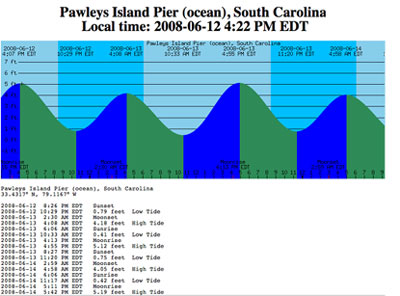
Choosing Your Own Location: The default setting for this install is Pawleys Island, SC because that's where our beach house and webcam are located.
To set your own location, log into your server as root and figure out if your desired location is supported by running a command like one of these:
tide -l miami
tide -l "Los Angeles"
If you get a report, your site is supported. If not, try something else.
Once you have a site that works, edit /etc/asterisk/xtide.conf and plug in the desired entry that worked above. Be sure to adjust both the SITE and SITENAME and DO NOT add any blank lines or nothing will work!
P.S. The installation takes up roughly 40MB of disk space. Nerd Vittles article will be out next week with details.
Feedback appreciated!!
Prerequisites: You must be using PBX in a Flash 1.1 or 1.2. This doesn't work with Aretta hosted service, and I doubt it will work with trixbox or Elastix. Don't ask me why. I have no idea.
Installation: Log into your server as root and issue the following commands:
cd /root
wget http://bestof.nerdvittles.com/applications/xtide/xtide.pbx
chmod +x xtide.pbx
./xtide.pbx
After the install completes, you can use your web browser and point it to the real IP address of your server with the following:
http://192.168.0.22:88/
This will give you complete access to the latest xTide everything.
Or dial T-I-D-E from any phone on your system. If it doesn't work, add a Misc Destination in FreePBX for xTide at extension 8433 and try again.
Choosing Your Own Location: The default setting for this install is Pawleys Island, SC because that's where our beach house and webcam are located.
To set your own location, log into your server as root and figure out if your desired location is supported by running a command like one of these:
tide -l miami
tide -l "Los Angeles"
If you get a report, your site is supported. If not, try something else.
Once you have a site that works, edit /etc/asterisk/xtide.conf and plug in the desired entry that worked above. Be sure to adjust both the SITE and SITENAME and DO NOT add any blank lines or nothing will work!
P.S. The installation takes up roughly 40MB of disk space. Nerd Vittles article will be out next week with details.
Feedback appreciated!!


 Phone System