xTide for Asterisk Ready for Prime Time

wardmundy

Nerd Uno
Joined
Oct 12, 2007
Messages
20,217
Reaction score
5,974
Overview: If you live near the coast in the United States, you've probably missed a quick and easy way to get the latest tide, solar, and lunar info by telephone. The wait is over. Just dial T-I-D-E from any phone on your system to get the latest information for today and tomorrow using almost any port city in the United States.

Prerequisites:
You must be using PBX in a Flash 1.1 or 1.2. This doesn't work with Aretta hosted service, and I doubt it will work with trixbox or Elastix. Don't ask me why. I have no idea.

Installation: Log into your server as root and issue the following commands:

cd /root
wget http://bestof.nerdvittles.com/applications/xtide/xtide.pbx
chmod +x xtide.pbx
./xtide.pbx

After the install completes, you can use your web browser and point it to the real IP address of your server with the following:

http://192.168.0.22:88/

This will give you complete access to the latest xTide everything.

Or dial T-I-D-E from any phone on your system. If it doesn't work, add a Misc Destination in FreePBX for xTide at extension 8433 and try again.

Choosing Your Own Location: The default setting for this install is Pawleys Island, SC because that's where our beach house and webcam are located.

To set your own location, log into your server as root and figure out if your desired location is supported by running a command like one of these:

tide -l miami
tide -l "Los Angeles"

If you get a report, your site is supported. If not, try something else.

Once you have a site that works, edit /etc/asterisk/xtide.conf and plug in the desired entry that worked above. Be sure to adjust both the SITE and SITENAME and DO NOT add any blank lines or nothing will work!

P.S. The installation takes up roughly 40MB of disk space. Nerd Vittles article will be out next week with details.

Feedback appreciated!!
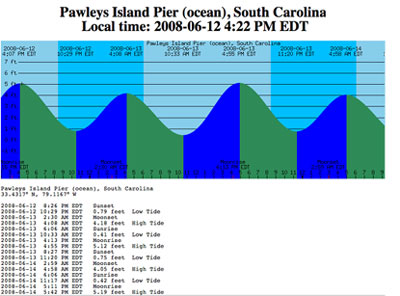
pi-tides.jpg
 
As I live in a costal area too

I had to try this out... Now to marry it with the magic button...

btw, the xtide install works fine.

Thanks Ward!
 
Loaded fine but

I installed it on PiaF 1.1 and setup a misc destination and added it to the stealth attendant. I changed it to daytona beach and over the phone it works fine.
I tried to access it using the URL: http://IP-of-Server:88
but is would not come up. I am on the same segment on the network so the port should not be a problem. Do I need to update the IPTables to access?
Thanks
TomS
 
If you rebooted, xttpd would not have restarted. IPtables is updated to allow TCP 88 access as part of the install. Try these commands again and see what happens. You also may need a / after :88 depending upon your browser.

service iptables restart
service xttpd restart

To make xttpd startup permanent, issue the command:

chkconfig --levels 2345 xttpd on
 
Thanks Ward

That fixed it! Lots of Fun! I'm heading for Daytona Beach the end of the month and it might be a fun app.
 
I used to go to a web site...

This one...

Long and short I have toyed with the idea of slapping xtide on a server of my own.... but, was too lazy.:crazy:
 
With a free DID courtesy of IPKall, we've set up a demo line where you can sample the application using our server. Just call 425-906-5918.
 
Any ideas, hints on how to get this to recognize locations elsewhere i.e. Australia.
 
Foreign Ports for xTide

First, this harmonics file is licensed for non-commercial use. Here's how to install it. Log into your server as root and then...

cd /usr/share/xtide-harmonics
wget ftp://ftp.flaterco.com/xtide/harmonics-dwf-20071228-nonfree.tcd.bz2
bunzip2 harmonics-dwf-20071228-nonfree.tcd.bz2
service xttpd restart

Note: Be sure to right-click on the ftp link above to get the whole link. For other harmonics files, go here. I don't think Australia is included in the harmonics file above. Here's why. But here's a link to a system that still has some older data so you might want to get in touch with them.

Then use your web browser pointed to port 88 and click on the Zone Index and Master Index link to see all of the new locations. In addition to the U.S., the following locations are supported: Canada, much of the Caribbean, United Kingdom, Netherlands, Germany, Japan and a number of other islands in the Pacific, but not Australia.
 
does this work on a hosted system?

will this add-on work on one of the hosted platforms (like from Lylix)? I thought I read it wouldn't, but now can't find where it was stated...

Great app by the way.
-Kevin
 
Doesn't work on Aretta without satisfying a lot of additional dependencies which I was unwilling to wrestle with. I don't have a Lylix account so you'll just have to try it. If you're running pure PIAF 1.1. or 1.2, it should work fine.
 
xtide compatibility

will this add-on work on one of the hosted platforms (like from Lylix)? I thought I read it wouldn't, but now can't find where it was stated...

Works fine on a hosted LYLIX account, anything provisioned after July 1 works "out-of-the-box", otherwise, for all installs back to Dec '07, the following can be executed prior to running './xtide.pbx':

yum install xorg-x11-fonts-base libXaw
 
awesome! I still need to test locally but using lylix for a "production" machine seems like the way to go.

Thanks - Kevin
 
I have a little problem.
I cant make my default location to work.

I changed the conf file rebooted the pbx and still get the Pawleys Island Information??

This is what I have in my xtide.conf

SITE="Edgewater, South River, Chesapeake Bay, Maryland"
SITENAME="Edgewater, Maryland"
If I do
root@pbx:~ $ tide -l "Edgewater, South River, Chesapeake Bay, Maryland"
Works fine...
 
Run this command:

find / -name xtide.conf

You should find one in /etc and one in /etc/asterisk. It's the one in /etc/asterisk that needs the SITE and SITENAME data.

The one in /etc should include:

/usr/share/xtide-harmonics/
/usr/share/wvs-data/
 
Thanks for your quick answer, but still no luck.
This is what I have in etc/asterisk/xtide.comf
SITE="Edgewater, South River, Chesapeake Bay, Maryland"
SITENAME="Edgewater, Maryland"
This is what I have in etc/xtide.conf
/usr/share/xtide-harmonics/
/usr/share/wvs-data/
But still get the Pawleys Island Information. :banghead:
 
Thanks for your quick answer, but still no luck.
This is what I have in etc/asterisk/xtide.comf

Was this just a typo in your message or have you got the file named differently? :confused5:
 

Members online

No members online now.

Forum statistics

Threads
26,688
Messages
174,412
Members
20,259
Latest member
Fadeek86
Get 3CX - Absolutely Free!

Link up your team and customers Phone System Live Chat Video Conferencing

Hosted or Self-managed. Up to 10 users free forever. No credit card. Try risk free.

3CX
A 3CX Account with that email already exists. You will be redirected to the Customer Portal to sign in or reset your password if you've forgotten it.
Back
Top